I was very surprised today that I cannot trigger a macro when I connect to my university's Ethernet network. I would like to open the login page as soon as the DHCP server gives a new IP (the system is strange, and it takes 3-4 minutes to get it ) but I have not been able to find any trigger to do it. Someone in the forums advised using an external tool called EventScript, but it is not available in the Appstore in my country. Any ideas on an equivalent solution: triggering a macro as soon as an IP number starting with a given first two digits has been obtained by my Macbook?
There's no public macOS Event for that, so KM can't offer a trigger.
What you can do is watch for a file that's changed, and for DHCP a good candidate is var/run/resolve.conf. Unfortunately, KM can watch a folder but not a particular file.
If you have Hazel you could use that to fire off a KM macro whenever resolve.conf is changed. Or you could create your own Launch Agent -- this is a good instruction site, or you could use Launch Control -- and trigger the macro with that.
Your macro would then check the current IP and act accordingly.
For me that file updates instantly, but you should check to see where your 3-4 minute delay is happening -- does resolve.conf update and it takes 3-4 minutes to get an IP, or does resolve.conf update when you get that IP?
The file will also be updated when the DHCP lease is renewed, so you'll probably want a Global to keep track of whether you're already on the network so you don't get an unnecessary login page.
See if the resolve.conf update will work as a proxy -- if it does we can start building a macro.
…will return the IP address currently in use. So you could have a periodic macro that's set to run every 30 seconds (or whatever interval you feel comfortable with) and checks. But that seems very inefficient, as you know when you connect the cable, and there's no need to check 99% of the time.
Instead, set up a macro on a hot key, and run it just before you plug in the cable. Here's one way to do it:
Macros are always disabled when imported into the Keyboard Maestro Editor.
The user must ensure the macro is enabled.
The user must also ensure the macro's parent macro-group is enabled.
System information
macOS 15.7.3
Keyboard Maestro v11.0.4
The macro enters an "Until" loop, and checks the IP address every second until it matches whatever starting digits you specify—I used 10. in the macro, but change that to whatever you need.
Then after that, you'd put your Open URL or whatever action to get the login window.
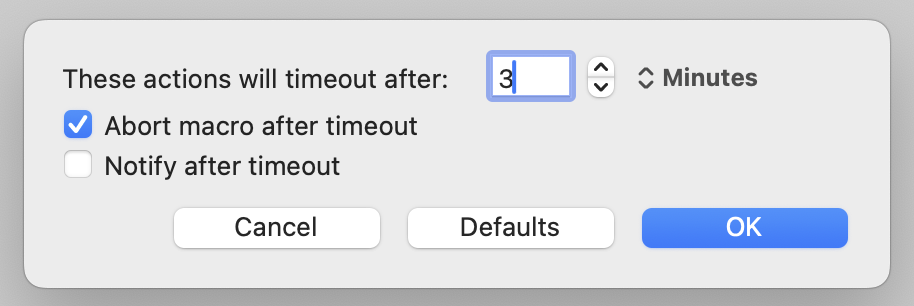
Important note: I've use the gear icon to change the Action Timeout for the Until command:
It will try for three minutes, then give up. This prevents the macro from running forever, and you said you normally get an address within a few minutes. You can change the time as required.
I can't really test this here, but in theory, it should work :).
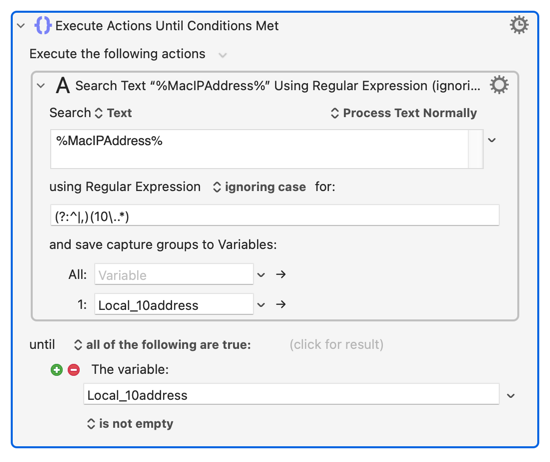
And before anyone jumps in with "But Nige -- there's a %MacIPAddress% Token for this!"...
There is, but it returns a comma-delimited list of all the machine's current IP addresses. That can be useful, or it can confuse the issue: I get a list of 3 addresses right now -- one each for ethernet, wireless, and VPN -- with no indication of which is the default route.
I find that that command fails silently in the terminal and that the macro based on it fails with (according to the log) a status 1 error. That’s under MacOS 14.8.3 (Sonoma).
Nifty! (Note: that gives the Mac’s IP address on the LAN).
Presuming that the university network connects the OP’s MacBook to the Internet, a solution could also be based on the MacBook’s public IP address, using this shell command: curl icanhazip.com.
I don't have access to any Sonoma Macs any more, so I can't test myself. I asked an AI, and it offered up a few alternatives, all (duh) untested by me on Sonoma:
I think (do your own check!) that, like @griffman's cantrip, it gives the IP of the current default route. So if you on both wired and wireless it will return the wired connection's IP (assuming that's higher in the network service order than wireless, which it is by default).
When a VPN is involved it will depend on your VPN settings. If they are "Send all traffic..." then your VPN connection's IP address will be returned, but if the VPN does smart routing then I think it will be your ethernet if connected then your wireless.
Probably not -- there's a high likelihood OP is getting a private IP from a NATing gateway and a query to a public service will return the gateway address.
Yes -- so a self-assigned private address first and, eventually, a DHCP-assigned private address.
I don't think you'll get a change to resolve.conf on the first, but check and see -- if you do then make your macro so it checks the current IP and exits if that starts with 169 (it wouldn't hurt to do that anyway) as there's no point repeatedly checking when we know that the macro will fire again when the DHCP server finally replies.
I am confused now about whether or not I was confused in the first place.
The gateway address will only be returned if the gateway is being used… and the IP address(es) of that would be in the university’s IP address block and would be a constant that could be checked against.
May or may not useful. I'd get the same "positive" from my home ethernet but with the VPN fired up, or on my work's Guest network.
More importantly for this particular case, I suspect it wouldn't work I think OP is trying to automate network authentication via a captive portal, so can't even get to an external site at this point.
 ) but I have not been able to find any trigger to do it. Someone in the forums advised using an external tool called EventScript, but it is not available in the Appstore in my country. Any ideas on an equivalent solution: triggering a macro as soon as an IP number starting with a given first two digits has been obtained by my Macbook?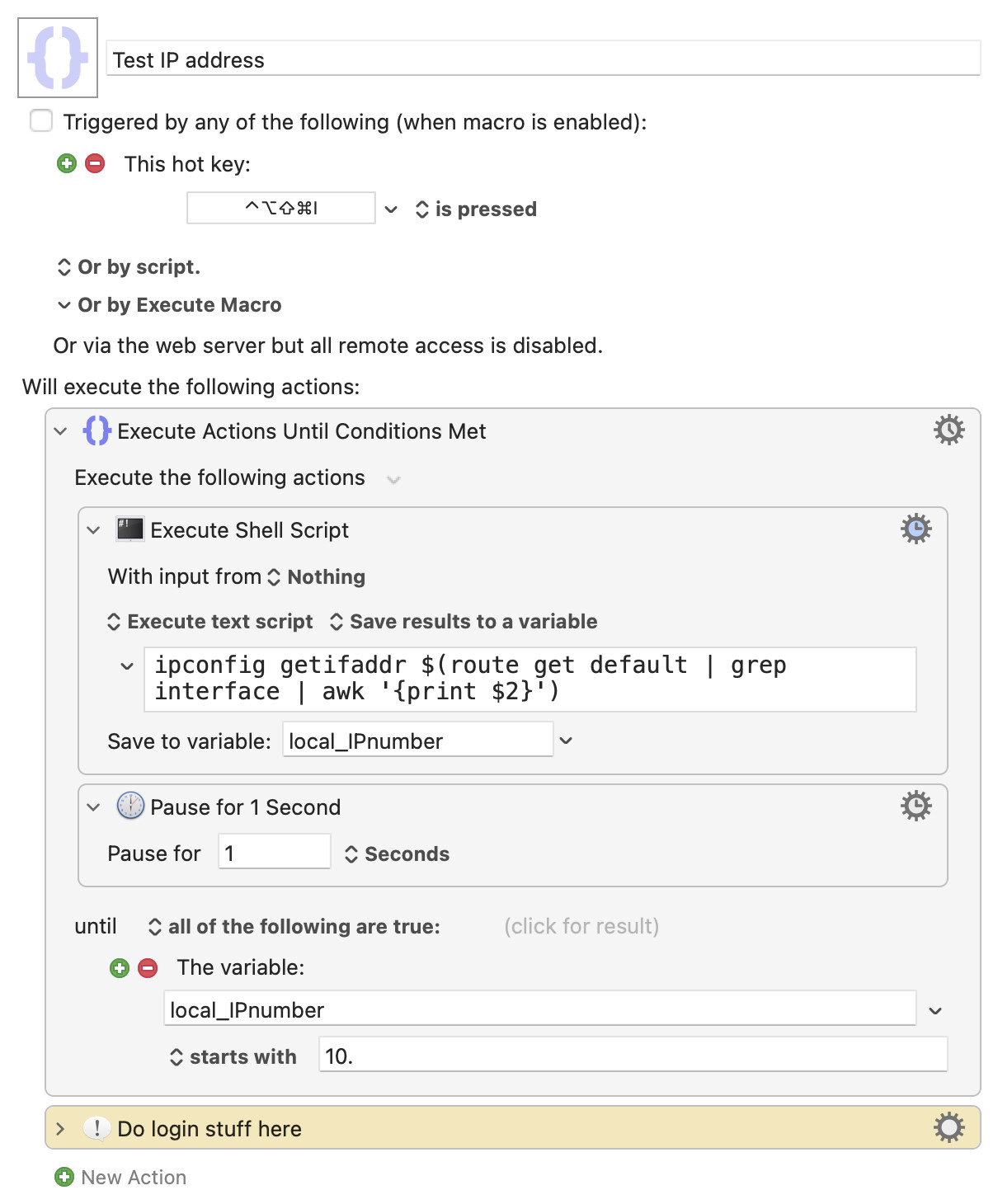

 I think OP is trying to automate network authentication via a captive portal, so can't even get to an external site at this point.