Hello All,
Is there a way to select a portion of my screen and have KM alert me if the pixels within that box change?
This way, I don't have to stare at that piece of real estate on my screen for minutes or even hours, to catch a change, and can do other things, and just have KM alert me when an eventual pixel change does happen within that grid.
Should definitely be possible, and below I've uploaded a crude demonstration that resembles what you ask for.
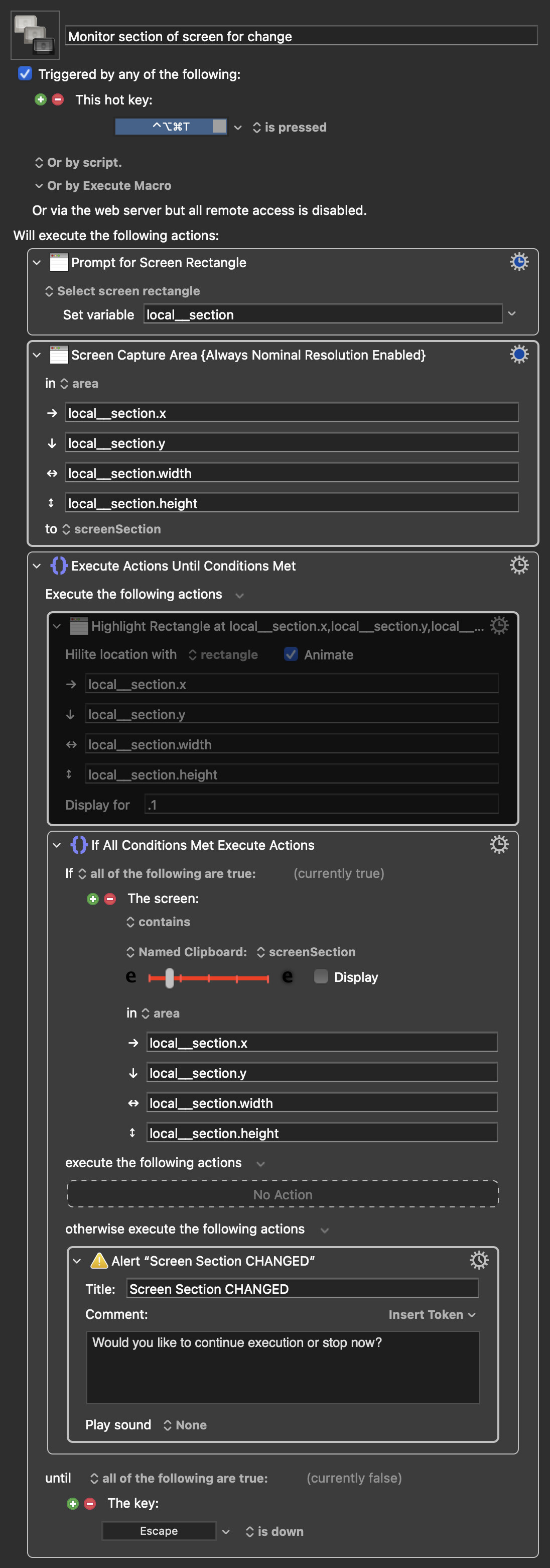
This macro prompts you for a screen rectangle selection, stores a screen capture of this area in a Named Clipboard, and then continuously monitors this area to see if the state of this area is the same as when the screen capture was created.
Monitor section of screen for change.kmmacros (20 KB)
Macro Image
To have the selected area highlighted you can enable the action within the Until.
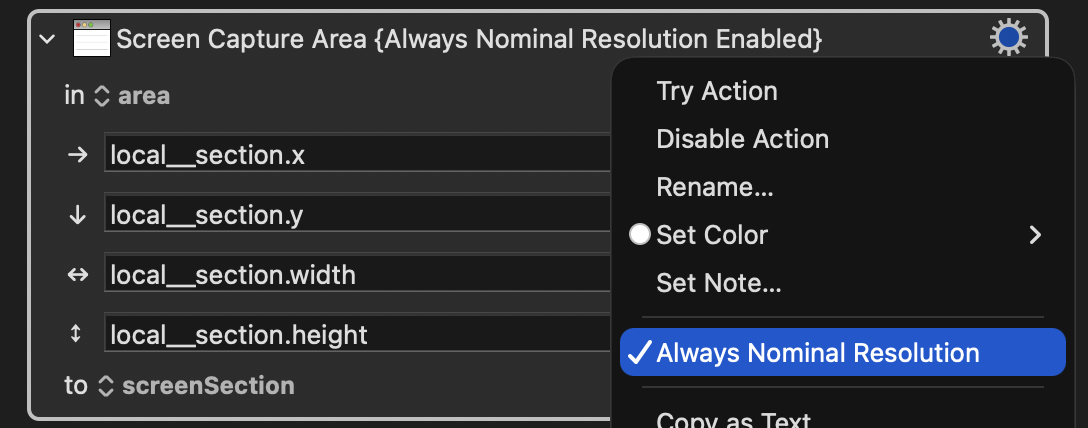
Importantly, when making a screen capture for use like this in a Found Image condition, you need to enable the setting "Always Nominal Resolution" in the gear menu of the Screen Capture action:
Okay, that gets me closer to my goal, but it brings up more questions for me.
Is it possible to set an X,Y box, that will always be in the same position, and once I trigger the Macro, KM will "Look" at the current pixel status at the time I trigger the Macro, and then just monitor it until I stop the Macro some hours later...BUT, every time the pixels change, the Macro alerts me, and then keeps watching the NEW pixel setup (the one that triggered the alert in the first place), and then notifies me when this new pixel setup changes, and so-on-and-so-forth.
Eg:
- Say I draw a box on my screen that has the stock ticker "ABCD" in it, and I want KM to watch the pixels within that grid box for any changes.
- The stock ticker in that grid that I've selected doesn't change for quite some time.
- All of a sudden, the stock ticker in that grid box changes to "XYZ", and thus the pixels in that grid box, change.
- KM notifies me of the pixel change.
- KM then notes / keeps an eye on this NEW pixel arrangement of "XYZ", and notifies me again when it changes to something else.
So, there'd be long periods of time when the pixels in the grid box I've selected wouldn't change at all, thus no KM alerts. But, then there might be a flurry of activity in that grid box, and the pixels in that grid box might change every 1 second or so (for a few seconds), as the stock ticker symbol in that grid box is changed to multiple different stock tickers in a short amount of time, to check the stock chart / price of each (ie: quickly cycling through multiple stocks to check the status of each)...and then it would go back to static for a while (all the while, KM would be monitoring the pixels in that grid box, and notifying me each time they change, until my trading day is over, and I kill the Macro for the day).
I am heading out, and in a bit of a hurry, but will something like this bring you closer?
ΚΜ-forum – Sharing Macros.kmmacros (36 KB)
Macro images
Now spit into two macros:
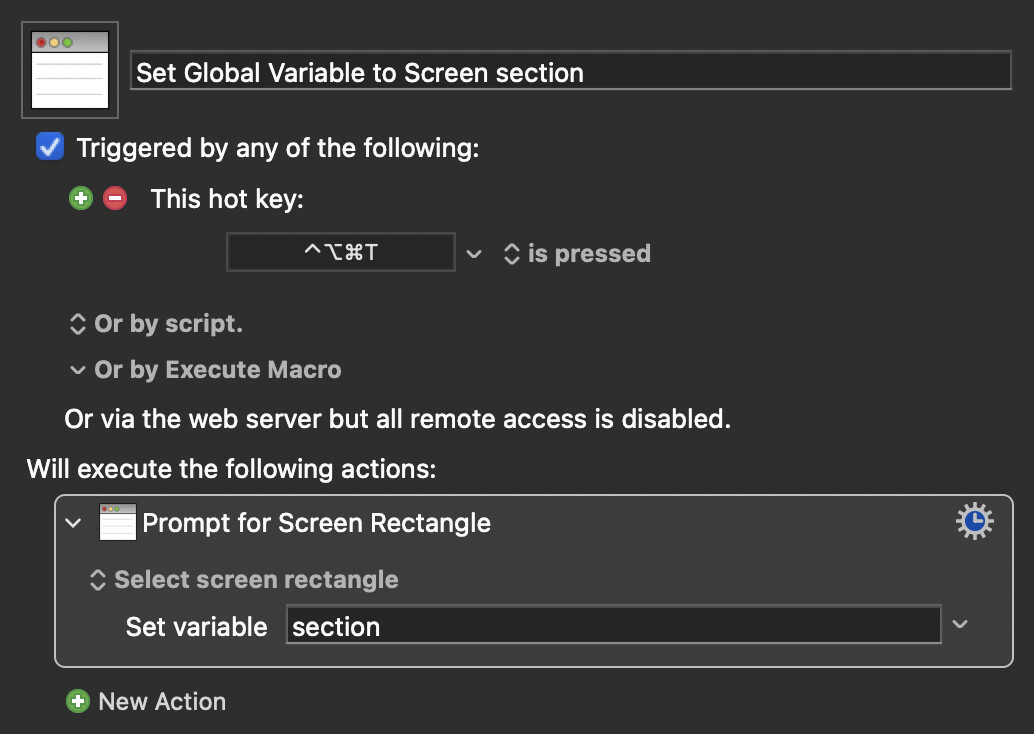
One that prompts for a screen rectangle and stores it in a global variable.
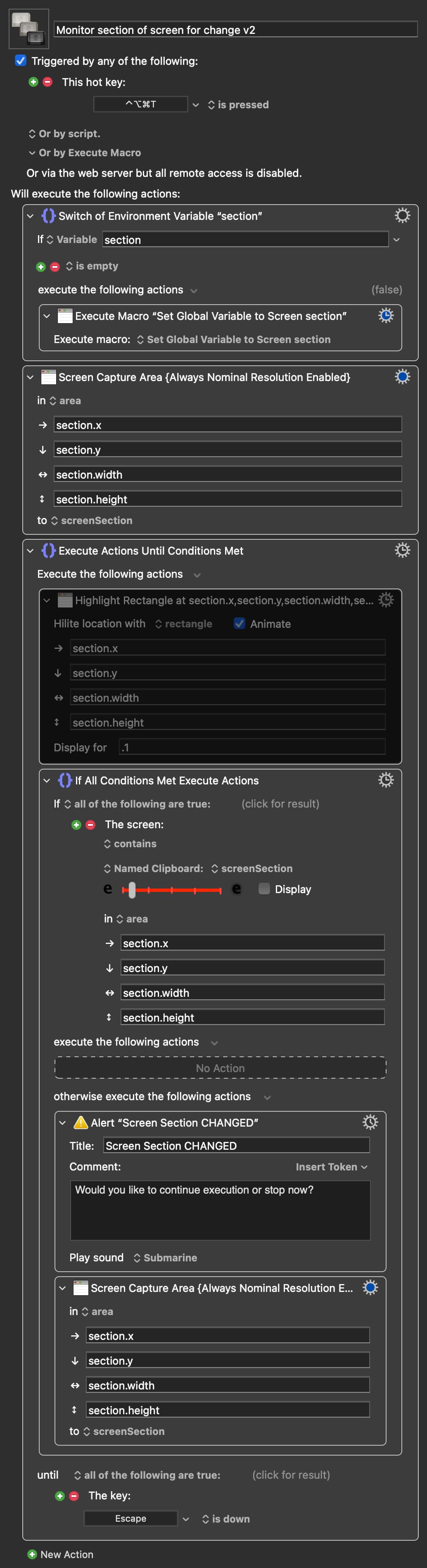
Another macro that resembles the last, only it re-captures the screen capture after each detected change. Both macros are now set up with the same Hot Key trigger, resulting in a conflict palette where you can select which of the two you want to run.
1 Like
Interesting workaround....
I'm in the middle of watching the markets, but can hopefully try this out over the weekend.
Thank you very much for scripting that / walking me through it.
Here's a majorly updated version of the macro pair; now turning it into a something that resembles a user-friendly tool for the task of monitoring a selected area of the screen for change.
I've moved away from using the simple conflict palette, instead now using a Prompt for User input Settings Pane, to select area, start monitoring, and choose among different modes of alert: Continuous repeating sound alert, continuous highlighting of the changed area, etc., as well as an alert prompt (as was the only mode of alert in my last macro). The second macro of the pair has now been repurposed as dealing with the asynchronous needs of the alert.
While monitoring one can always press the option key to return to settings pane, or press the escape key to cancel monitoring.
Monitor Selected Area of Screen for Change v3.3 (v11.0.4)
ΚΜ-forum – Sharing Macros.kmmacros (78 KB)
Macro Images
EDIT, v3.1: Uploaded a slightly upgraded version of the macro, as there were some issues with how the macro handled the "Once" alert mode/interval.
Also added a "Once, then retake capture" mode, that alerts once, then retakes the screen capture and then continues to monitor for further changes from this re-captured state.
Also added the ability to press the shift key once alerted (or while alerting), that in this same way retakes the capture, resets the alert, and has the macro continue to monitor for further changes.
There might still be some glitches, but this seems to now be a well functioning tool.
EDIT, v3.2: Miniscule update, simply naming the Named Clipboard in better accordance with the macro name. (Didn't bother updating the macro image to reflect this small change).
EDIT, v3.3: Fixed a bug in the prompt display
1 Like