Hello
Is there a way to toggle the onscreen keyboard on and off?
For the emoji keyboard is a shortcut, but I can't find a way to do this with the onscreen keyboard.
I've found no way to set a keyboard shortcut for this directly in Mac OS, so UI scripting might be your only option.
The methods below both rely on you having "Show Input menu in menu bar" enabled (System Settings, then under "Text Input", "Input Sources" Edit, then enable Show Input menu in menu bar).
An LLM helped me to the following AppleScript:
AppleScript
-- Requires: Input menu visible in the menu bar, and Accessibility access for Script Editor/your runner.
tell application "System Events"
	tell process "TextInputMenuAgent"
		tell menu bar item 1 of menu bar 2
			click
			tell menu 1
				if exists menu item "Hide Keyboard Viewer" then
					click menu item "Hide Keyboard Viewer"
				else
					click menu item "Show Keyboard Viewer"
				end if
			end tell
		end tell
	end tell
end tell
It works consistently, but for whatever reason there seems to be an inherent delay of about 1 second, after the step of opening the Input menu in the menu bar, before selecting the correct menu item. This might be okay for you, but for me, it felt horribly sluggish, so I created the following KM-AppleScript-hybrid-workaround:
Toggle Keyboard Viewer.kmmacros (17 KB)
(KM v11.0.4)
Macro Image
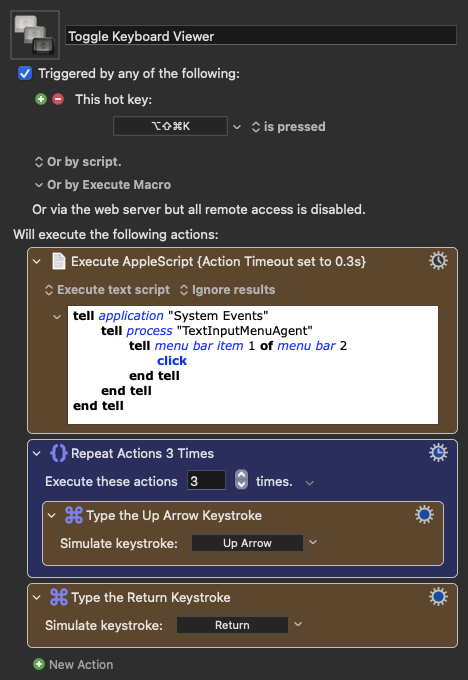
My workaround is a little bit hacky, as it relies on having the action timeout set to 0.3 seconds, circumventing the weird inherent delay by not waiting for the script to run to completion. You might have to fine-tune the timeout, but on my system 0.3 seconds is more than enough for the menu to reliably have opened, but still fast enough so that it feels halfway snappy.
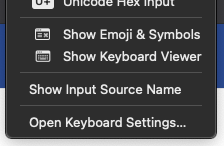
Here at my system the "Show/Hide Keyboard Viewer" seems to always be number three from the bottom, and my hybrid solution moves on from the AppleScript to hitting Up Arrow three times, and then hitting Return, to Show/Hide the Keyboard Viewer. But you might want to check if this is consistently true on your system as well.
Image of menu items at my system
By the way: If you use Ice or another Menu Bar Manager, placing the Input menu in the always-hidden section, the UI interaction is also completely hidden, but it still navigates to the right Menu Item, toggling the Keyboard Viewer.
2 Likes
Perfect! Thank you so much. The KMM works perfect. I just had to change the "Execute these actions" from 3 to 2.
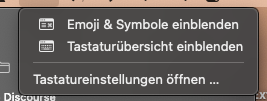
As you mentioned, the AppleScript has a long delay.
Thanks für your great help! 
1 Like