That would be awesome to use this feature (that can be automated via iOS) as a trigger for changing setup Macros.
Can you not use a Shortcut, triggered when you enter a certain Focus mode, to run one or more KM macros using kmtrigger URLs?
AFAIK you can use a Focus Mode change as a trigger in Shortcuts for iOS/iPadOS, but not on macOS.
Shortcuts on macOS is missing the “Automation” tab that we have in the mobile counterparts.
Or am I missing something?
Only the fact that I'm an idiot  Not being a Focus Mode or Shortcuts user but having heard the last Automators podcast about Focus Mode, I confused iOS and macOS functionality.
(Seriously Apple -- how are Focus Mode Shortcut triggers not a thing on macOS yet? Ventura, maybe?)
How are you setting Focus Mode? While we wait on Apple you could do things in reverse -- use KM to trigger the setup macros and for switching Focus.
Currently, I can trigger a Focus Mode from a Macro via Shortcuts, just like Brett Terpstra showed here.
There's also a script that can fetch the current Focus Mode (took it from Automators Discourse) and I've set it to save the focus mode to a variable whenever I wake my laptop. However it will not update manually if I happen to change the Focus Mode after I wake my computer.
That's fine and all, but I still have to find a way to use other triggers to allow for a KBM macro to run the setup and then set the desired Focus Mode.
Given that Focus Mode has a bunch of triggers built into every device I use (including the watch) and that this status sync to all of them, I figured it would be nice to have my Mac trigger a different setup macro (specific apps and settings) for each one of these Focus Modes.
At this moment, I tend to use local networks as a proxy to location, but that misses the point since sometimes I do work out of my office.
Having to manually trigger the Focus Mode is, of course a minor annoyance, but still an annoyance nevertheless.
Given that, look some of Rosemary Orchard's other posts -- in the Automator episode I mentioned she talked about syncing her Mac to her iOS devices via DataJar and/or Pushcut. So you could change Focus Mode on your phone and have your Mac react to that, with it also running macros etc.
You could also look at using the Focus switch on the iOS device to send a KM "Remote Trigger" to your Mac, kicking off a macro that does the things and sets Focus mode for you that way.
I saw the script you refer to when I looked earlier, but it's set me thinking... If there's something you can check to find the current Focus Mode, presumably there's something that's changed when you change Focus Modes... If it's a file, that raises the possibility of a LaunchAgent using WatchPaths and triggering a response whenever that/those somethings change -- (a lot less resource intensive than the simple fix of your current Focus Mode checker once every second!).
Stuff to think about -- but, given the work involved, you might want to start by checking the beta test reports and seeing if Ventura brings what you want natively!
Your recommendation to use Focus Modes as a trigger (in the Automation column) to run a shortcut that uses a remote trigger to activate Keyboard Maestro macros was exactly what I was looking for (though I am not the original poster of the question). Thank you!!
Wondering if in 2025 there’s yet a direct way to use a change in focus mode as a KM trigger. I see nothing in the docs or in KM itself. I understand how it can be mimicked in a convoluted way — and in my younger days have indeed set up such Rube Goldberg systems (often using Keyboard Maestro as the glue) — but I’ve found them to be quite fragile in general. @peternlewis, if this is a technical possibility, I’d be grateful if you’d consider this a Feature Request. 
I want to understand this request. Focus mode is probably an iCloud feature, that only works when the user is logged into an iCloud account. I can't see how Focus mode would work if the Mac is not logged into an iCloud account. As such, it would also be very useful (and maybe necessary) for KM to be able to trigger on when an iCloud account is logged in or logged out. Does this make sense? And if so, maybe there are some related triggers that would be relevant, like whenever Apple Private Relay is turned on or off.
P.S. It follows that, since this is iCloud related, a person changing his focus mode on an iPhone would also change the focus mode on the Mac with the same iCloud account, resulting in a cool way to trigger a macro remotely.
The problem is that there's no public API for focus mode, so making a trigger on it would be pretty tricky without using a private API (assuming it could be found, and assuming Peter would be OK with private APIs in the app, which I'm pretty sure he's not).
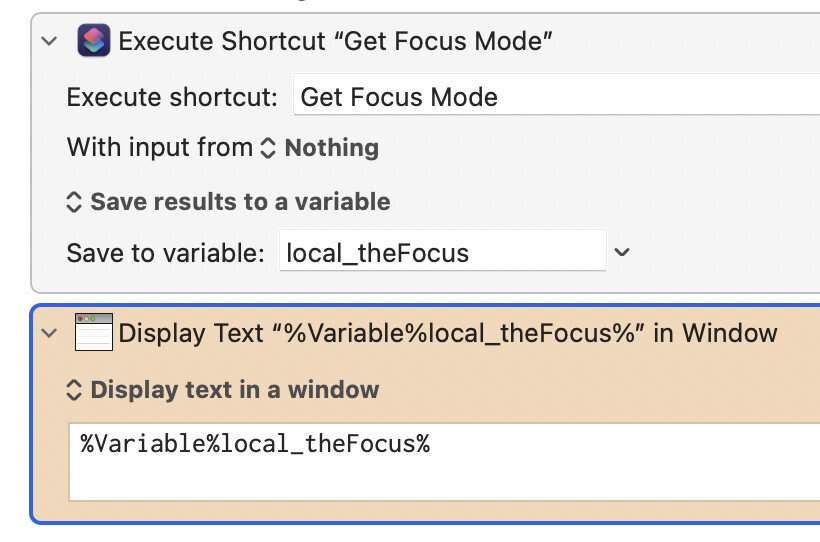
I think the best you can do would be to write a periodic macro that runs a macOS Shortcut (which is the only way I know of to get/set Focus modes without using the UI). That shortcut returns the name of the current Focus, which the periodic macro watches for in a Loop; when it finds it, it launches the macro you want to run.
This shortcut should return the name of the active focus; run it from an Action and save the results to a variable:
I think this is the best you'll be able to do, given the lack of access to Focus mode info for developers.
-rob.
Thanks for the insight, @griffman. I hadn’t realized (although I should have suspected) that Apple hasn’t opened any official access to this. Seems short-sighted on their part.
You’ve saved me some research into exactly how to cobble this together, though, and I’m grateful.
I’m not sure whether focus modes can be invoked if one is not logged in to an Apple Account; if one can, then it’s really not iCloud related. iCloud would certainly be the communication medium, though, if one wanted to change focus on another device and have it take effect on all other devices, including one’s Mac. I am indeed wanting to do just that.
But I could totally see wanting to invoke a KM script on my Mac whenever I switched focus modes directly on my Mac. In that case, of course, iCloud would not need to be involved at all (unless focus modes don’t work without being logged in).
Your postscript is very much the lines I’m thinking along:
- switch to an automobile-driving focus on my phone and have my Mac go to sleep;
- switch to an “I’m giving a presentation now” mode on my Mac and have all my devices go into silent mode, quit unnecessary apps on my Mac, hide my desktop, and launch Keynote;
- switch to a “music performance” focus on any device and quit everything except ForScore;
It seems to me this could be incredibly powerful.
You could easily test it out, by logging out of your iCloud account and trying to use Focus.
Yes I would love that too, but Rob said that Focus is a private API thing, so we are very likely not going to get that.
As I said, you can test if Focus mode works without being logged in.
Late 2025? Possibly, and almost directly...
Tahoe expanded Shortcuts Automation triggers to include Focus modes turning on and off (see eg this video, from the 5:20 mark). So you could have a Shortcut that was triggered by a Focus mode change that fired off a KM macro via Shortcut's "Open URLs" action:

Not yet upgraded to Tahoe myself, so not tested...
Indeed, I could, @Airy — of course. But that aspect of it is utterly unimportant to me. I was trying to address your question.
Oh, my! This looks perfect. Thank you, @Nige_S!

And now we have you as a guinea pig... 
Does this work as a single "on any Focus change" trigger, or do you have to set up individual Shortcuts for "Focus Mode A on", "Focus Mode A off", "Focus Mode B on", "Focus Mode B off", etc?
The only question I asked was "Does this make sense?" so I'm finding myself lost in the weeds. But since Nige answered your question, I guess we're finished.
Clearly we miscommunicated somewhere, somehow. No harm done.