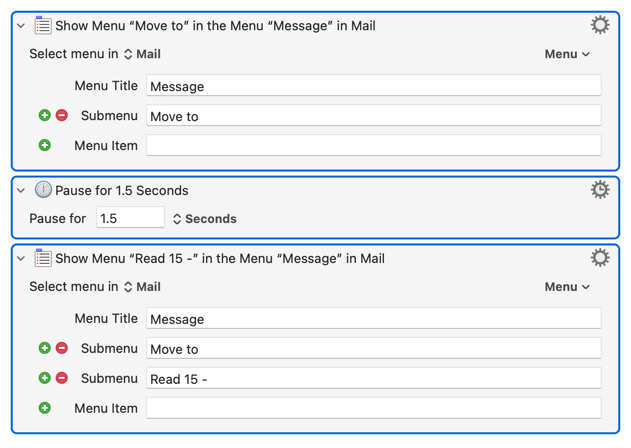
Alas, here I am again, wondering why the most simple of "Move Message to…" KM macros causes an explosion of activated menus and the Apple Mail application hanging.
Historically, the patient and helpful KM Forum has told me to simplify my Apple Mail subfolders, etcetera, but things were working just fine. And then they were not.
(For frame of reference, the equivalent KM macros in the leaner Thunderbird for Mac work wonderfully. Cue Tim Cook presenting the MAGA Mango with a lovely gold blob…)
Any broad-stroke notions about why this might be, and is there a solution.
Interestingly, my research has come up with these reasons for the collapse of what was once a thing of beauty:
"This is a known macOS Sequoia (macOS 15) behavior change, not something you broke — Apple tightened how menu events are exposed, and it affects Keyboard Maestro’s ability to record menu selections."
This response doesn't seem to sail as the macro was not borne of a recording, but a simple menu selection macro, per the uploaded.
My guess as to the "explosion of activated menus" is that macOS is not populating the menus for Keyboard Maestro unless a menu is selected by KM, followed by a brief pause by KM, then a sub-menu is selected, followed by another brief pause. That can need repeating until the desired menu item is selected.
For the task at hand, I have long moved emails to Mail folders/mailboxes with AppleScript. At least a decade. It's always worked, faster on some versions of macOS than others, but well enough that I've never been compelled to change my macros.
I moved to Sequoia just a couple months ago and the AppleScripts I have long used were much faster than on my prior Mac running Mojave. A script like this moves a selected message (words in all uppercase would need to be adjusted for your Mail account and Mailbox):
tell application "Mail"
	activate
	with timeout of 30 seconds
		set theSelectedMessages to selection
		repeat with theMessage in theSelectedMessages
			set theMailbox to "BUSINESS/CUSTOMERS/INVOICES"
			tell application "Mail"
				move the theMessage to mailbox theMailbox of account "INVOICES"
			end tell
		end repeat
	end timeout
end tell
Not shown with that code... For no good reason, I use AppleScript and System Events to prompt me to choose a mailbox and then the appropriate script is run to move a message. This could also be done using a KM Palette. Either of those could be shown if they are of interest.
Start with the Interactive Help, Something expected is not happening and make sure all of that is good and the macro is executing normally.
If the issue is with Select Menu, there are many reasons that can fail.
Cross platform applications, including Finale and many Adobe applications, do not necessarily update or even build their menu bar until the menu is selected with the mouse. When asked for the menus via the accessibility subsystem, the menus are either not there, or not currently correctly built for the context (eg, menus may be disabled or invisible when they should not be).
Options to force the application into updating its menus include:
Switch out and back to the application, and then use the Select Menu Item action.
Use the Show Menu variant (leave the item field blank) of the Select Menu Item action to show the menu item first, and then the Select Menu Item.
Simulate a click in the menu bar, and then use the Select Menu Item action.
Desperate measures, simulate a click in the menu bar, and then use arrows and typeahead (Insert Text by Typing) to select the menu item.