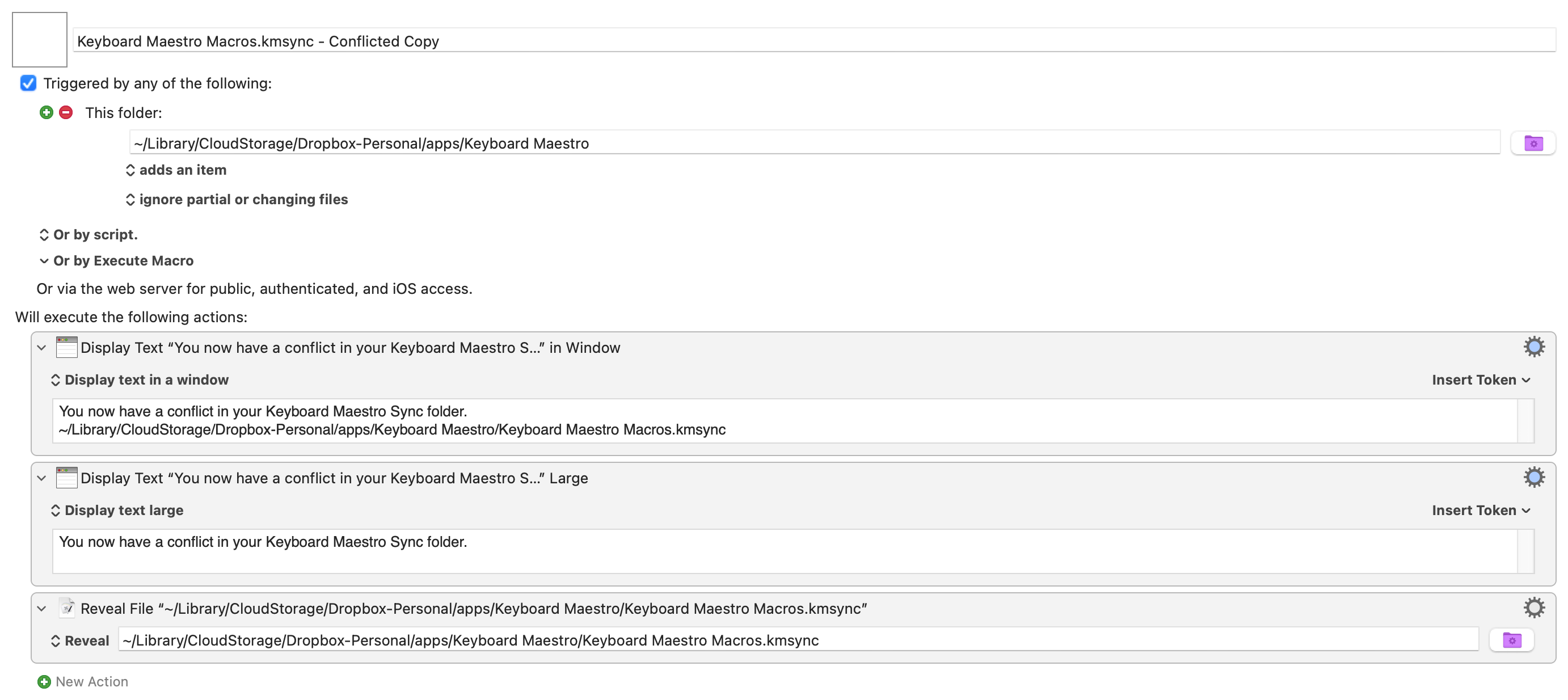
If this is of any use or an idea for anyone if you sync via dropbox occationally you might get a conflicted copy if you switch between your desktop and laptop like I often do. This macro by Rob here
is a great companion to always checking that you have the latest Keyboard Maestro Macros.kmsync file in use between your computers. That file is updated everytime you add or delete or change things in the editor so it can be somewhat easy to get conflicts depending on your workflow.
Found this helpful post after making a near identical macro myself. But this only identifies a conflict and doesn't help with resolution.
I bumped into this whole idea of conflicted copies when setting up another MacBook and pointing both my main Mac Mini and the MacBook to the same .kmsync file in Dropbox.
I understand the concept of conflicts if there’s activity in KBM on both devices at the same time, but I’m finding:
Every time I log into my MacBook, which auto-launches KBM, it creates a conflicted copy. I’m not interacting with KBM at all or making edits. KBM is always open on my Mac Mini, btw.
To be very intentional with KBM not being modified on either machine, I keep my account in view-only mode (View menu → Stop editing macros) on all devices unless I need to make changes. I haven't made changes in days, and it’s rare that I’ll make changes on my MacBook at all.
Question 1: I came here to ask how this could still be causing conflicts, with 2 computers both in view-only mode.
I have one ideas so far. I have a few dozen variables that are “global” (listed in Preferences → Variables) and it’s possible some are being altered when KBM starts up, but honestly after tracing my macros that launch on the MacBook when it boots, I don’t see any case where this would actually happen. (stuck for now on how to trace this further or see history of activity in last X minutes, for example)
Question 2: Is there any reasonable way to compare two .kmsync files (primary -vs- conflicted) to see what has changed between them? I’ve tried some diff tools (e.g. Kaleidoscope) but can’t read the file format plainly.
If I could read the files and know what’s conflicting, I could resolve this and understand it better.
I suspect only @peternlewis would have these answers. Tagging in, since I haven’t found an answer after searching documentation and forum. (thank you!)
It takes very little for the editor to write the macros.
If you are launching the editor on two different Macs, then you need to ensure that the sync is happening so both will need to be awake and the syncing system will have to promptly sync between the different Macs. If you can’t guarantee that, then you probably need to ensure you only have the editor open on one Mac at a time. The editor does not need to be launched at login, only the Keyboard Maestro Engine should be launched at login (by enabling the preference in the Keyboard Maestro General preferences).
BBEdit can compare them.
Be extremely careful with this, modifying the files is not recommended and definitely not if the Keyboard Maestro editor or Engine is running, and modifying the kmsync file may not work either since it’s been seen already.
I suspect that this is exactly where your problem is - Macros that are launching at login and writing some kind of change. I would disable these Macros as a test to see if the problem of conflicted copies stops.
As a side note - when Dropbox detects a conflict it adds "conflicted copy with user name in brackets" onto the name of the .kmsync file. This ensures that Keyboard Maestro will never use any of these files - it will only ever use the file named Keyboard Maestro Macros.kmsync so, you won't get any problems. Just delete the conflicted copy files. I have to do that every now and then (i.e. delete those conflicted sync files) and I've never had issues. So, it's not something to worry about.
One reason the conflicted copies were being created from my MacBook every time I booted was because of the "Reopen windows when logging back in” option being enabled. Typically I’ve have the Editor closed on my MacBook, but I was actively working with the app when I started noticing these issues, and so it would re-open every time I logged back in.
The use of BBEdit was helpful too, just for view-only comparison of the files. It’s hard to understand everything I was seeing, but it didn’t look like anything important was conflicting.
I’ll take Zabobon’s advice and not worry about this further. Glad to get a better understanding of it all, though.
 But this only identifies a conflict and doesn't help with resolution.