CORRECTED 2025-11-06: I had written “InDesign” in the first line below but meant “Illustrator.”
When copying a live text object in Adobe Illustrator 2026 (point type, area type, type on a path objects), pasting converts the text into outlines. Quitting Keyboard Maestro Engine stops the behavior so that copying and pasting gives live text in the pasted object.
I’ve submitted a bug report to Adobe, but I also wanted to post it here. The problem is clearly something Adobe did with ‘26, but I don’t know if @peternlewis has any suggested fixes.
I’ll be curious to know if Tahoe causes the same issue when the system clipboard history is enabled.
In any event, presumably InDesign is unhappy because some specific clipboard flavor is being read. You should report this to Adobe, and then you can try things like:
Exclude InDesign from the Keyboard Maestro clipboard history
Figure out which flavor of the clipboard is causing the problem
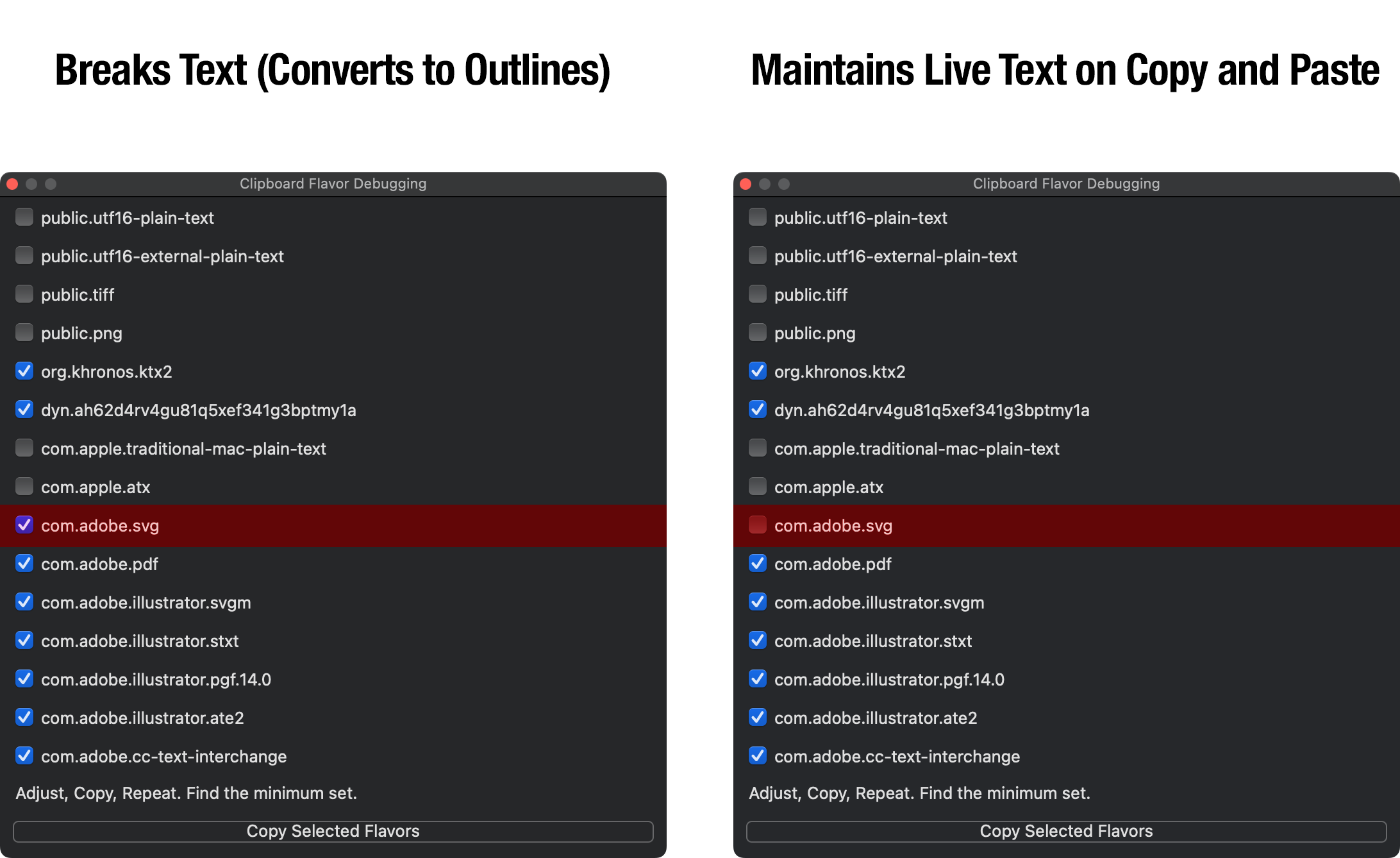
To find the flavor causing the problem, in Keyboard Maestro’s status menu, hold the option and shift key down and select Start Debugging, that will enable a clipboard debugging mode.
A debugging window will appear.
Then copy something in the problem application (so that it misbehaves).
All the flavors that were copied will be listed, with all the normal ones unchecked and all the non-standard ones checked. The checked ones are ignored. So now try again, and Copy should work safely in the target application.
Turn off each non-standard one in turn, check whether Copy works. If it misbehaves, turn it back on, if it does not, leave it off.
Let me know the minimum flavors that need to be left checked to avoid the problem.
Using that clipboard debugger and a little experimentation I found that “com.adobe.svg” is the culprit. If it’s checked, the problem occurs; unchecking it makes the problem go away. But as soon as I close the clipboard debugger, the problem reoccurs–copy and paste breaks the text.
Is there a way to permanently prevent com.adobe.svg from working?
In the meantime, I did as you suggested and excluded Adobe Illustrator 2026 from the Keyboard Maestro clipboard history.