KM Engine "doScript" with "Prompt for User Input" action doesn't modify Instance variables?

I'm working on dynamically building a "Prompt for User Input" action in JXA. I have almost everything working.

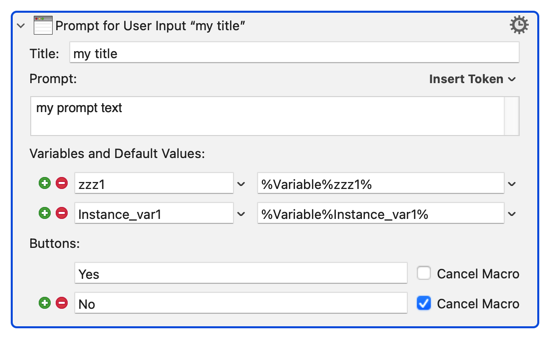
Consider this action:

image

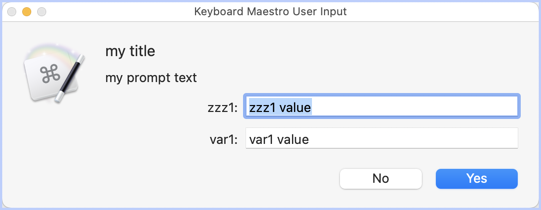
I dynamically built that action with my JXA code, and it works fine. The XML I produce matches the XML from the real action, and "doScript" produces the correct prompt:

image

(If you're confused by the image of the prompt, KM removes the "Instance_" from the front when displaying the prompt, which is why it only says "var1:" instead of "Instance_var1:")

If I modify the value for variable "zz1" (which is a global variable), the variable reflects the change.

But if I modify the value for variable "Instance_var1", it does not actually modify the variable, and that's my question.

I would chalk it up to "doScript" not having access to Instance variables, and I suppose that's possible. But consider this:

_kme.doScript(xml);
const resultButton = _kme.processTokens("%Result Button%");

I get the correct value for %Result Button%", which I would think is an instance-based token.

So why would I get the correct value for %Result Button%, but the Instance variable didn't get updated?

I hope this is clear - I rewrote the question about 10 times. :slight_smile:

Farbeit for me to think that I could ever correct you, but I'm a fool, so I will try.

That isn't correct. Tokens are not instance or local. It's better to think of them as "Global Functions" in my opinion.

The %Result Button% token acts more like a global variable, and maintains its value even after all macros have ended. So that proves it's not working like an "instance variable." Try it and see.

Clearly some tokens act like "instance" variables, for example %ExecutingInstanceName%, but even then, they still aren't the same thing as Instance variables. They are implemented in an entirely different way.

You can effectively return a number of values from .doScript (in the form of a JSON Array or Dictionary, parseable with the %JSONValue% token, or, of course, with JSON.parse),
but I think it invokes a separate thread, with its own evaluation space and distinct instance signature.


.processTokens and .doScript both return values to the calling evaluation space.

(in the case of .doScript, the XML needs to contain a Return Result action)

action:Return Result [Keyboard Maestro Wiki]

1 Like

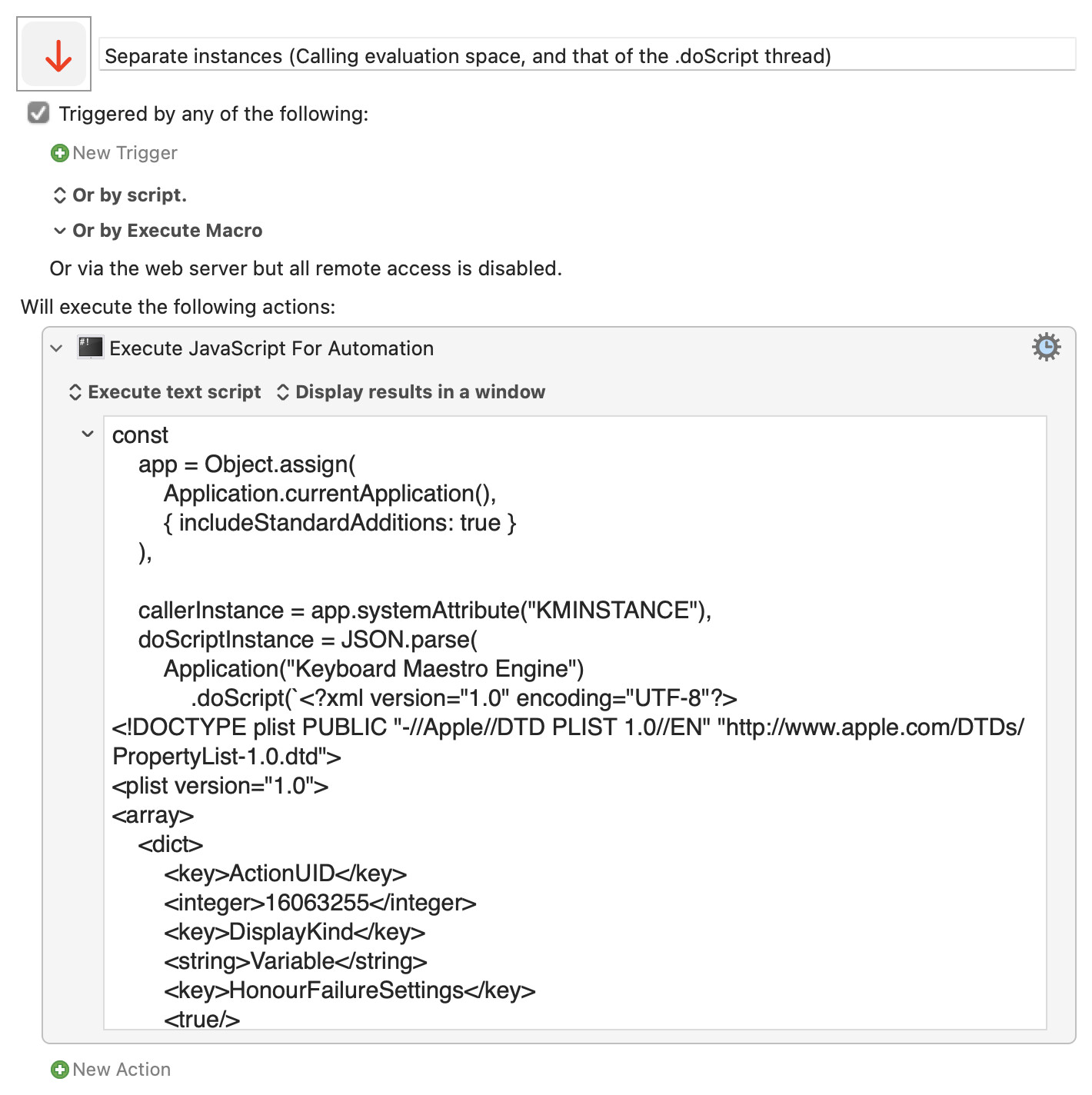
For example, when I evaluated the macro below just now, the caller instance and separate .doScript instances were:

{
  "callerInstance": "C2234005-B7B5-4E94-8F24-03D80514F567:88BBEE2F-EA33-4D03-90E8-7B1BB0CD6BE6",
  "doScriptInstance": "12358143-A4AA-4648-BF8F-1AFBE7B55769:30834851-BC82-49D3-A8C3-30D1304A9536"
}

Separate instances (Calling evaluation space- and that of the .doScript thread).kmmacros (4.1 KB)


Expand disclosure triangle to view JS source
const
    app = Object.assign(
        Application.currentApplication(),
        { includeStandardAdditions: true }
    ),

    callerInstance = app.systemAttribute("KMINSTANCE"),
    doScriptInstance = JSON.parse(
        Application("Keyboard Maestro Engine")
            .doScript(`<?xml version="1.0" encoding="UTF-8"?>
<!DOCTYPE plist PUBLIC "-//Apple//DTD PLIST 1.0//EN" "http://www.apple.com/DTDs/PropertyList-1.0.dtd">
<plist version="1.0">
<array>
    <dict>
        <key>ActionUID</key>
        <integer>16063255</integer>
        <key>DisplayKind</key>
        <string>Variable</string>
        <key>HonourFailureSettings</key>
        <true/>
        <key>IncludeStdErr</key>
        <false/>
        <key>IncludedVariables</key>
        <array>
            <string>9999</string>
        </array>
        <key>MacroActionType</key>
        <string>ExecuteJavaScriptForAutomation</string>
        <key>Path</key>
        <string></string>
        <key>Text</key>
        <string>const
    app = Object.assign(
        Application.currentApplication(),
        { includeStandardAdditions: true }
    ),

    callerInstance = app.systemAttribute("KMINSTANCE");

return JSON.stringify(
    callerInstance
);</string>
        <key>TimeOutAbortsMacro</key>
        <true/>
        <key>TrimResults</key>
        <true/>
        <key>TrimResultsNew</key>
        <true/>
        <key>UseModernSyntax</key>
        <true/>
        <key>UseText</key>
        <true/>
        <key>Variable</key>
        <string>local_Result</string>
    </dict>
    <dict>
        <key>ActionUID</key>
        <integer>16063484</integer>
        <key>MacroActionType</key>
        <string>Return</string>
        <key>Text</key>
        <string>%Variable%local_Result%</string>
    </dict>
</array>
</plist>
`)
    );

return JSON.stringify(
    {
        callerInstance,
        doScriptInstance
    }, null, 2
);
1 Like

Compared with a "main" calling a sub-routine, where the instances are:

Main Inst: FD37EA36-C64D-409D-B287-640BBA37D65B:AAAD6BD1-1830-41F4-A488-6BD236B6ECCC
Sub Inst: FD37EA36-C64D-409D-B287-640BBA37D65B:3E4FB4DE-0F21-4F71-9C0C-B07BE6F8A097

Note the identical values before the :

Playing last night, I found "easy mode" to be:

In the KM Editor

  1. Add a "Group" action
  2. In that "Group", add a "Prompt for user input" action
  3. In the "Group", after the "Prompt", add a "Return" action
  4. Set the "Prompt" and "Return" actions' fields etc to "obvious" things so you can spot parts in the XML
  5. Right-click the "Group" and "Copy as XML"

You can then hack around in your favourite text editor to change the XML as needed -- starting by deleting everything before and after the highest-level <dict> (basically deleting the first 4 and last 2 lines of the XML).

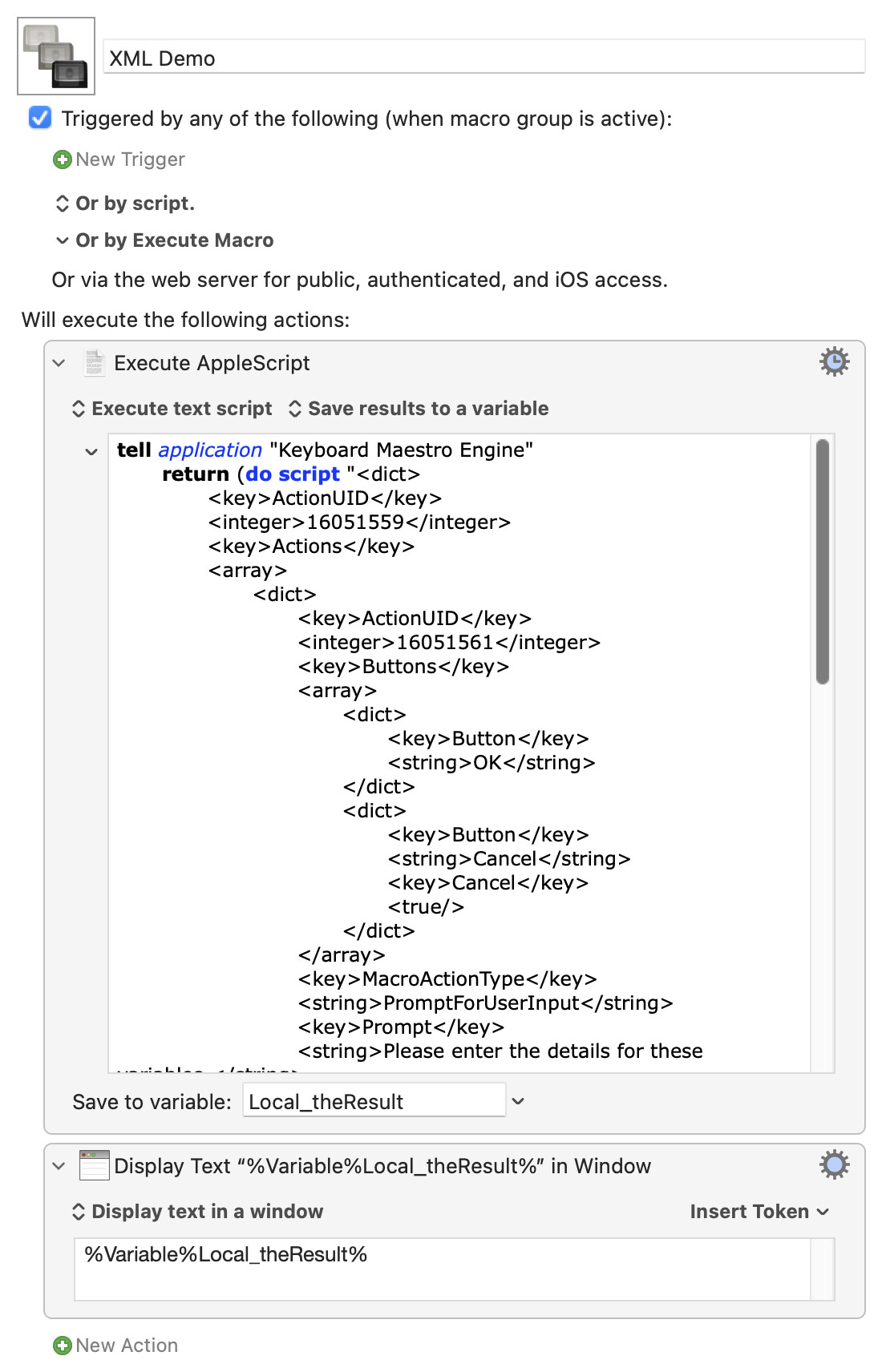
Your "new" action (using AS coz I still don't JXA) will then be

set theXML to "your XML from above goes here"

tell application "Keyboard Maestro Engine"
	return (do script theXML)
end

...with the action set to "Save to variable" -- you can the use the contents of that variable later in the macro.

Demo:
XML Demo.kmmacros (5.3 KB)

Image

2 Likes

Don't ever feel like that, at least with me. I'm asking the question because I need to understand, so anything you can add will help.

Unfortunately, in this instance (see what I did there?), that's not true.

From the wiki:

The %PromptButton% token (v8+) returns the name of the last selected Prompt for User Input button in this execution instance. (emphasis mine)

1 Like

Oh. All I saw was %Result Button% in your original question. I didn't see %PromptButton%. I now yield to the true experts who are trying to help you.

Thanks for kindly tolerating my attempt to help.

LOL. No "tolerance" required.

I like the way you’ve nicely summarized the steps, @Nige_S.

Like others on the forum, I use this approach often within macros to dynamically create Keyboard Maestro actions. (So often that I have a utility macro that does the top and bottom trimming that you mention.)
1 Like