This will probably be a controversial post. People have very strong opinions on AI. If someone can spot any errors or omissions in this post, please correct me. (I can correct my message if you spot any errors.) And here’s another warning: I’m not very smart so there could be mistakes here.
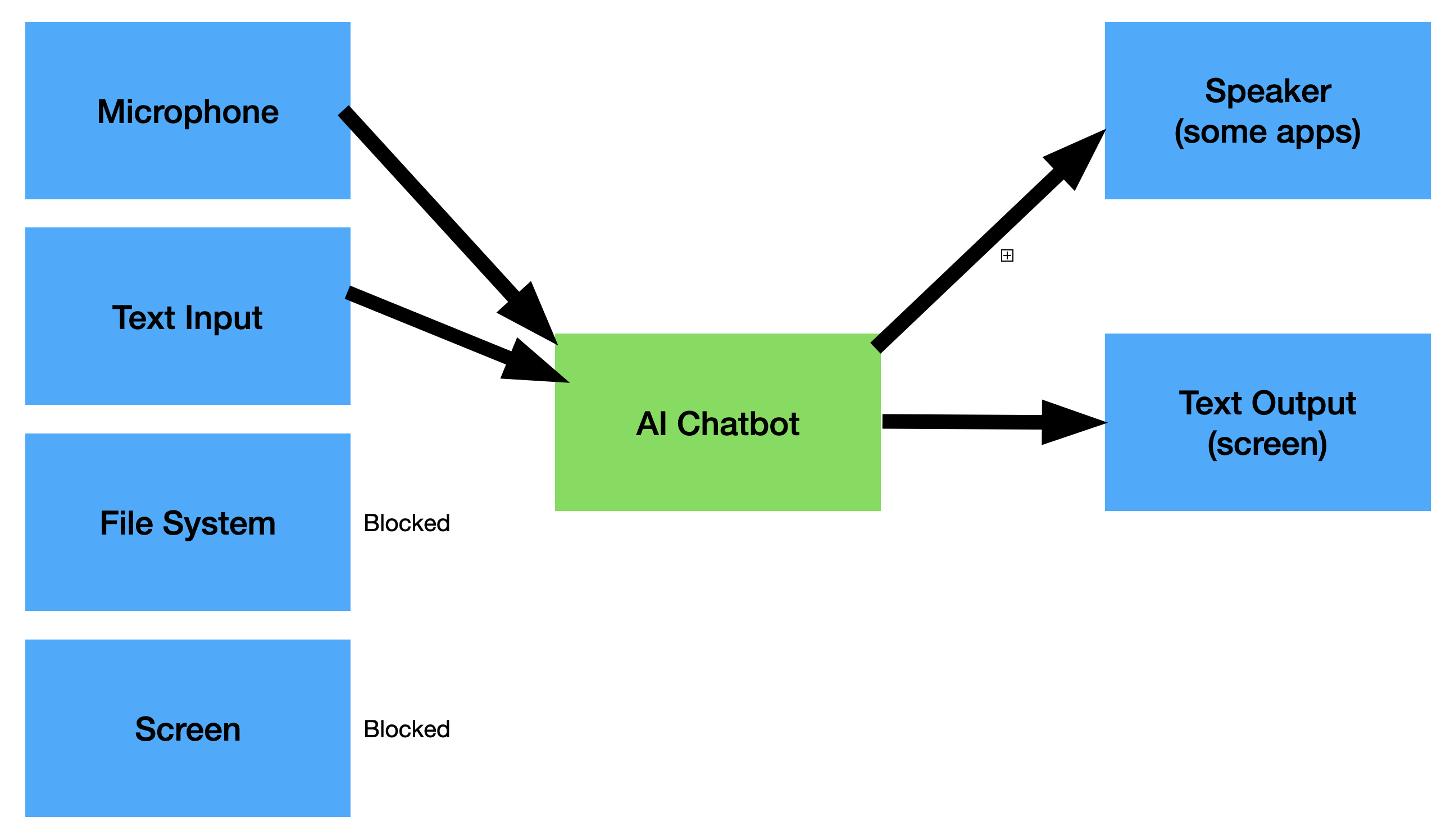
Most AI programs that you can download today for macOS are traditional “generative” AI which means that they don’t have any ability themselves to read files or screens or any data on your Mac (as opposed to agentic AI applications when can read or write to your computer.) All they can do is read the text that you type or listen to words that you dictate into the microphone. Here is what a basic generative AI app looks like, in terms of input and output.
Whereas here’s what an agentic AI app, like Siri AI in macOS 27, (there are other apps, at least for macOS) looks like:
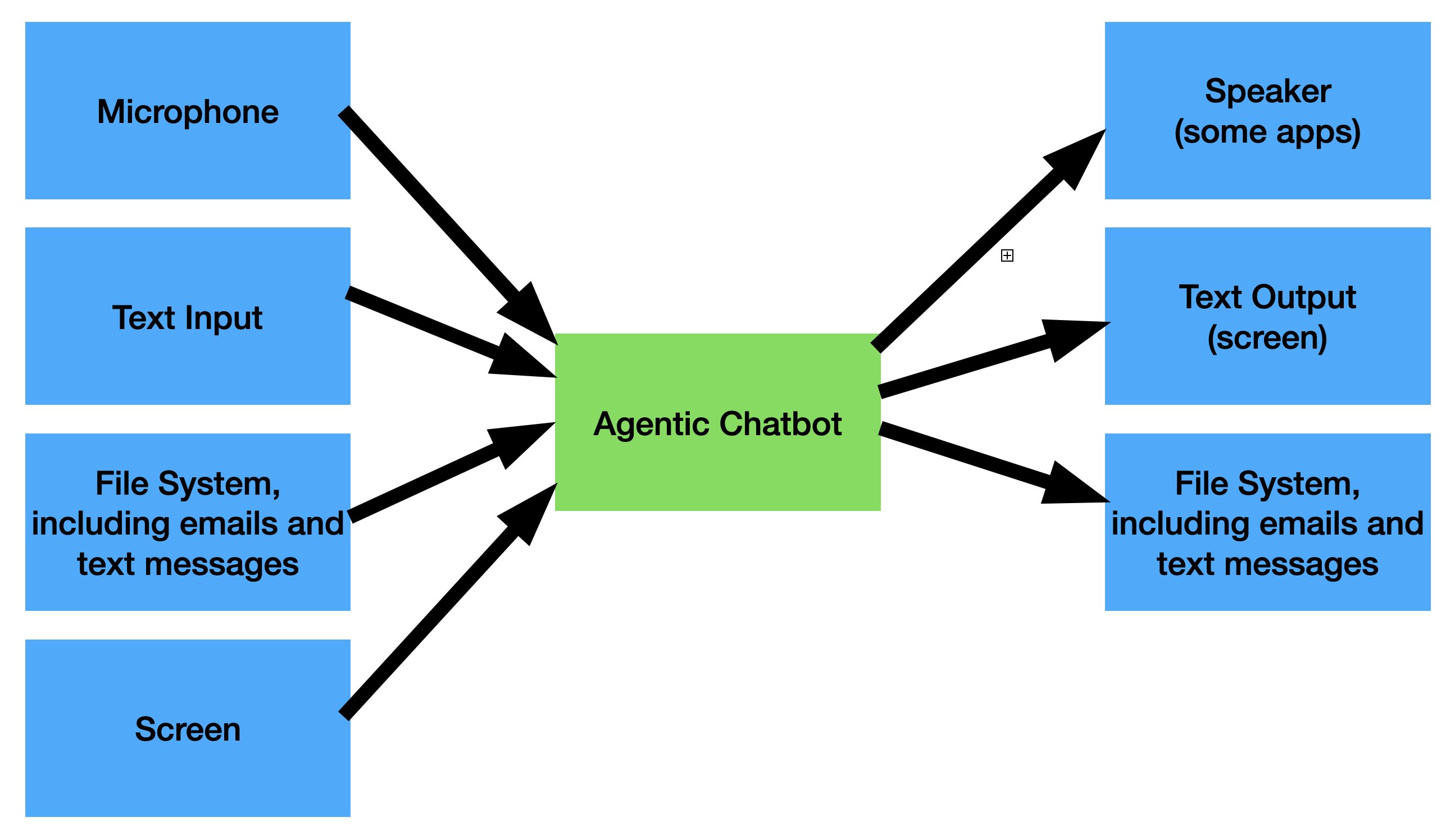
As you can see above, an Agentic AI chatbot can read system resources like your file system (including files, emails, text messages) and then even modify those resources. (These agentic apps are usually limited, by Apple, to macOS as opposed to iOS or iPadOS. Apple doesn’t block this sort of app from macOS, largely because a macOS computer can obtain apps from outside the Mac App Store.)
Siri AI (in the new macOS 27 and other Apple OS’s) can do agentic things, but everything it does has been written by Apple and Apple can vouch for its safety. For example, Siri AI can write to your file system in a number of ways, such as sending information via Safari to update your passwords, or sending text messages.
(Sidenote: The EU wants Apple to allow third party AI vendors to replace their version of Siri AI with another company’s version, but this will never happen because it means giving third parties full access to all user data and the ability to send that protected data out of the device to a third party corporate HQ.)
There’s a third diagram I need to draw here, because it illustrates how Keyboard Maestro can interface with AI apps to provide solutions that can’t be provided by either Siri AI or third party AI apps. Basically, by adding KM to an existing generative AI app, you can create an agentic AI app.
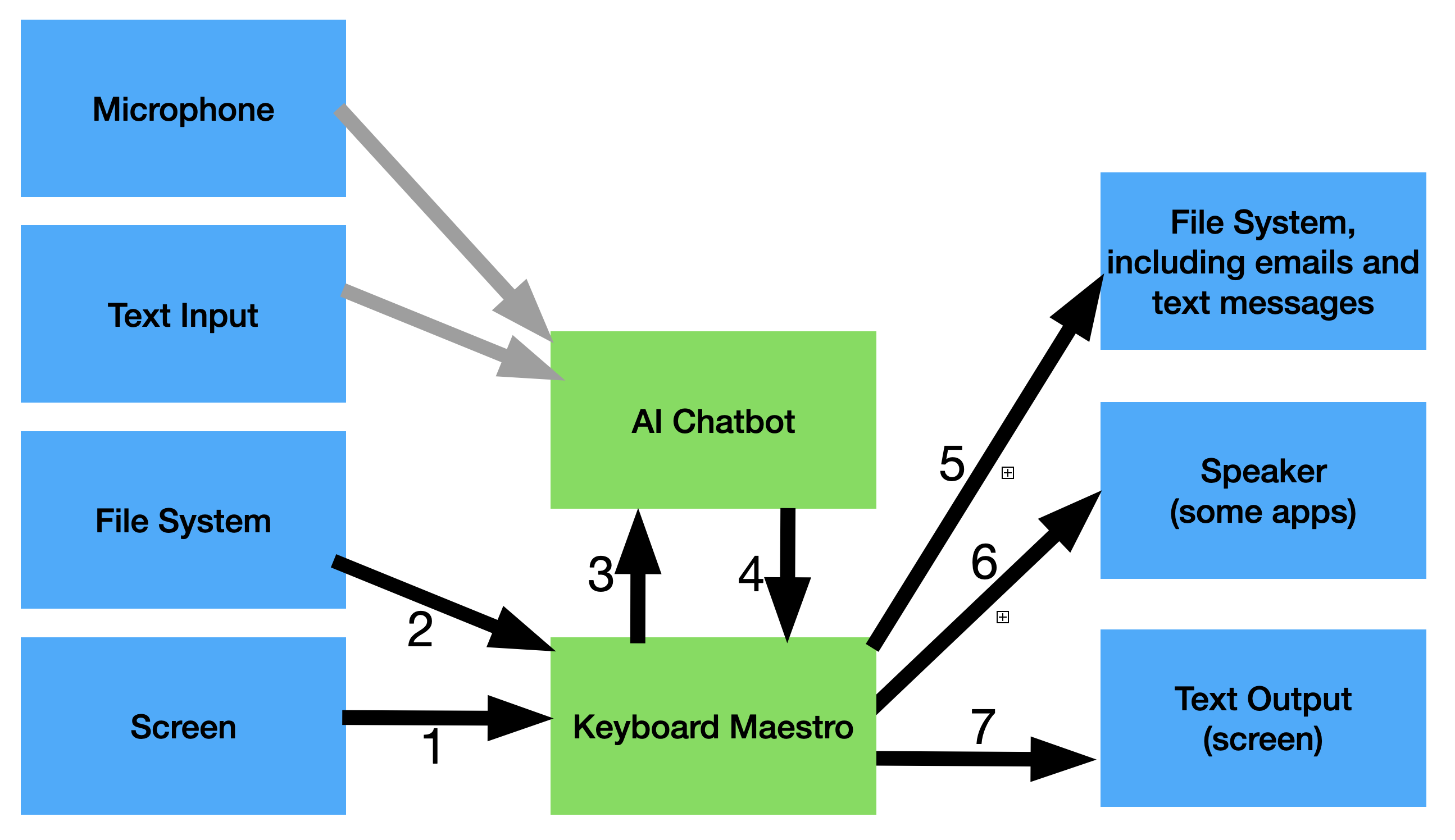
Arrows 1 & 2 represent all the actions that KM can use to fetch data from your Mac, like actions which open a file, or capture a screen image. Actions 5, 6, and 7 represent the actions that KM can use to write data to the system, like Display Window, Play Sound, and Write to File.
The new part worth thinking about are arrows 3 & 4 which are methods that interface between KM and a generative app. Over the last few weeks I’ve written a few macros that send data from KM to an AI application, and retrieve their results. From there, my KM macro can do some processing and then perform actions which are similar to the results of Agentic AI. Essentially, Keyboard Maestro can be combined with a generative AI program to create something equivalent to an agentic AI program.
One of the main challenges with Arrow #4 is that until recently, data returning from an AI app was in free formatted English text, which is quite difficult for a KM macro to process, for several reasons:
- The text is often returned in RTF format, and removing RTF structure, to process it, could damage the result.
- The text is not always consistent. Each request (even if using the exact same words) can return a different set of English words. E.g., if you ask “What is the capital of Canada?” you could get the result “Ottawa is the capital of Canada” or “The capital of Canada is Ottawa.” It’s not easy for a KM macro to capture the actual answer. Sometimes careful wording of the question can limit variation in answers, but it’s never easy.
- There is no built-in action in KM for speaking to generative AI apps (there probably should be, hint hint) and returning the results.
However I have managed to create some KM macros which implement all the arrows from #1 to #7. For example I wrote a macro that allows me to ask the user for the name of an object (using a Shortcut that converts a user’s spoken words to text), then passing that text along with the screen image to an AI agent, along with the words, “find the X and Y coordinates of the item described by the following text within the attached image", and then waiting for the AI chatbot’s results, and then analyzing those results, extracting the coordinates, and then moving the mouse to each of the location(s) specified in the results, after converting the results to screen coordinates. My results were a little inaccurate because I was using a two-year old LLM.
Step #4 is about to become much easier with the “fm” command in macOS 27 because it supports schemas which allows us to specify the JSON object names that we want the AI application to return as its output. Where fm falls short, I think, is that it’s not an agentic AI app like Siri AI. But I’m not sure yet if Siri AI for macOS 27 supports a “type to Siri” mode, like previous versions of macOS support. If so, I could write an entire new post about that.
In summary, I think Keyboard Maestro has a great capability to let us write macros that interface between the user, the system and AI applications, like Apple’s fm or other AI apps. When I get macOS 27, I plan to experiment by using KM to use fm to process some user data, and then take action in a way that no generative model can do.
