Interesting suggestion! This is usually dealt with by having a folder full of buttons with different parameter settings. Can you give me a use case where this would be necessary?
Weigh in. Start the sequence on the phone. Get and send the data. Enter the data on the Mac.
Adding a count for a list of things. Open the list. Select and send.
Adding totals. Add a number of things, a price, total and send to Mac.
1 Like
I get it now! Great idea.
1.4.7
- New option for Macro buttons: Prompt for Parameter
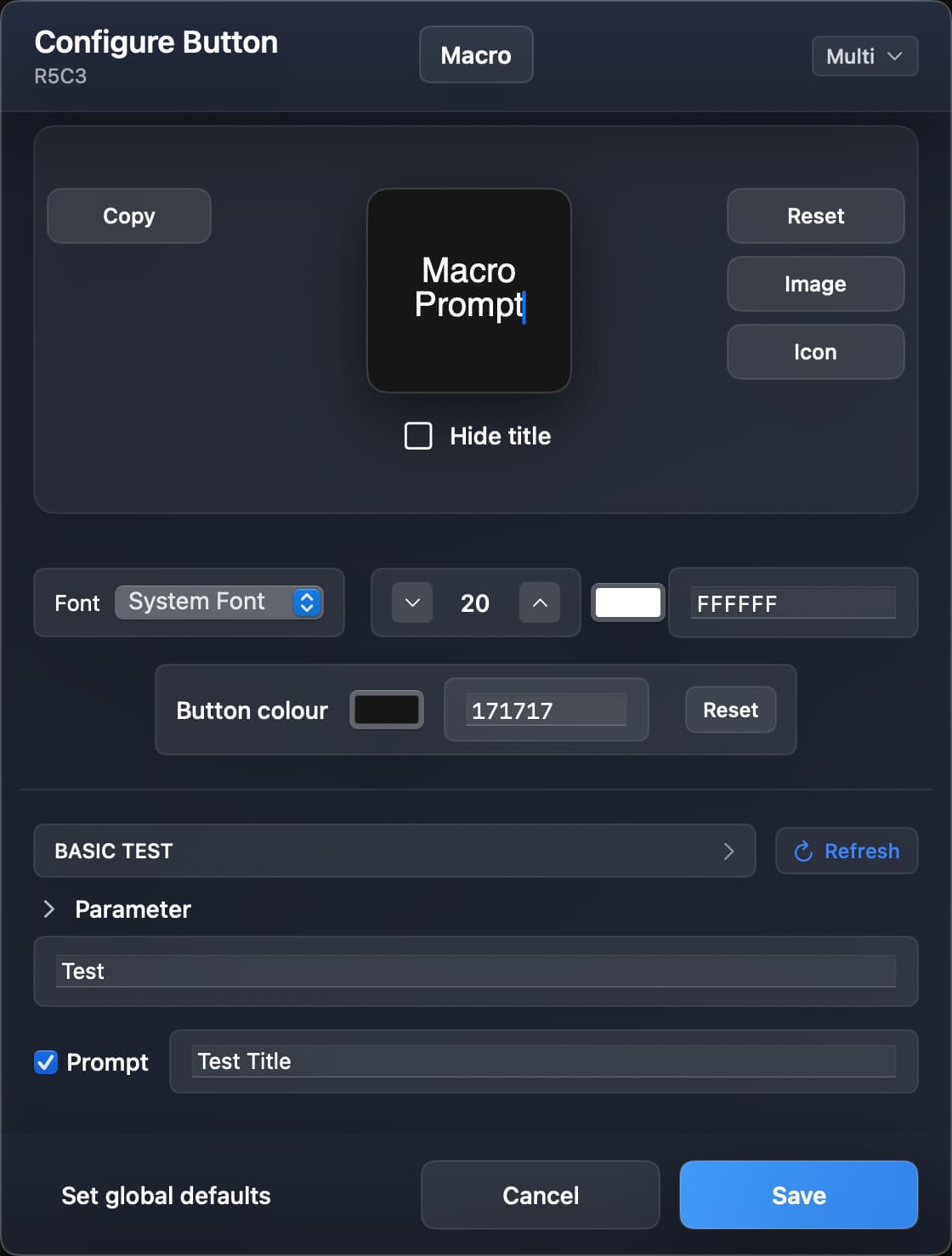
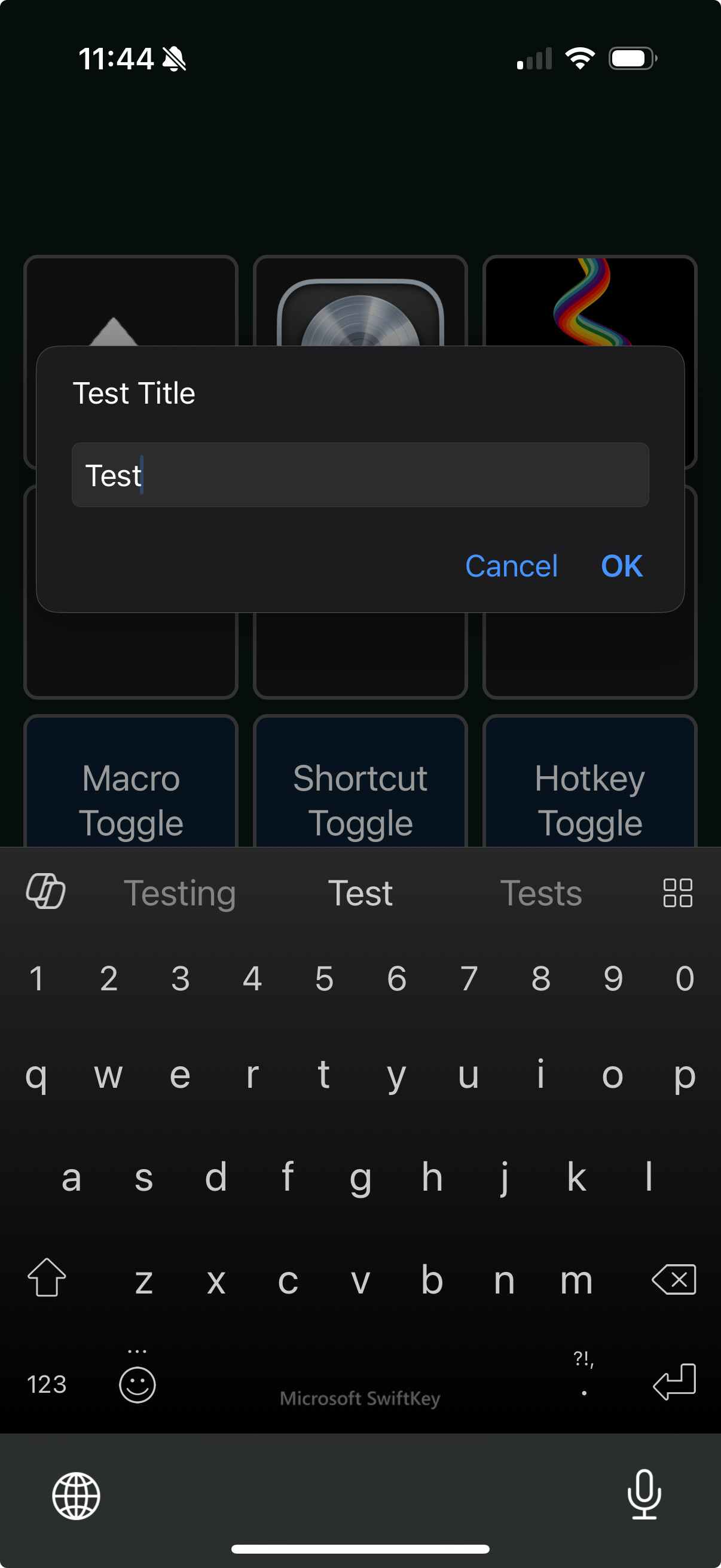
If you include a value in the parameter field, it will pre-populate the prompt.
- Fixed button config modal UI not updating when switching from Toggle to Single/Double/Long mode.
3 Likes
1.4.8
TL;DR: I've made major under-the-hood changes, that I'd been putting off for a while. I've tested and everything seems to be 1:1 but please let me know if you find any issues.
In my previous post, you'll see that I just added a prompt option to the macro button type. It took a very long time to get it working with all three trigger modes (basic, toggle and multi-press), as the app has developed into a bit of a beast.
In order to expedite future augmentations (and to stop me from losing my mind!) I've completely rewritten the button configuration system to be more centralised. Rather than lots of separate functions for each trigger type, they now all point to a single source of truth. This means I can add a new feature to a button type (macro, shortcut, hotkey, etc...) and the different trigger types pick it up automatically.
Misc:
- Quit dialog: ↵ to hide to the menu bar; ⌘Q again to quit completely
- Improved automatic window resizing logic
- Improved permissions process UX
3 Likes
1.4.9
- further refactoring to simplify adding new features
- allow typed values in grid controls (row/column numbers)
- multi-press modes for MIDI buttons, including custom delay time for automatic release message
The latest refactor means that legacy decks (those created before this version) will still be loaded, but saving will overwrite them in a new simpler format, incompatible with older versions of KMDeck. You may wish to backup your existing decks, but everything seems to be working nicely. Let me know if you encounter any issues and I'll try to fix them quickly to avoid downtime.
2 Likes
I've been wanting to try this out for some time now but I'm having problems getting started. I click on the link above and it brings up a Dropbox page, I download the app file.

In my downloads directory is a zip file. Double clicking on it unzips it but no app. Reading the thread a bit more I notice that @leroy figures out that if you delete the ".zip" extension it becomes an app and you can double click on it. When I do that I get this:
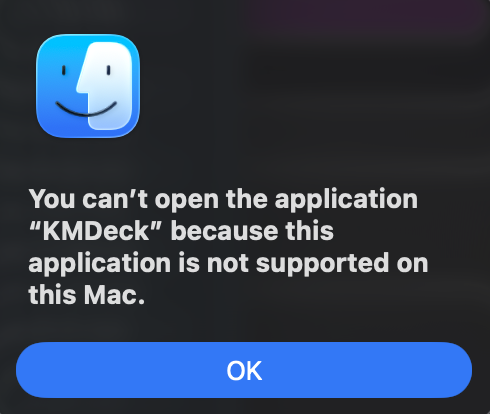
I'm running this on a M3 running 26.1.
What am I doing wrong?
Sorry to hear you're having trouble with it. I don't really understand it to be honest. Dropbox zips it for download, not me. I can download and unzip it just fine, but then I'm using Keka rather than the native macOS extraction tool. Maybe that's part of it?
I wonder if it would work right away if you download the whole folder rather than just the app file? If it does, I'll make a note in the original post to advise other people to do so too.
I'm pretty sure downloading the whole folder was more successful than just the .app file for me. Not sure if that was causation or I also did something else different at the same time though.
1 Like
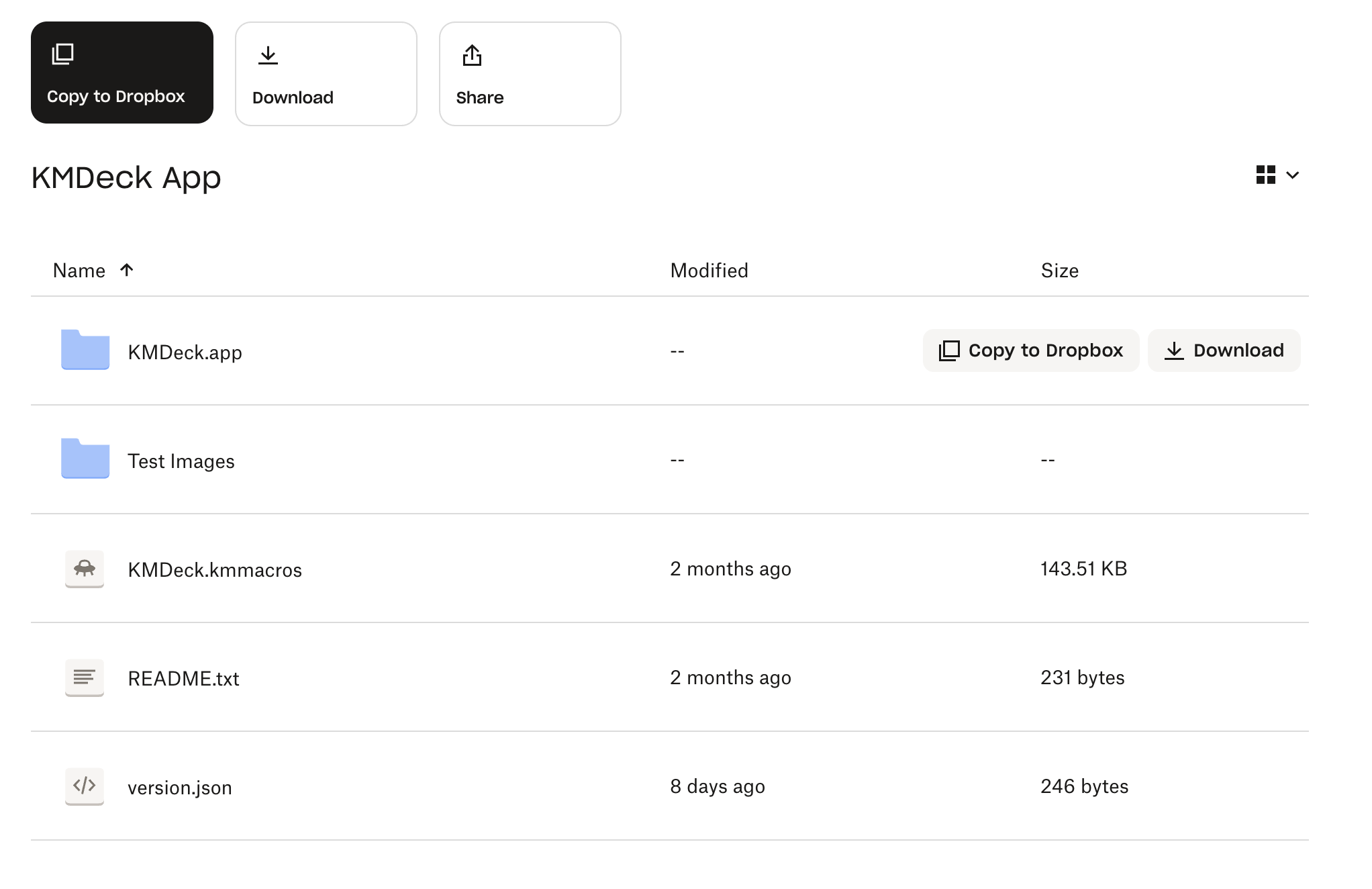
I was clicking on the smaller download button to the right of the KMDeck.app dropbox file. This puts a zip file in my downloads folder that when unzipped leaves a folder called "Contents" that contains all the assets for the app but is otherwise useless.
If you click on the smaller Copy to Dropbox button to the right of the KMDeck.app dropbox file on the webpage, it copies the app to my Dropbox folder and leaves the KMDeck.app as an intact application that runs. It must do the unzipping automatically.
Clicking the large Download button at the top left of the Dropbox webpage (see pic below) copies a zip file to my downloads folder that when unzipped, reveals a folder called "KMDeck App" that contains all pieces of your project (kmmacros, README.txt, etc). If you don't have Dropbox installed on your machine, this is the button to click. If you do have Dropbox installed and want it there, then clicking on the large "Copy to Dropbox" button (hi-lighted in black below) creates a folder in your Dropbox folder called "KMDeck App" with all of the project files. Again, Dropbox must handle all the unzipping behind the scenes.
I don't use Dropbox that much. Maybe the cleanest way to install this is to tell users to install by clicking on the large "Download" button at the top of the Dropbox web page that you provided a link to and then unzip.
1 Like
That's really helpful. It looks different in my dropbox account, as it's my own folder, so those buttons aren't there. I'll add your screenshot to the original post, if you don't mind. 
Opps, I just noticed that if you go the click on the Downloads button route, unzip the file then drag the KMDeck App folder to your Applications folder, launching the KMDeck app throws this error.
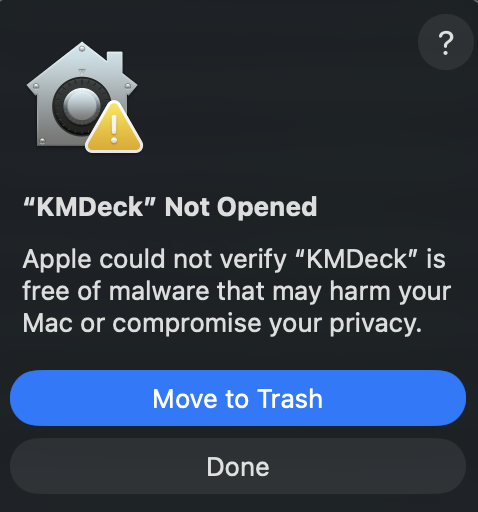
I'm not sure but I think when you copy from your Dropbox webpage to the local machine Downloads folder, the app is unsigned. Somehow, going through your local Dropbox account must preserve the signed app intact.
I just clicked on the Copy to Dropbox button and then copied the KMDeck App folder from my Dropbox folder over to my Applications folder and the app launches fine. If people that want to install KMDeck and don't have Dropbox installed, then it won't launch.
I think this is unavoidable on first launch because, as you say, it's unsigned. You have to right-click and select Open.
You've got "Open safe files after downloading" (or your browser's equivalent) turned on.
For me, unfortunately, both automatic and manual unzipping go too far and I get an (unpackaged) "Contents" folder.
@noisneil -- try making a new disk image with Disk Utilities, copying the KMDeck app onto that, unmounting the volume, then uploading the .dmg to Dropbox. People should then be able to download and unzip the file and mount the .dmg, and copy the app proper to wherever they want.
4 Likes
Great shout. Done!
3 Likes
Oooh! Get you, with your alias to /Applications for an easy install 
Works perfectly here.
Reminder to those on Sequoia/Tahoe -- if you get the "Apple could not verify..." alert then go to System Settings... -> Privacy & Security, scroll to the bottom of the right-hand pane, and click "Open Anyway":
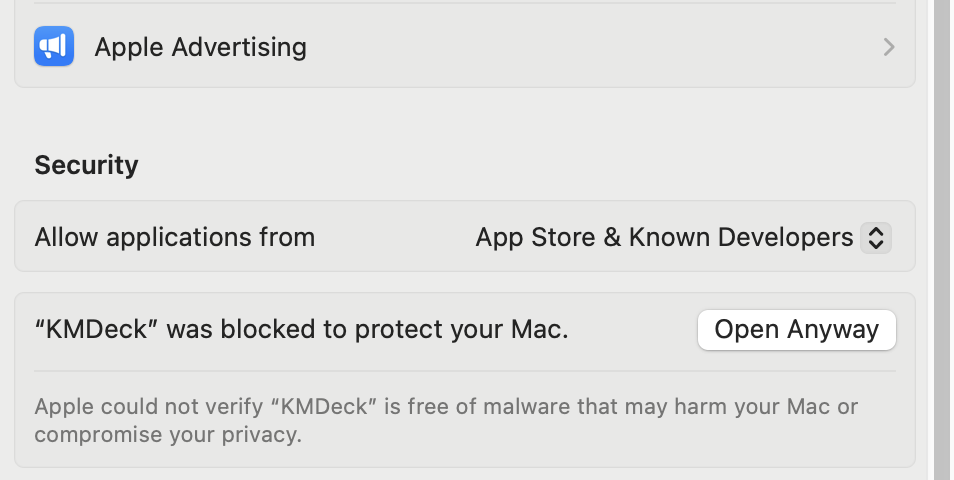
If you aren't seeing that you could instead delete the "quarantine" flag. Assuming you've already copied KMDeck to your Applications folder, run this in Terminal:
xattr -r -d com.apple.quarantine /Applications/KMDeck.app
3 Likes
I tried the dmg but got the same error as before (getting the could not verify KMDeck was free of malware error). Privacy & Security was not giving me the option to open anyway. However the xatrtr command you provided did fix up the file and was able to open it. Again if I use the copy to Dropbox button and then in Finder move the files from my Dropbox to the Applications directory, it works perfectly fine without needed the xattr command.
Thanks for checking into this.
It would be neat if there was a Keyboard Maestro script to download from Dropbox, mount in the Finder, transfer to the Applications folder and remove the quarantine flag would simplify the process.
Can somework check that the following works on their mac.
Assumes you have HomeBrew installed and you have installed wget.
wget -O KMDeck.zip "https://www.dropbox.com/scl/fo/hkp8229qnukb9tv6o6gim/ANYZTUq2Iflrt_Qc940kxWs?rlkey=jro5m8llnyx81i7272qf8tmtv&e=1&st=bbb7ot11&dl=0"
hopefully the link stays the same.
I've got this working locally.
#!/usr/bin/env bash

echo "Downloading latest to KMDeck folder"
./download-KMDeck.sh

echo "Mount Disk Image"
./mount-KMDeck-disk-image.sh

echo "Install KMDeck to /Applications"
./install-KMDeck.sh

echo "Detach image"
./detach-KMDeck-disk-image.sh
download-KMDeck.sh
#!/usr/bin/env bash

echo "Remove any remnants of previous KMDeck install"
rm -rf KMDeck

echo "Get the latest version from dropbox"
wget -O KMDeck.zip "https://www.dropbox.com/scl/fo/hkp8229qnukb9tv6o6gim/ANYZTUq2Iflrt_Qc940kxWs?rlkey=jro5m8llnyx81i7272qf8tmtv&e=1&st=bbb7ot11&dl=0"

echo "Unzip the archive into a KMDeck directory"
unzip -o KMDeck.zip -d KMDeck
mount-KMDeck-disk-image.sh
#!/usr/bin/env bash

FOLDER="${1:-KMDeck}"

# 1. Find first .dmg file in the folder
DMG=$(find "$FOLDER" -maxdepth 1 -type f -name "*.dmg" | head -n 1)

if [[ -z "$DMG" ]]; then
    echo "No .dmg file found in $FOLDER" >&2
    exit 1
fi

echo "Found DMG: $DMG"

# 2. Capture current volumes
before_vols=()
while IFS= read -r v; do
    before_vols+=("$v")
done < <(ls /Volumes)

# 3. Use 'open' to mount the DMG (Finder will mount it)
open "$DMG"

echo "Waiting for DMG to mount..."

MOUNT_POINT=""
for i in {1..40}; do  # up to ~20 seconds (0.5s * 40)
    sleep 0.5

    # List current /Volumes entries
    while IFS= read -r v; do
        # skip if it was there before
        skip=false
        for b in "${before_vols[@]}"; do
            if [[ "$b" == "$v" ]]; then
                skip=true
                break
            fi
        done
        $skip && continue

        # New volume detected
        MOUNT_POINT="/Volumes/$v"
        break
    done < <(ls /Volumes)

    if [[ -n "$MOUNT_POINT" ]]; then
        echo "Mounted at: $MOUNT_POINT"
        break
    fi
done

if [[ -z "$MOUNT_POINT" ]]; then
    echo "Failed to detect mount point under /Volumes" >&2
    exit 2
fi

# 4. Find first .app bundle inside the mounted volume
APP=$(find "$MOUNT_POINT" -maxdepth 1 -type d -name "*.app" | head -n 1)

if [[ -z "$APP" ]]; then
    echo "No .app found inside $MOUNT_POINT" >&2
    exit 3
fi

# 5. Echo the .app path (this is what you can cp to /Applications)
echo "$APP"
install-KMDeck.sh
#!/usr/bin/env bash

echo "Remove old copy if one exists."
rm -rf /Applications/KMDeck.app

echo "Copy in new version"
cp -r /Volumes/KMDeck/KMDeck.app /Applications

echo "Remove quarantine"
xattr -r -d com.apple.quarantine /Applications/KMDeck.app
detach-KMDeck-disk-image.sh
#!/usr/bin/env bash

echo "Detaching /Volumes/KMDeck"
hdiutil detach "/Volumes/KMDeck"
1 Like
For those who don't want to do that (though wget is great for many things, and I use it daily!), you can use the built-in curl instead:
curl -L "https://www.dropbox.com/scl/fo/hkp8229qnukb9tv6o6gim/ANYZTUq2Iflrt_Qc940kxWs?rlkey=jro5m8llnyx81i7272qf8tmtv&e=1&st=bbb7ot11&dl=1" -o KMDeck.zip
Note that I believe you should use &dl=1 not &dl=0, as zero means view and one means download—but it's somewhat moot as we're using a tool that can't really view :).
-rob.
3 Likes
Only just starting to use KMDeck, but just want to say a massive thanks to @noisneil for writing and distributing the app. Very useful and usable.
3 Likes