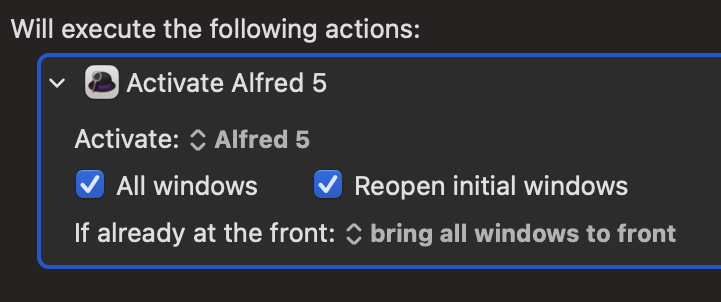
I’ve searched the forum and found posts about triggering Alfred Workflows from KM, but what I’d like to do is simpler than that. At the end of my KM macro, I want to trigger Alfred so I can do some searching within its interface and then, based on that, launch an Alfred workflow. So, all I want to do in KM is trigger Alfred so I can use it.
The problem is that if I use KM to type Alfred’s trigger (⌘space), the Alfred dialogue box appears for a fraction of a second and then vanishes. I’ve tried adding delays around it to no avail.
Is there a way to do this? I’d like to avoid the extra keystrokes if I can.
Thank you! That’s just the kind of solution I was hoping for.
The good news is that it is bringing up the Alfred window and allowing me to use it.
The bad news is that it is pulling focus away from the window in the original application that I was hoping to use with Alfred. So when I run the workflow, I get nothing but error noises because it can’t access the Move File dialogue box from PDF Pen Pro.
Here’s what I’m trying to do: I am filing away a bunch of scanned PDFs. A lot of them get filed automatically with Hazel, but some don’t. I’ve set up a macro in KM that moves the file front-and-center, prompts me for the name, triggers File-Rename so it can type that name there, then triggers File - Move To…, hitting arrow-down and then End and then Return which opens a Move To dialogue box that lets me save the file anywhere on my machine.
The next step is for me to trigger Alfred, find the right folder (which is much easier in Alfred than other methods), then trigger the Go To Here Workflow which will use Shift-CMD G to change the folder location in PDF Pen Pro’s Move To dialogue box. From there, all I need to do is hit Enter and the file is moved.
If I just hit ⌘shift myself, then the Go to Here workflow works just fine. But using KM, somehow the Move To dialogue box from PDF Pro becomes inactive. I’ve tried unchecking the boxes in Activate Alfred 5 and changing the “If already at the front:” to each of the first 3 options, but no dice.
Is there something else I can do to get this to work?
Can you add an "Activate PDF Pen Pro" or similar to the beginning of the Alfred "Go To Here" workflow?
Not an Alfred user so I don't know if that's possible -- but if you can only get to Alfred by giving the app focus then you need to find some way to put focus back onto PDF Pen Pro so you can manipulate its dialog. Doing that as part of the workflow would be more reliable than doing it in the KM macro.
Thank you. I want to be able to use this workflow with more than PDF Pen Pro, but it sounds like the next step is to reach out to the Alfred forum to see if there is any way to instruct the workflow to activate the foreground application after KM has pulled focus from it.
I was able to find a solution over at the Alfred forum. Just to close the loop here in case anyone else runs into something like this, here is that thread: