Hi Chris / @pseudo_meta ,
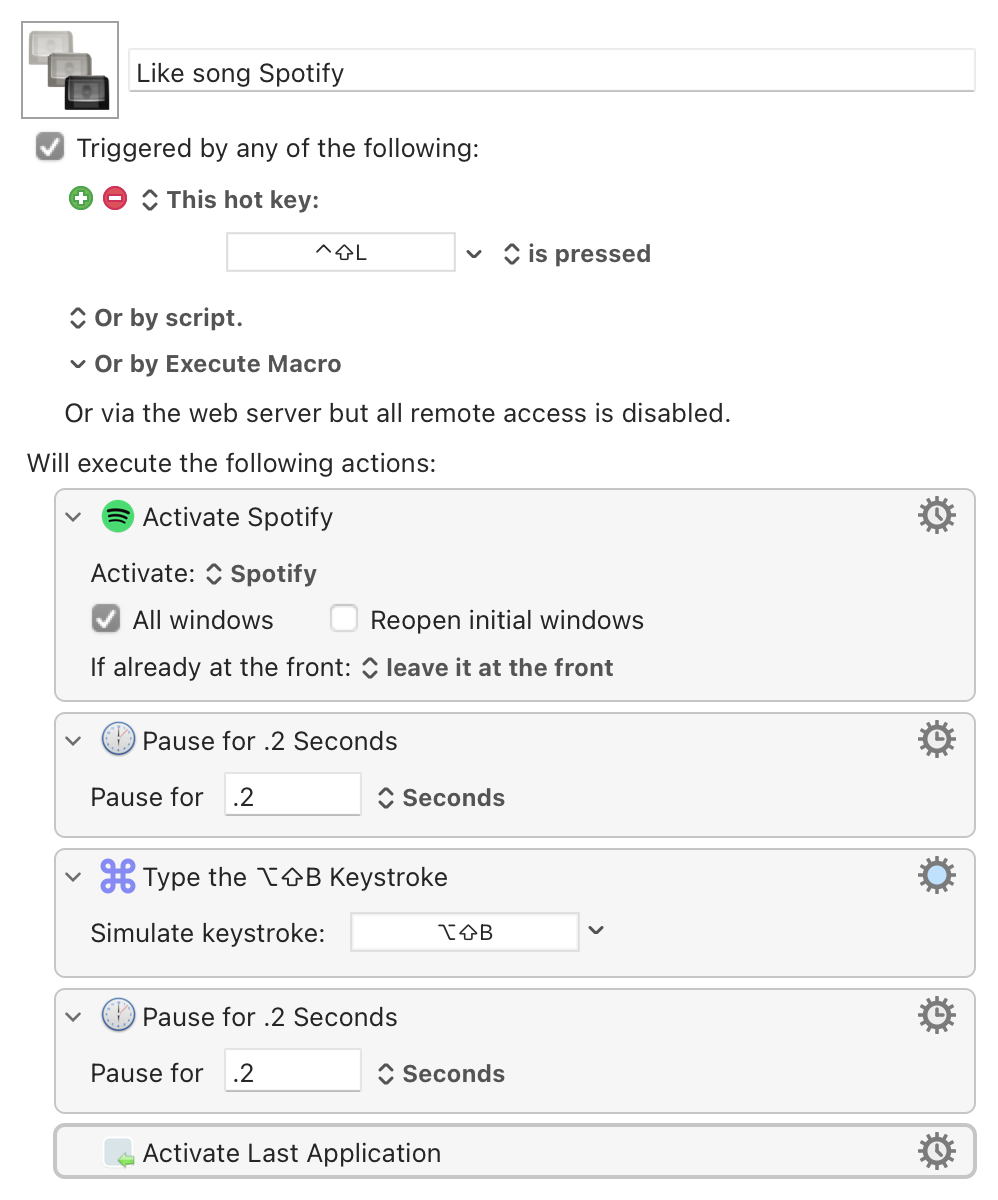
There is a Santa Claus. I ran into your issues with wanting to be able to like a Spotify song but keep working. Inside Spotify, the keyboard shortcut to like a song is shift-option-B. For my universal shortcut, I chose shift-control-L. Here's the macro which switches quickly to Spotify, likes the song and returns you to the original application. There are small pauses to make sure nothing goes wrong.
The only big issue is that the switch is a toggle. To be sure you don't like the song already and are not unliking it, you need to be able to see the like status, which means having the playing Spotify song with its like button visible somewhere on your desktops. It would be great if Spotify had two buttons:
- a like button
- a dislike button
In that case, liking a song multiple times couldn't make disable like.
Like song Spotify Macro (v10.0.2)
Like song Spotify.kmmacros (2.9 KB)
What I haven't built is a tool to dislike songs (useful in Discover and Release Radar playlists.
I hope this helps.
1 Like
I was so sure this keyboard shortcut didn't exist, thank you
1 Like
Hey there. I love the functionality of this shortcut, but what seems to be happening is that if I have already liked a song (I’ll just be working away in another app and hit this shortcut without going directly to Spotify), I actually remove the like. Have you figured out a way to keep the like if you’ve liked it in the past? Thanks!
Sadly no. It’s a toggle for me too. Maybe someone else expert has an idea on how to check status first? @griffman
1 Like
I don't have any experience with Spotify, so not sure how much help I can be. Two things I can think of that might help...
• When you switch to Spotify, are there any menus that differ for liked songs versus not liked songs? If so, you could use the menu status condition on an IF action to trigger only for songs where the "not liked yet" menu is active.
• You could probably use a screen capture action to look for the image of a "liked" song ... but this would depend on knowing where the currently-playing song appears in the UI, which I know nothing about :).
-rob.
This is really smart, @griffman. I will try to add an IF statement to this shortcut. Same for screen capture. I’m one day into using keyboard maestro, so I am less than a rookie, but if I have success, I’ll post!
Hell yeah! I think the second option worked!
@foliovision I created a Macro for Dislike. It only works when you are using the Radio feature or like a Mix because otherwise there isn’t a dislike button. I’ll copy it here.
I also updated the Like Song macro so that if they song is already liked, the macro quits.
Dislike song Spotify.kmmacros (2.5 KB)
Like song Spotify.kmmacros (26.9 KB)
1 Like