I'm using the following Apple Script to get the names of every macro in a group named Timers
tell application "Keyboard Maestro"
	set macroList to {}

	repeat with g in macro groups
		if name of g is "Timers" then
			repeat with m in macros of g
				set end of macroList to name of m
			end repeat
		end if
	end repeat
end tell

-- convert list to newline-delimited string
set AppleScript's text item delimiters to linefeed
set macroText to macroList as text
set AppleScript's text item delimiters to ""

tell application "Keyboard Maestro Engine"
	setvariable "timersList" to macroText
end tell
As a start, you can extract it from the plist but I suspect that will be a fair amount of work using native Keyboard Maestro actions but I could be wrong.
Although not Keyboard Maestro actions you use the following command in a Shell Script to read from the plist which may be a bit easier noting you need to change every occurrence of __Utilities to teh desired macro group. The said your AppleScript is not awful in terms of complexity.
Run in terminal or a Keyboard Maestro shells script:
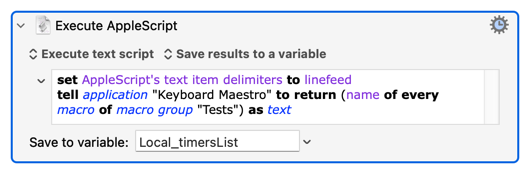
set AppleScript's text item delimiters to linefeed
tell application "Keyboard Maestro" to return (name of every macro of macro group "Tests") as text
Change the name of the macro group to suit.
The downside of using AS, of course, is that the Editor must be open. If that's a problem then you can use a shell utility as @Joel suggests. Or, since KM's macro plist is "flat" (no nesting of groups) with consistent indenting, you can get away with text searching.
To clarify -- when I say "must be open", if you run the script and the Editor isn't open then tell application "Keyboard Maestro" will launch the Editor so the enclosed commands can be executed.