Is there any way to test for whether some text is currently selected (in the frontmost window)? Somebody else asked about this here but that solution assumes something's been selected and copied (so Clipboard can be tested for a changed state).
I want KM to tell me: Yep, there's some text selected there! [True] Or, Nope, you ain't got nothin' selected [False]. Just that simple.
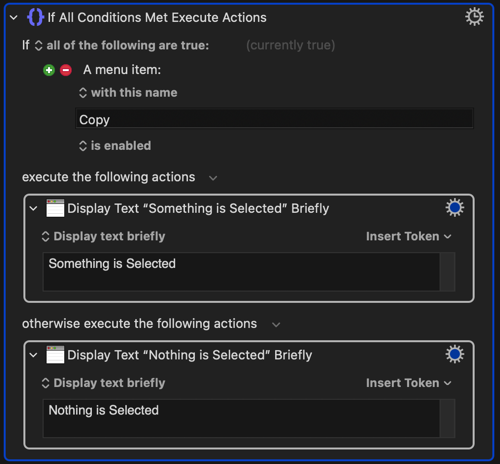
To my knowledge, there is no simple way to tell that. Unless the app enables/disables a menu item like "Edit->Copy" - in that case, you can just check the status of the menu.
The only other thing I can think of is to clear the clipboard (set it to an empty string), do a copy, and see if anything shows up in the clipboard. You'd need to do it something like this:
Make sure the options for the "Copy" action don't abort your macro on failure (click the "gear" icon).
For the "Pause Until Conditions are Met" action, use the gear icon to set a very short timeout period, and don't abort on failure.
If something is selected in the frontmost App then the Menu Item Edit→Copy will be Enabled. If nothing is selected the same Menu Item will not be Enabled. You could use this in something like this:
This would be for anything selected in the the frontmost App, not just text, but it might work for what you are trying to do.
EDIT - Just reread @DanThomas's reply to you and see he suggested this too.
The macOS accessibility API does not provide convenient access to the currently-selected-object. Hard stop.
Therefore all methods to do this are workarounds – unless an app is AppleScriptable and the selection-object is available – or you can get to
the selection-object with System Events and UI-Scripting.
So – it's very important to mention what app or apps you're working in.
The version of the macro I posted previously had a bug. The use cases tested are:
ABC
XYX
ABC (or XYZ) in Clipboard, no text selected, trigger macro, paste text.
ABC in Clipboard, XYZ selected, trigger macro, paste text.
XYZ in Clipboard, XYZ selected, trigger macro, paste text.
The previous version of the macro failed the third use case.
I've updated this post with a corrected macro. I apologize if the previous version caused confusion.
Hi @rowan. I was working through this very issue when I was developing a macro named Augment or Filter Text. I discovered a few nuances during the process.
Here's a simplified macro that includes the relevant actions.
DOWNLOAD Macro File: Get Selected Text- Otherwise Clipboard v1.1.kmmacros (16 KB) Note: This macro was uploaded in a DISABLED state. It must be ENABLED before it can be run. If it does not trigger, the macro group might also need to be ENABLED.
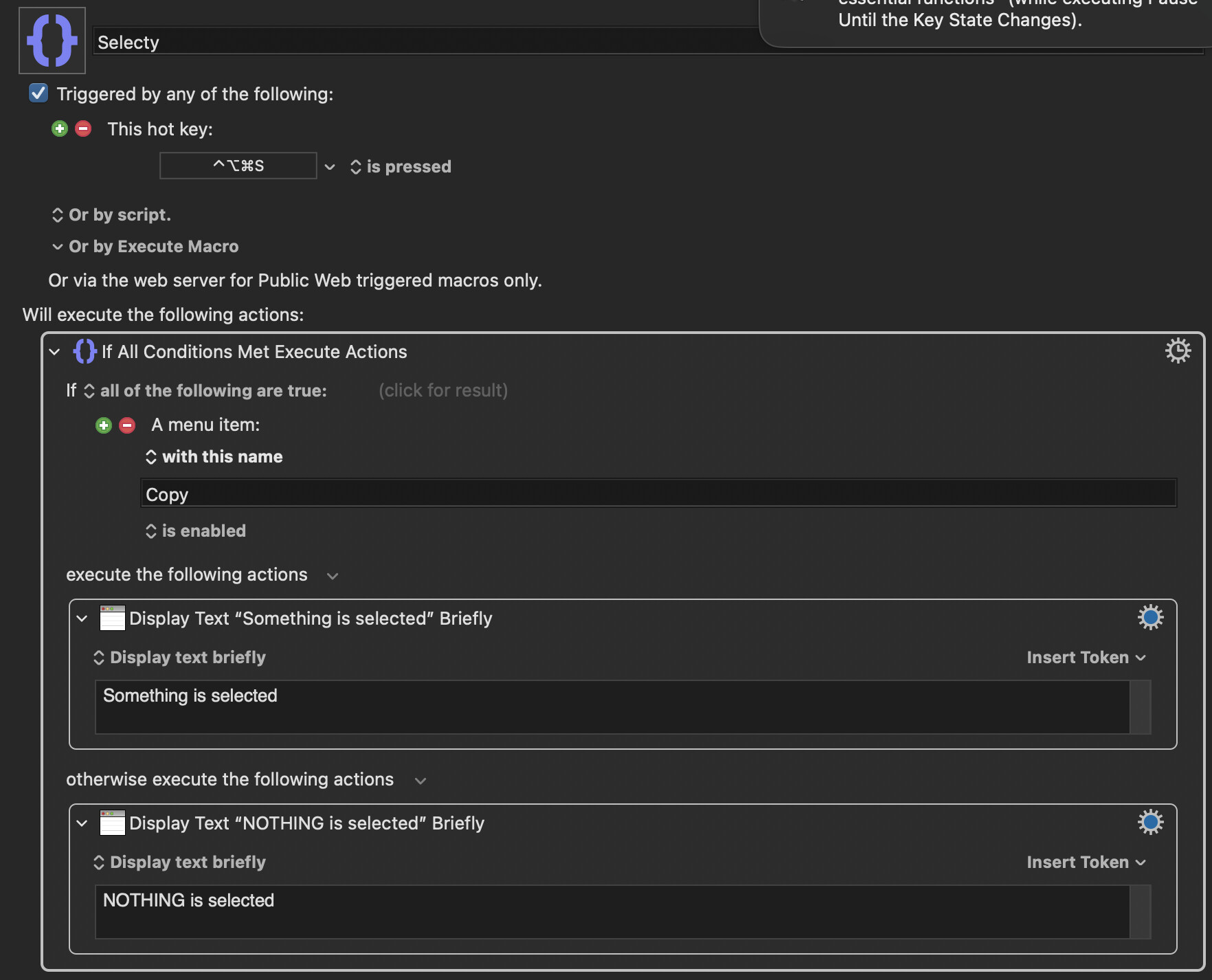
I recreated this as the screenshot you've shown. It works on all the apps I tested except Google Chrome. Whether I highlighted some text or not, it still gives me the notification "Something is selected", meaning it constantly think something is being highlighted. Any idea why that is so? Selecty.kmmacros (2.7 KB)
This is part of a plan to use single letter hotkeys and the shift key as a modifier so that a Macro will do one thing if you are in a text field and something else if you are not in a text field?
In which case you will need to find a condition, such as a particular menu, item that changes depending on whether you are in a Chrome text field or not.
So, if "S" was used as the hotkey the Macro would check to see if you are in a text field or not before either doing some action or typing the letter "S".
The problem with this approach is that even if you find a condition, Keyboard Maestro will "swallow" the keystroke before it does anything so it will cause a delay to typing. Unless you type very slowly you will find this annoying.
I think our end goal is different here, but the basic concept remains the same. Our commonality lies in that if texts are selected: do one thing, if texts are not selected do another thing.
Now, in most apps, when we highlight any text, the menu item "Edit→Copy" will then be enabled. This is true for all of the apps I tested except Google Chrome, which has the "Edit→Copy" constantly enabled even if you have not highlighted anything
This won't be a problem for me since I don't think we are doing the same thing here. But it is related to the original question the user first posted. Here's what I wanted to do:
IF texts are selected → Copy the texts and search them in google
If no texts are selected → Open Google Chrome
Yes, like you said I have to find a menu item that only changes when I select some text, which I don't think I can find any in Chrome. So this approach probably won't work for my goal.