Greetings from Melbourne.
I'll be upgrading my MacBook to OS 26 beta 5 next week.
Anybody any experience of Keyboard Maestro under Tahoe?
Cheers Robert
Greetings from Melbourne.
I'll be upgrading my MacBook to OS 26 beta 5 next week.
Anybody any experience of Keyboard Maestro under Tahoe?
Cheers Robert
No, but I've had KM since a very early version (I think v3), and every time a new macOS version comes out, I've had no problem that I can remember. The reason Keyboard Maestro so reliable is that it uses only public API calls in macOS, and therefore there are no problems, even when Apple changes how its undocumented API calls work. So I wouldn't expect Tahoe to be any different.
In addition, KM most macros that were written 10 or 15 years ago still work on current versions of macOS for the same reasons.
Stairways Software has owned Keyboard Maestro for a little over 20 years now. We should have had a 20th birthday party! 


No KM problems here under Tahoe B4, and very few other issues with Tahoe.
Thanks Bill, that's great to hear.
Thanks Airy. Really good to hear. And yes, I've been impressed with Keyboard Maestro over the years and the support from Stairways Software. Great software, great company.
I've installed Tahoe Public Beta version on my MacBook Pro and so far no problems and Keyboard Maestro is running fine with macros working as before.
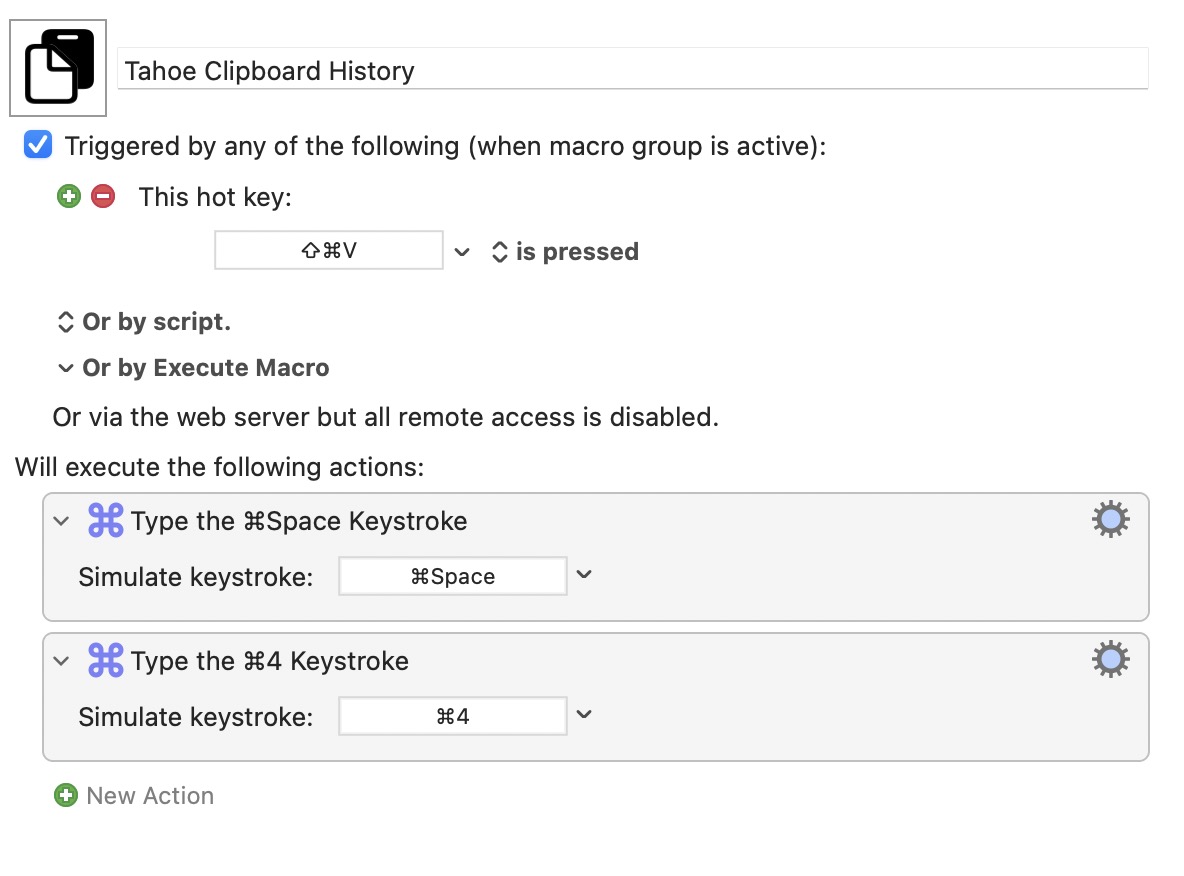
Tahoe has the new inbuilt Mac Clipboard History. But one quirk is that there is no single shortcut to access it... you have to press ⌘space (to invoke Spotlight) followed by ⌘4 to open Clipboard History. Keyboard Maestro to the rescue and my first Tahoe specific Macro 
Oh, that's great news! And thank you very much for the macro tip for Tahoe.
Just for anyone else on Tahoe, trying out the new built-in Spotlight Clipboard History: there is no need to do what I did ( i.e. make a Keyboard Maestro Macro to give Spotlight Clipboard History a dedicated shortcut).
To launch the Tahoe Splotlight Clipboard History window in one step, press ⌘space4
I have been playing with this new Mac feature. It is fairly limited but it has some interesting qualities:
Any text is held without formatting, meaning that if it is pasted from the Spotlight Clipboard Window it will match the formatting of the destination. For my use, this is a good feature.
It seems to be limited to text and images. It will not hold more complex clipboard data (i.e.data that is specific to any App). Copying something more complex that an image or text just gets ignored by the Spotlight list.
Universal Clipboard in my testing doesn't work i.e. if I copy something on my iPhone this does not seem to show up in the Spotlight Clipboard History on my Mac. This is odd as it is supposed to work.
Here is a good article about it: