I wanted to share a macro that has been a huge time-saver lately for my scripting workflows. This is a modified version of a wonderful macro originally created and kindly shared by @ComplexPoint here.
INCLUDE Only the Variables Used in the Selected SCRIPT.kmmacros (17.9 KB)

Unified JXA v1.3
return (() => {
"use strict";
// Update XML for selected Keyboard Maestro Script Actions
// (ExecuteJavaScriptForAutomation, ExecuteShellScript, etc.)
// This JXA parses to specify inclusion only of variable references found in script source code
// Original version by Rob Trew @2025 (v1.0)
// Modified by JuanWayri @2026 (v1.3) to support multiple script languages and variable syntaxes and nested scripts
ObjC.import("AppKit");
const kme = Application("Keyboard Maestro Engine");
const main = () => {
const
km = Application("Keyboard Maestro"),
selection = km.selection(),
action = 0 < selection.length
? selection[0]
: null,
macro = km.selectedMacros()[0];
return either(
alertAndEmptyResult
)(
macroAndActionIDsWithUpdatedXML(
macro
)(
action
)
)(
bindLR(
0 < selection.length
? Right(action)
: Left("Nothing selected in Keyboard Maestro.")
)(
actionItem => updatedXMLForKMSelectionLR(actionItem, macro)
)
);
};
// macroAndActionIDsWithUpdatedXML :: KM Macro ->
// KM Action -> JSON String
const macroAndActionIDsWithUpdatedXML = macro =>
action => updatedXML => {
const affix = "(original)";
const originalName = action.name();
// 1. Modify the original action (Backup)
action.enabled = false;
action.disclosed = false;
action.color = "red";
if (!originalName.includes(affix)) {
action.name = `${originalName} ${affix}`;
}
// 2. Restore Selection
Application("Keyboard Maestro").select(action);
return JSON.stringify(
Tuple(
[
macro,
action
].map(x => x.id())
)(
updatedXML
),
null, 2
);
}
// alertAndEmptyResult :: String -> JSON String
const alertAndEmptyResult = msg => (
alert("Update Action IncludedVariables")(msg),
JSON.stringify(
Tuple([])("")
)
);
// updatedXMLForKMSelectionLR :: KM Action -> KM Macro -> Either String (XML String)
const updatedXMLForKMSelectionLR = (selectedItem, macro) => {
const
selnType = selectedItem.properties().pcls,
optionalAffixForUpdatedAction = "";
return bindLR(
"action" === selnType
? Right(selectedItem.xml())
: Left(`Selection is ${selnType} – expected an Action.`)
)(
jxaActionXMLUpdatedLR(optionalAffixForUpdatedAction, macro)
);
};
// jxaActionXMLUpdatedLR :: String -> KM Macro -> XML String -> Either String (XML String)
const jxaActionXMLUpdatedLR = (optionalAffix, macro) =>
xml => bindLR(
jsoFromPlistStringLR(xml)
)(
dict => {
const allowedActionTypes = [
"ExecuteJavaScriptForAutomation",
"ExecuteJavaScript",
"ExecuteShellScript",
"ExecuteAppleScript",
"ExecuteSwift"
];
const
actionType = dict.MacroActionType,
defaultName = actionType.replace(/([A-Z])/g, ' $1').trim(),
actionName = (dict.ActionName || "")
.split("(original)")
.join("") || defaultName,
includedVariables = kmvarsInSource(dict.Text, macro);
return "ActionUID" in dict && (
allowedActionTypes.includes(actionType)
)
? plistFromJSOLR([
Object.assign(
dict,
{
ActionName: actionName
.includes(optionalAffix)
? actionName
: [actionName, optionalAffix].join(" "),
IncludedVariables: 0 < includedVariables.length
? includedVariables
: []
}
)
])
: Left(`Expected one of: \n${allowedActionTypes.join("\n")}\n\nSaw: "${actionType}"`);
}
);
// ---------------------------------------------------------
// MULTI-LANGUAGE PARSER & RESOLVER (FIXED v4)
// ---------------------------------------------------------
const kmvarsInSource = (source, macro) => {
const foundTokens = new Set();
let m;
// 1. Extract variable reference tokens from the script source
// JXA: document.kmvar.Variable_Name
const reJXA = /kmvar\??\.(\w+)/g;
while ((m = reJXA.exec(source)) !== null) foundTokens.add(m[1]);
// JS: kme.getvariable("Variable Name")
const reJSMethods = /\.[gs]etvariable\s*\(\s*(?:(["'])(.*?)\1|(\w+))/g;
while ((m = reJSMethods.exec(source)) !== null) {
const captured = m[2] || m[3];
if (captured) foundTokens.add(captured);
}
// Shell/Swift: $KMVAR_Variable_Name
const reShellSwift = /KMVAR_(\w+)/g;
while ((m = reShellSwift.exec(source)) !== null) foundTokens.add(m[1]);
// AppleScript: get variable "Variable Name"
const reAppleScript = /(?:get|set)variable\s+["'](.*?)["']/gi;
while ((m = reAppleScript.exec(source)) !== null) foundTokens.add(m[1]);
// 2. Gather Candidates from Environment
// A. Engine-Stored Variables (Currently existing in KM Engine)
const kme = Application("Keyboard Maestro Engine");
let engineStoredVars = [];
try {
engineStoredVars = ObjC.deepUnwrap(kme.variables.name()) || [];
} catch (e) { engineStoredVars = []; }
// B. Macro-Defined Variables (Found in the XML of the current macro)
let macroDefinedStrings = [];
try {
if (macro) {
const macroXML = macro.xml();
// Find all <string>...</string> values.
// This includes "Set Variable 'A B'", but also the script text itself containing "A_B".
const stringMatches = macroXML.match(/<string>(.*?)<\/string>/g) || [];
macroDefinedStrings = stringMatches.map(s =>
s.replace(/<\/?string>/g, "")
.replace(/</g, "<").replace(/>/g, ">").replace(/&/g, "&")
);
}
} catch(e) { }
// Helper: "A B" -> "a_b", "A_B" -> "a_b"
const sanitize = (s) => s.replace(/[^a-zA-Z0-9_]/g, "_").toLowerCase();
// 3. Build Lookup Maps
const buildCandidateMap = (varList) => {
const map = {};
varList.forEach(realName => {
const key = sanitize(realName);
if (!map[key]) map[key] = [];
// Store unique real names
if (!map[key].includes(realName)) map[key].push(realName);
});
return map;
};
const macroMap = buildCandidateMap(macroDefinedStrings);
const engineMap = buildCandidateMap(engineStoredVars);
// 4. Resolve Tokens to Best Variable Name
const resolveToken = (token) => {
const key = sanitize(token);
// Strategy: Look for a candidate that is NOT the token itself.
const findDifferentCandidate = (candidates) => {
if (!candidates || candidates.length === 0) return null;
// Try to find a variable name that differs from the script token
// (Matches "A B" when token is "A_B")
const distinct = candidates.find(c => c !== token);
// If found, return the distinct one. If not (list only had the token), return the token.
return distinct || candidates[0];
};
// Priority 1: Check Macro-Defined Variables (The context of this script)
const bestInMacro = findDifferentCandidate(macroMap[key]);
if (bestInMacro) return bestInMacro;
// Priority 2: Check Engine-Stored Variables (Existing global state)
const bestInEngine = findDifferentCandidate(engineMap[key]);
if (bestInEngine) return bestInEngine;
// Priority 3: Fallback to the token found in the code
return token;
};
return Array.from(foundTokens).map(resolveToken);
};
// ----------------------- HELPER FUNCTIONS -----------------------
const Tuple = a => b => ({
type: "Tuple",
"0": a,
"1": b,
length: 2,
*[Symbol.iterator]() {
for (const k in this) {
if (!isNaN(k)) yield this[k];
}
}
});
const alert = title => s => {
const sa = Object.assign(
Application("System Events"), {
includeStandardAdditions: true
});
return (
sa.activate(),
sa.displayDialog(s, {
withTitle: title,
buttons: ["OK"],
defaultButton: "OK"
}),
s
);
};
const jsoFromPlistStringLR = xml => {
const
e = $(),
nsDict = $.NSPropertyListSerialization
.propertyListWithDataOptionsFormatError(
$(xml).dataUsingEncoding(
$.NSUTF8StringEncoding
),
0, 0, e
);
return nsDict.isNil()
? Left(ObjC.unwrap(e.localizedDescription))
: Right(ObjC.deepUnwrap(nsDict));
};
const plistFromJSOLR = jso => {
const
e = $(),
nsXML = $.NSString.alloc.initWithDataEncoding(
$.NSPropertyListSerialization
.dataWithPropertyListFormatOptionsError(
$(jso),
$.NSPropertyListXMLFormat_v1_0, 0,
e
),
$.NSUTF8StringEncoding
);
return nsXML.isNil()
? Left(e.localizedDescription)
: Right(ObjC.unwrap(nsXML));
};
const Left = x => ({ type: "Either", Left: x });
const Right = x => ({ type: "Either", Right: x });
const bindLR = lr => mf => "Left" in lr ? lr : mf(lr.Right);
const either = fl => fr => e => "Left" in e ? fl(e.Left) : fr(e.Right);
return main();
})();
HOW TO USE IT
-
SELECT your Execute SCRIPT action in the editor.
-
TRIGGER this macro.
-
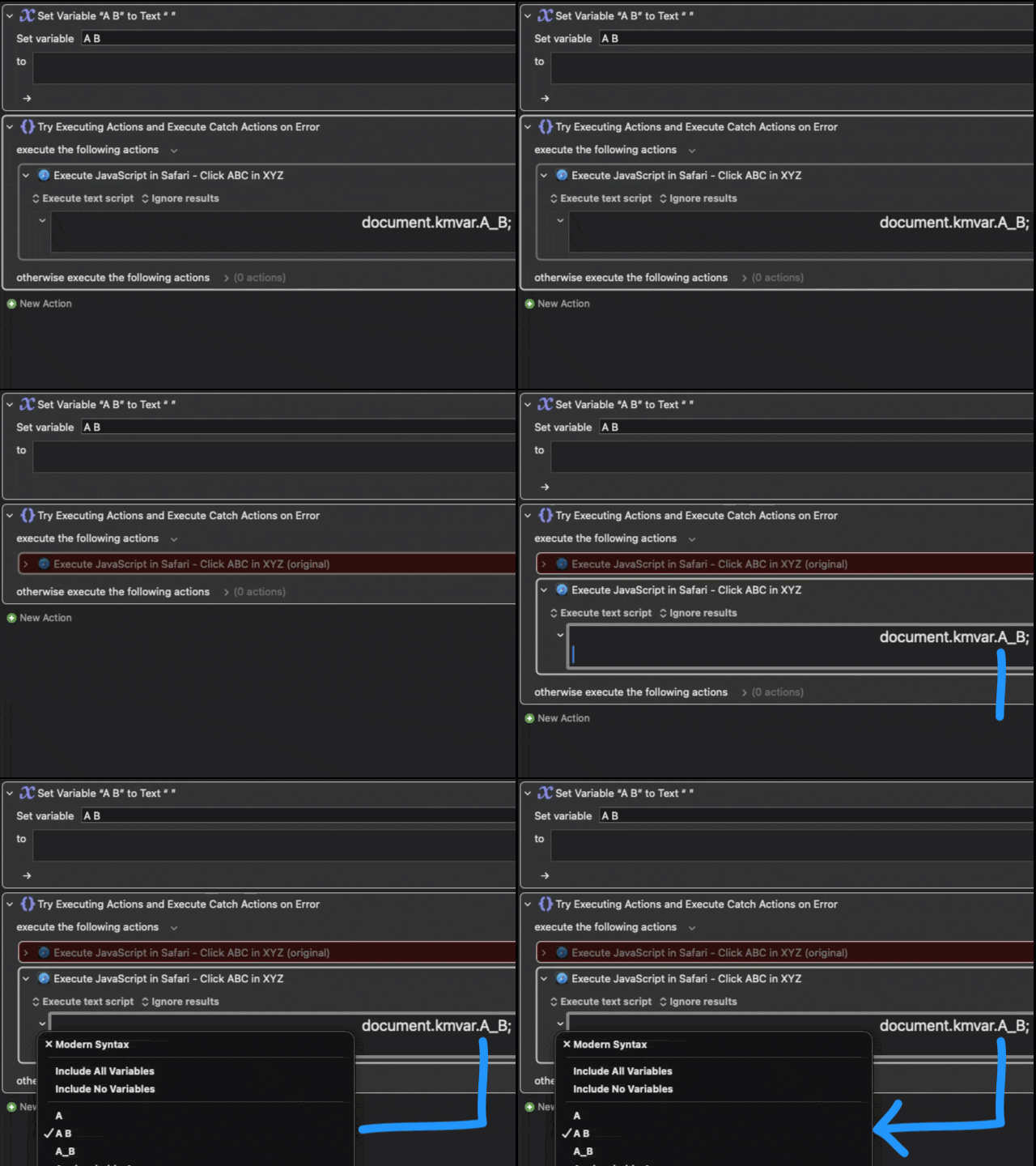
The macro will parse your code, backup the original action, and paste a new version configured to INCLUDE the variables detected in the script.
WATCH IT IN ACTION
WHY DO YOU NEED IT?
When using "Execute Script" actions (JavaScript for Automation, AppleScript, Shell Script, etc.), Keyboard Maestro defaults to "Include All Variables". While convenient, this practice has two major downsides:
1. Performance:
It copies every single variable currently in your KM Engine into the script's environment every time it runs. If you have large variables or a substantial number of them, this can significantly slow down execution.
2. Security & Privacy:
Perhaps even more importantly, passing unnecessary variables is a security risk. By defaulting to "All Variables," you are potentially exposing personal/sensitive data (stored in other variables) to the script environment. This increases the risk possibility of data leaks (when targeted by malicious third-party software or websites) and data loss (a buggy script might accidentally overwrite a variable it wasn't supposed to have access to).
It is best practice to switch this setting to "Include Specific Variables" to keep your execution fast and your data isolated.
The Problem: MANUAL Selection is TEDIOUS
Currently, adopting this best practice is a manual chore. You have to:
-
Click the dropdown to "Include Variables..."
-
Scroll through your entire variable list.
-
Manually select the variable referenced in your script.
-
Repeat steps 1-3 for each variable : (
-
If you add a variable to the script later, you have to remember to do the process again or your script won't work as expected!
The Solution: AUTOMATE it!
This macro solves that problem entirely. It parses the source code of your selected script action, identifies the variables you are using (detecting syntax like kmvar.My_Var, getvariable("My_Var"), getvariable "My_Var" or $KMVAR_My_Var), and automatically updates the action to include only those variables.
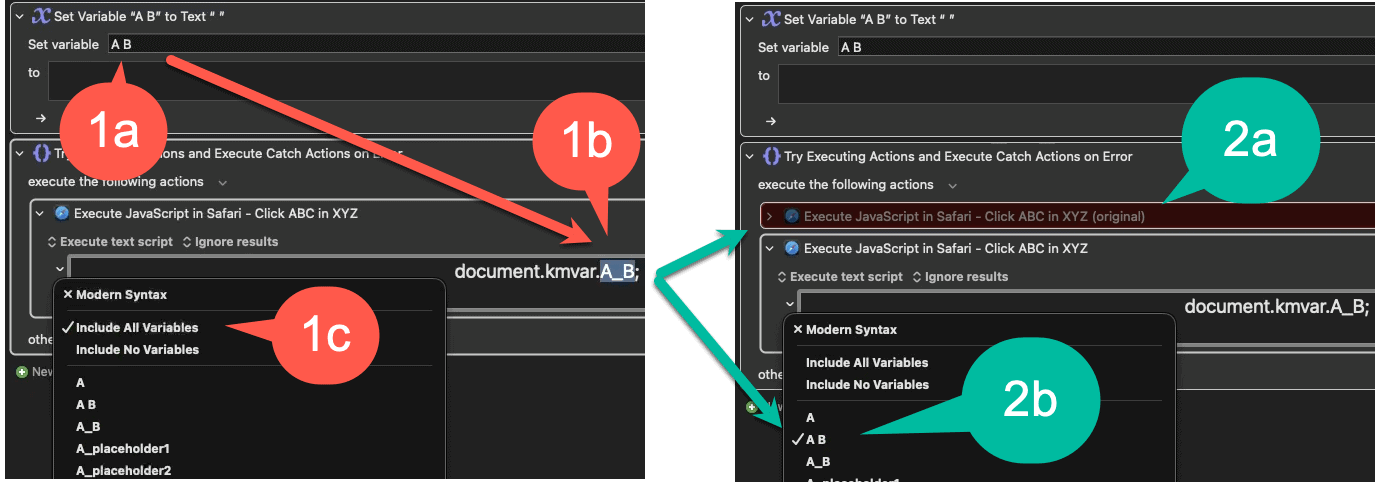
As shown in the image above:
-
(1a & 1b) You have a variable named "A B", which becomes
A_Binside the script. -
(1c) Normally, you’d have to find "A B" in the list manually.
-
(2a) This macro creates a backup of your original action (disabled and colored red) just in case.
-
(2b) It then generates a new version of the action where the relevant variables (like "A B") are automatically SELECTED to be INCLUDED for you.
SCRIPTS SUPPORTED
- JavaScript For Automation (JXA)
- JavaScript (Web browsers)
- Shell
- AppleScript
- Swift (may need more testing)
Notes on this version
One specific improvement in this version 1.3, apart from the support for multiple languages and scripts nested within conditional, group, and loop structures, is the handling of variables that contain spaces:
Keyboard Maestro variables can include spaces (e.g., "My Variable"), but the KM Engine forces them into underscores when it creates environment variables (e.g., "My_Variable"). This creates ambiguity: does the script reference My_Variable refer to a KM variable actually named "My_Variable", or one named "My Variable"?
This macro tries to resolves that ambiguity by prioritizing variables defined within the current macro. If it sees My_Variable in your script, it checks if "My Variable" exists in your macro first and prioritizes that, ensuring the correct variable is checked in the list.
If you encounter scenarios where this macro requires adjustments, kindly share your feedback so that we can enhance its functionality!