Hi there! I am using a trial of keyboard maestro on mac osx Monterey… but it is not working as I expected..
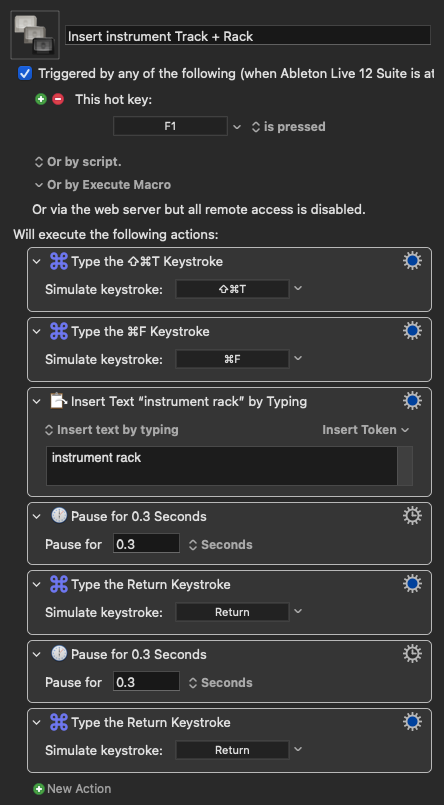
I use keyboard maestro to speed up my workflow on Ableton Live, I would like to press “command + F” then type text “instrument rack” then key stroke “enter” or “return” (don’t know which one would work the best) double times… I have a delay of 0.3 between every action, but everything is acting weirdly: sometimes it works but 1 time every 20… when it is not working the macro stops after typing text, without hitting “enter” double times… I tried to increase the delay time but no change, I tried to change “enter” with “return” no change… I tried to change my macro key from f1 to shift+1 no change… I checked all my permissions and it is all ok…
I don’t use Ableton Live, but I know that other people here do, so it’s likely that a solution will be found! I suggest that you post your macro (I find the “manual” method the easiest).
If there is no difference between using Enter and Return when manually performing this task within Live (as there probably isn’t), it won’t matter which key you use in KM either.
You might try adding an extra, longer pause before KM the simulated “Return”.
I’m not sure that it will help much with this issue, but, if you have not already done so, try running “Help > Interactive Help” from within the Keyboard Maestro Editor.
I just realised that with other macros the “Return” keystroke works… so it is something related to this specific macro which contains more keystrokes.. here it is.. I tried to add a pause between the first two keystrokes but nothing changes…