I am attempting to learn how to use pallets, other than conflict palettes.
I have been using conflict palettes for years, but have stopped using Keyboard Maestro because I have run out of hot keys to use and the conflict palettes allow only 9 (or 10) to be listed.
The wiki has not helped me and there are many threads covering very advanced usage and tweaking of organisation of palettes, but I cannot, through trial and error, get anything to work.
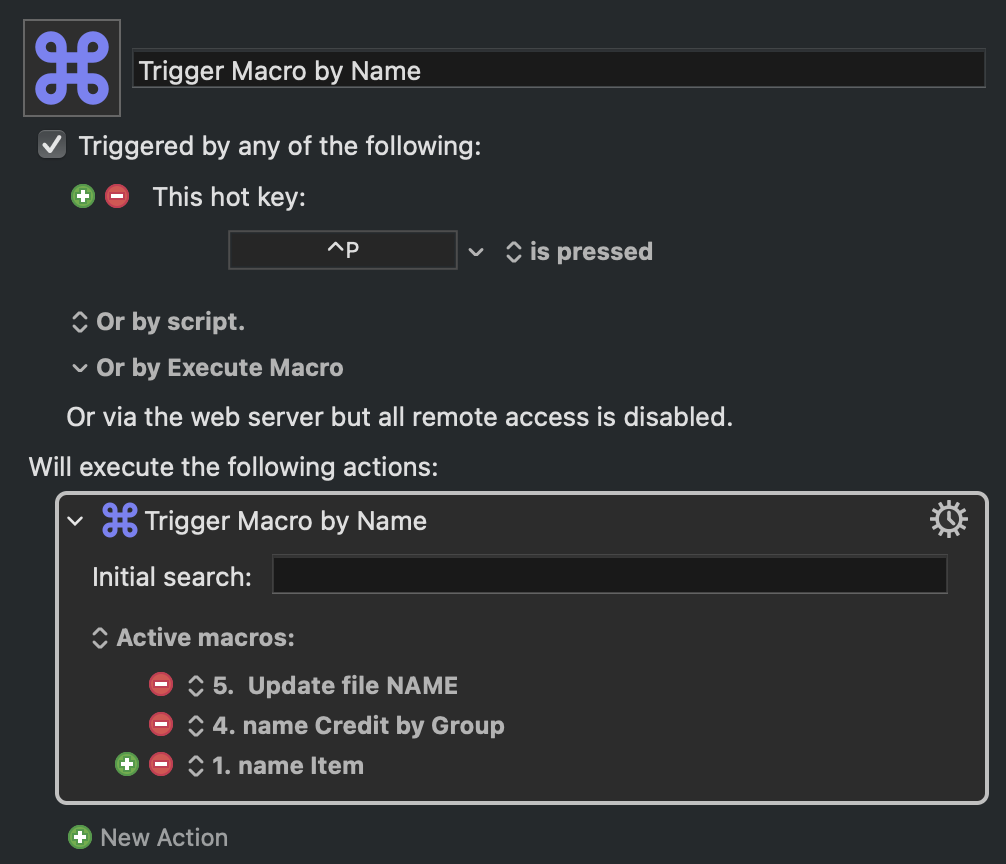
doesn’t seem to work. When I trigger it, Ctrl-P, a selection screen appears, but typing anything (including one of the three included actual macro names) into the dialogue will not produce any macro, and I'm at a loss to work out why.
Would appreciate any pointers on an easy guide to how to use the palettes so I can get started.
The displayed list is limited to 20 macros -- until you have typed enough to filter the selection to 20 macros or fewer, nothing will display
The way you've set it is "....from the active macros in this list: 5. Update file NAME, 4. name Credit by Group, 1. name Item". If none of those macros are active (perhaps you are in the wrong context), none of them will show
Also, this has absolutely nothing to do with Palettes!
An easy way to make palettes is to create a new macro group, configure it to Show a palette until (with nothing selected) and add macros in there.
You can configure the palette to toggle on and off or to be available only in specific applications, and you can design the theme of the palette, all in the macro group settings.
Hi, @KMkeeptrying. I'm glad you've found a helpful video.
A thread I recently created might also be helpful. If not the macro itself, the documentation might help, particularly the palette configuration details section below the first screenshot.