QUICK START
-
Using the yellow link in the MACRO DOWNLOAD section, download Quit Applications Selectively v5.0.kmmacros.
-
Open the downloaded file. The main macro and fourteen calling macros will be installed.
-
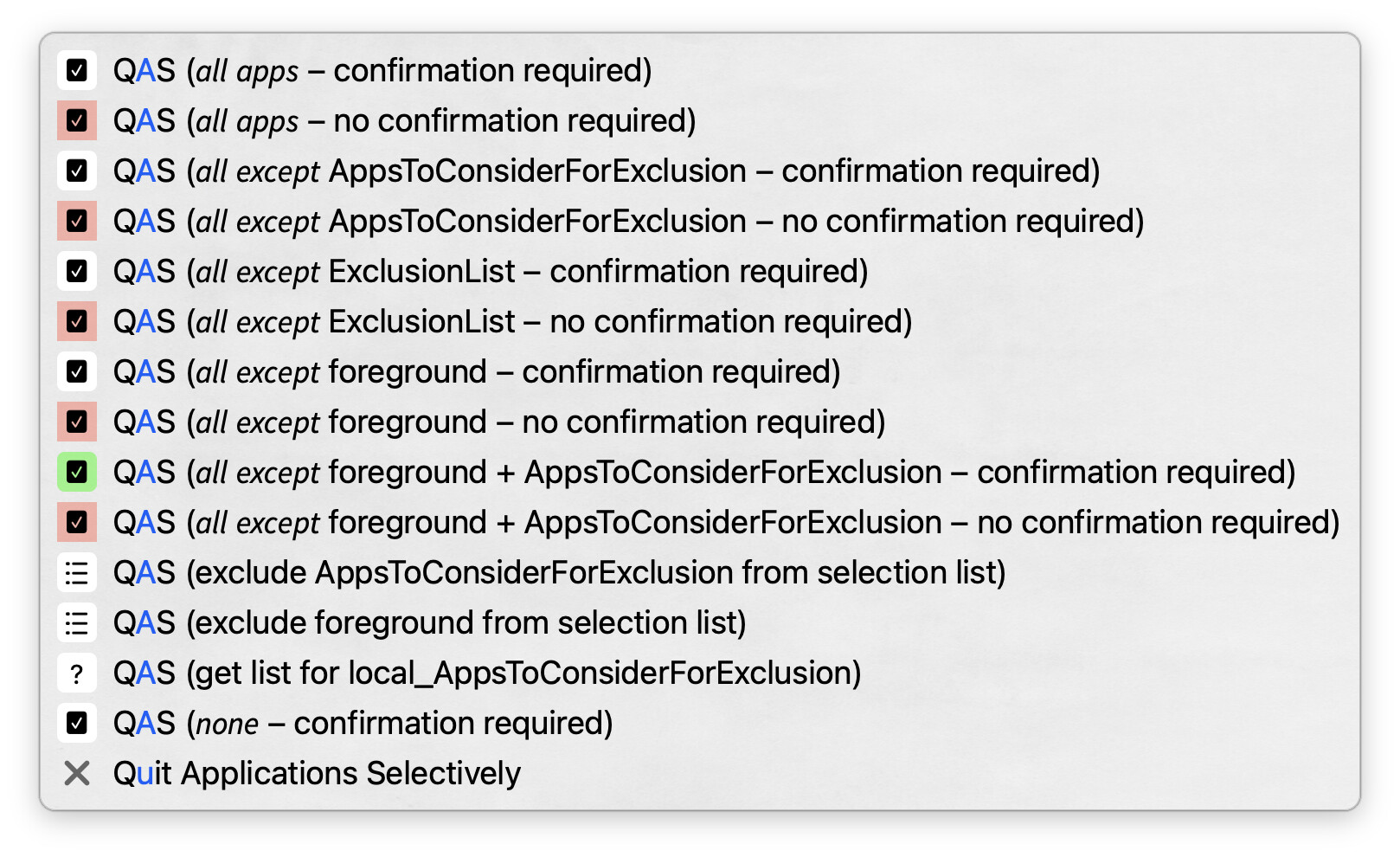
From the Keyboard Maestro editor, trigger the calling macro QAS (𝘯𝘰𝘯𝘦 – confirmation required). Use the controls in the confirmation dialog, select one or more applications to quit.
-
With one of your open applications in the foreground, trigger the main macro Quit Applications Selectively using ⌃⌥⇧⌘Q. Follow the prompts to quit one or more applications.
PURPOSE
This macro, Quit Applications Selectively, can be used to quickly close all, or a subset of all, open macOS applications.
Note that this macro only quits applications that are visible when using ⌘+Tab.
If one or more of the open applications have unsaved changes, the typical warning dialog(s) will appear, thus this method is as safe as interactively quitting an application.
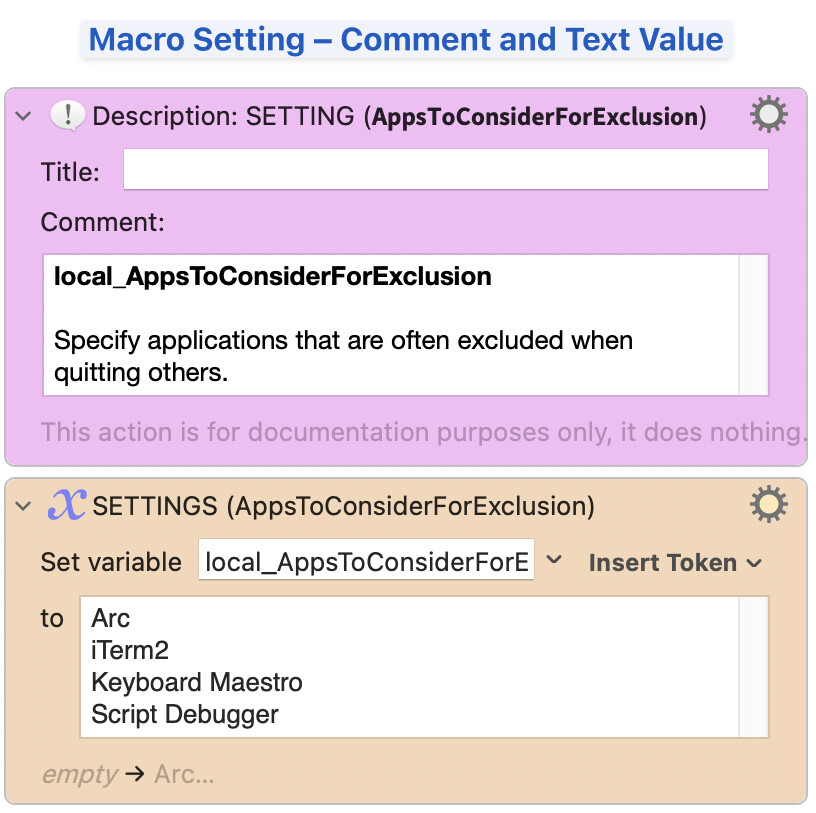
Macro Setting
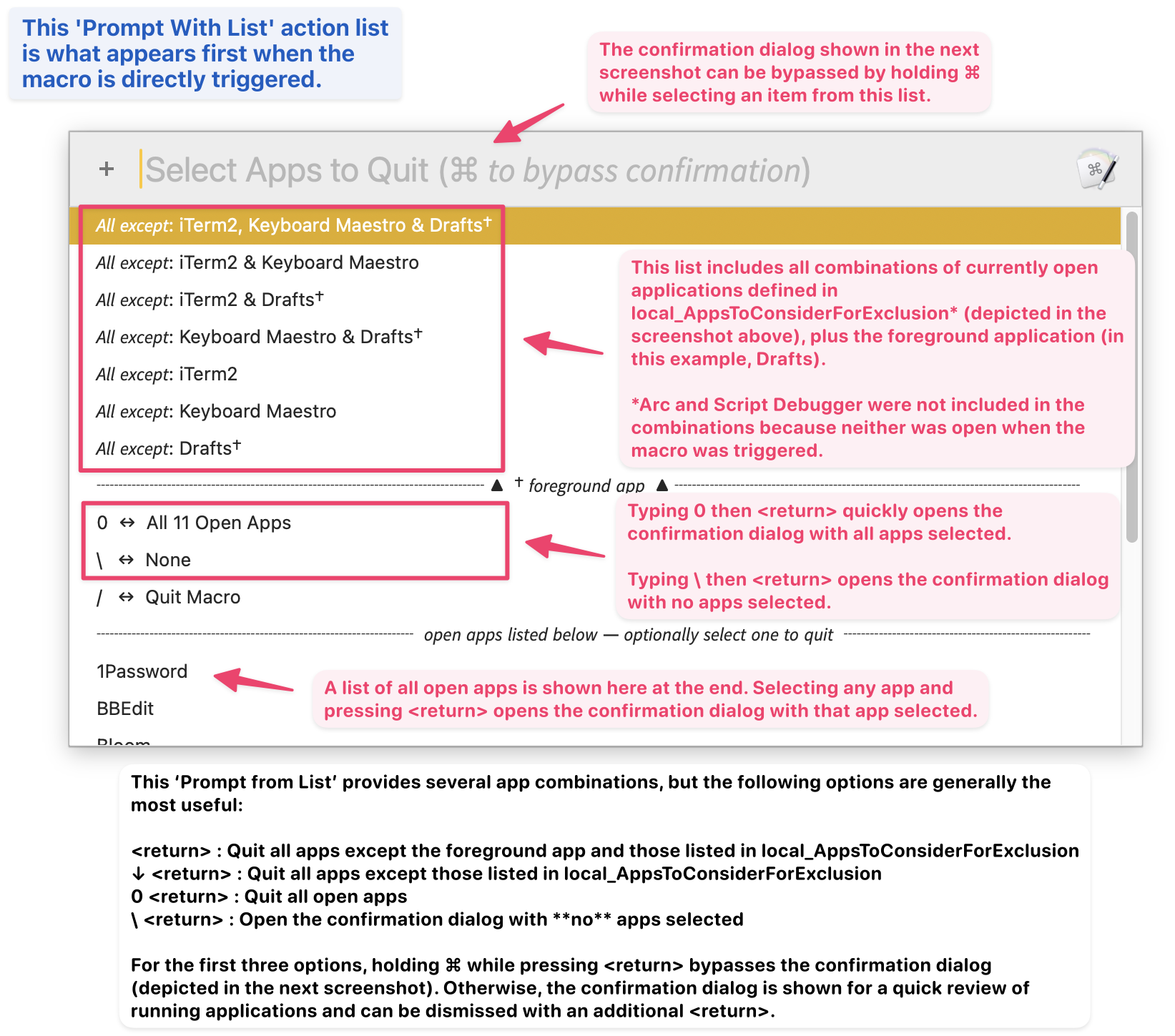
Initial Prompt With List
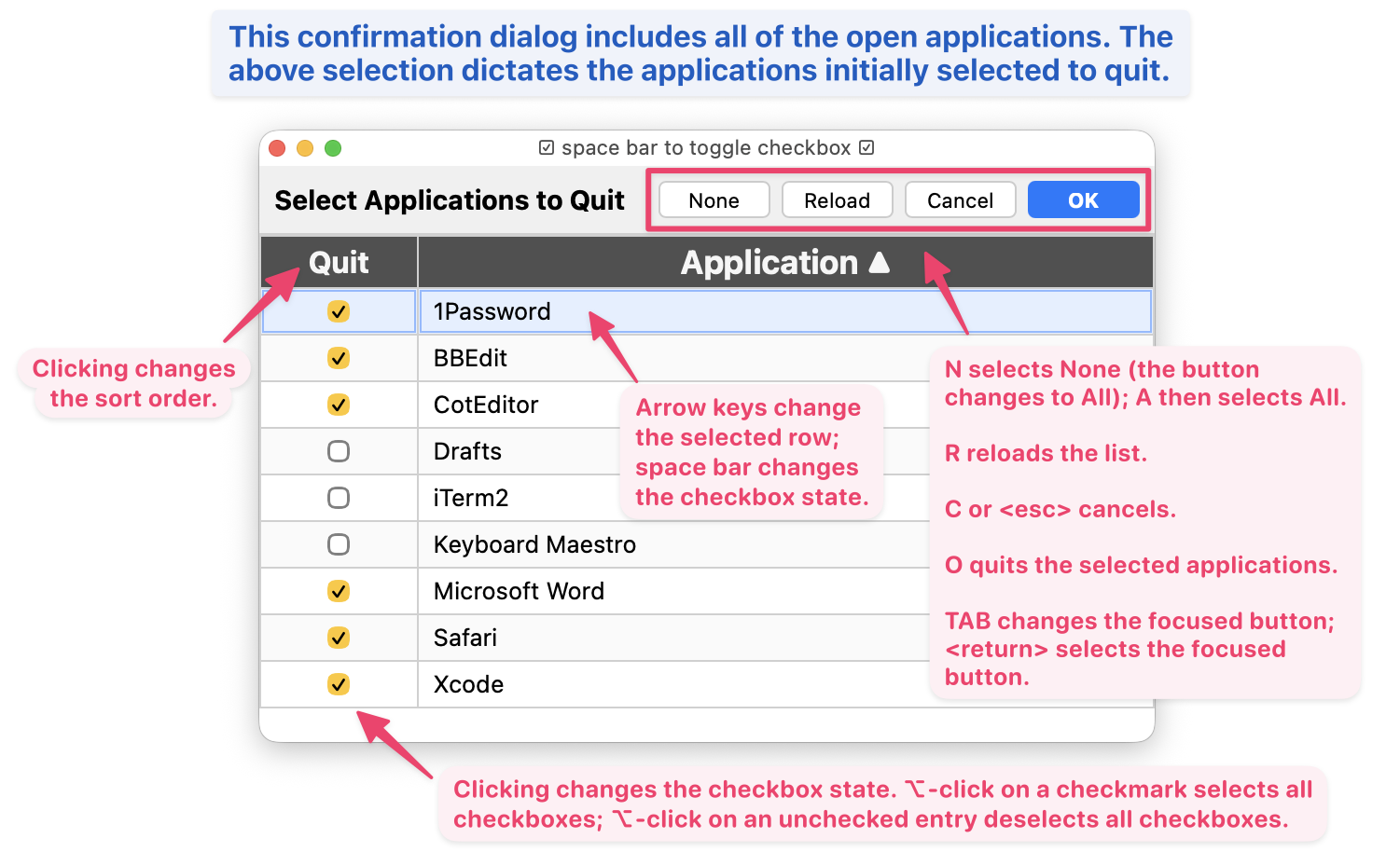
Confirmation Dialog
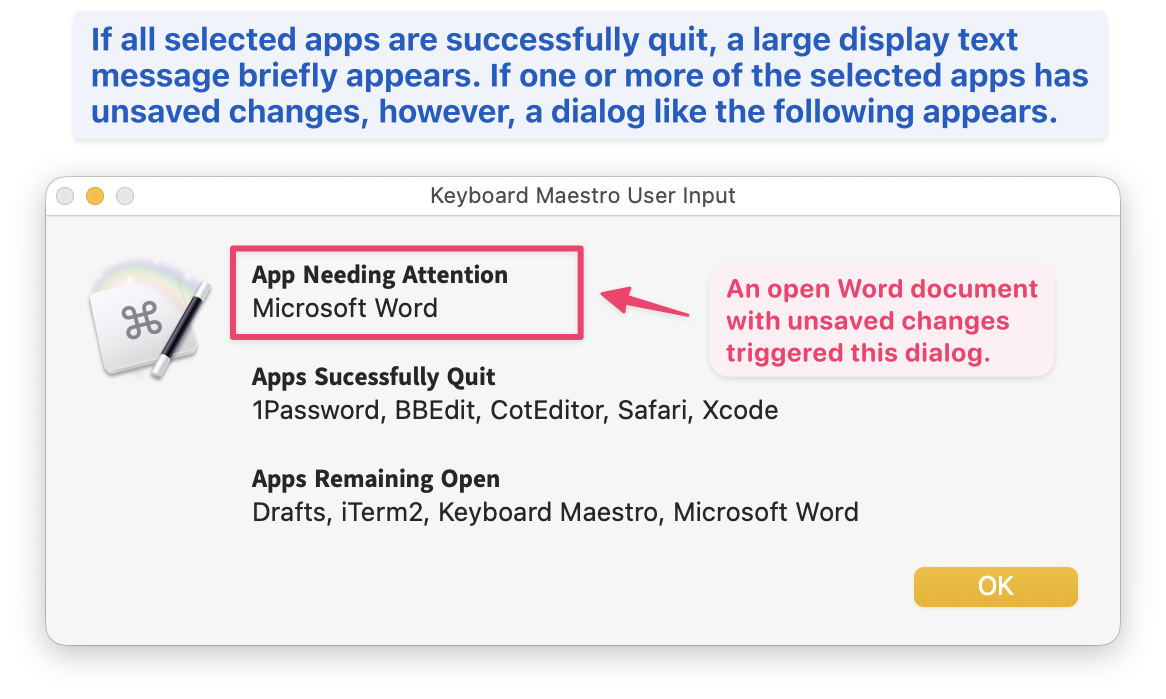
Feedback Dialog
MACRO SETTINGS
local_AppsToConsiderForExclusion : Used to specify applications that are often excluded when quitting others.
The foreground application and this setting, combined with the list of open applications, determines the applications that appear in the initial Prompt With List.
By default, the value of this setting is:
Arc
iTerm2
Keyboard Maestro
Script Debugger
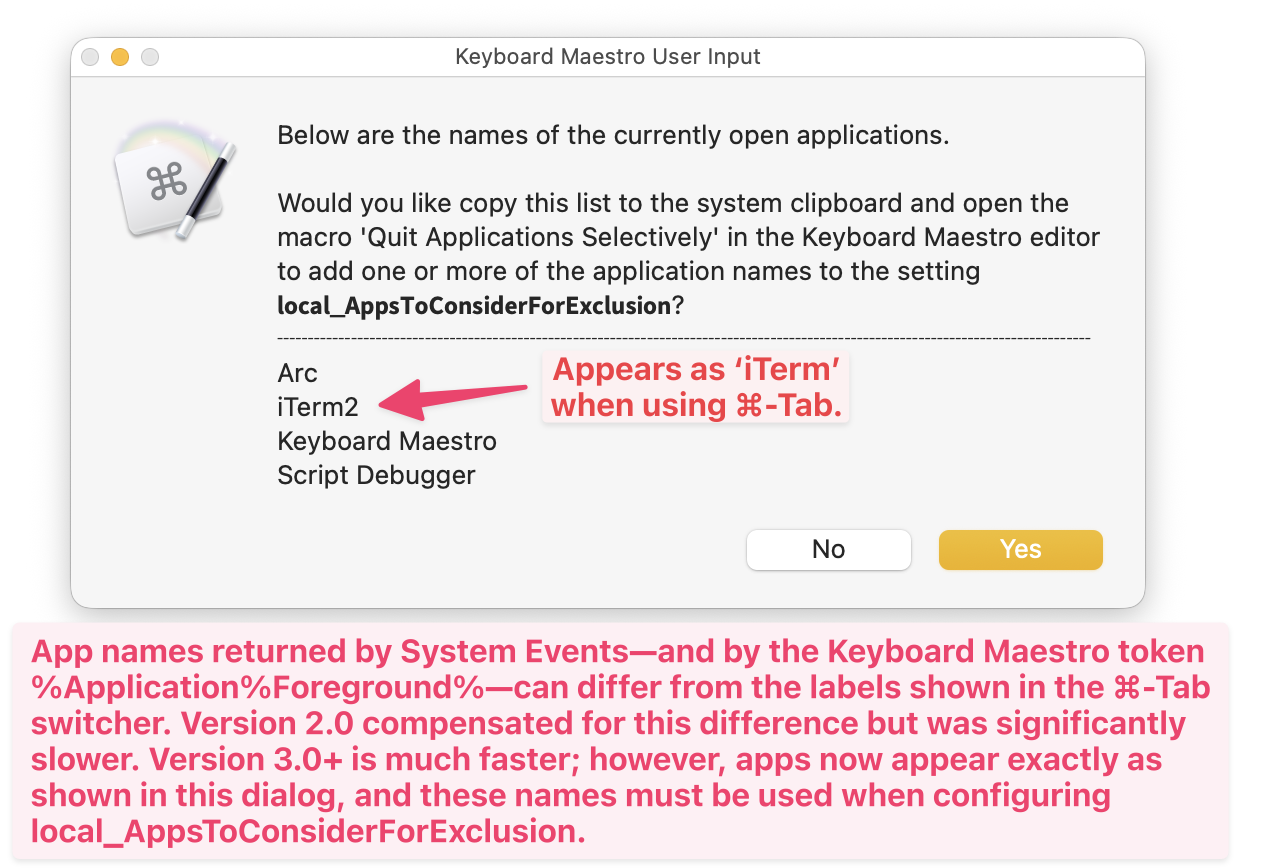
The macro includes a feature that makes it easy to populate this setting:
- Open the applications that you want to include in local_AppsToConsiderForExclusion.
- With the command key (⌘) held down, trigger this macro from the Keyboard Maestro editor.
- A dialog similar to the following will appear.
local_DialogFeedback : (0|1, default 0): when 0, final feedback is shown via Display Text Large; when 1, or when any app needs attention, feedback is shown via a Prompt For User Input dialog
ALTERNATE MACRO BEHAVIOR
You can start Quit Applications Selectively and bypass the initial Prompt With List by calling it from another macro that includes an Execute a Macro with one of the following With Parameter values.
With Parameter |
Macro Function |
|---|---|
0 |
all apps |
-0 |
all apps‡ |
1 |
all except foreground + AppsToConsiderForExclusion |
-1 |
all except foreground + AppsToConsiderForExclusion‡ |
2 |
all except AppsToConsiderForExclusion |
-2 |
all except AppsToConsiderForExclusion‡ |
F |
all except foreground |
-F |
all except foreground‡ |
>%local_ExclusionList% |
all except exclusion list |
->%local_ExclusionList% |
all except exclusion list ‡ |
\ |
none selected |
‡Run without displaying the confirmation dialog (see above). For example, -0 will quit all applications with no required user interaction (unless one of the apps has unsaved changes).
In addition, you can start Quit Applications Selectively, but exclude the foreground application from the initial Prompt With List.
With Parameter |
Macro Function |
|---|---|
!E |
exclude local_AppsToConsiderForExclusion apps from selection list |
!F |
exclude foreground from selection list |
Finally, when configuring the variable in Quit Applications Selectively, you can use:
With Parameter |
Macro Function |
|---|---|
? |
list open apps in a dialog |
This dialog can also be displayed by triggering Quit Applications Selectively from the Keyboard Maestro editor with the command key (⌘) held down.
TESTED WITH
• Keyboard Maestro 11.0.4
• Tahoe 26.3.1 (25D771280a)/MacBookPro18,2
VERSION HISTORY
( expand / collapse )
1.0 - initial version
2.0
a) The macro now uses app bundle IDs and process names. Thus edge cases like iTerm (which use custom display names) and Setapp-distributed apps (which use modified bundle identifiers) are easier to detect and quit. The result: the local_AppsToConsiderForExclusion allows and dialogs display the familiar names seen in Cmd-Tab for both standard and non-standard apps.
b) Added a Display Progress while the app list is generated.
c) Changed macro icons.
3.0
a) The macro now displays the initial dialog and quits the selected apps significantly faster. Note, however, that some apps—such as iTerm and some Setapp apps—may appear differently when included in the macro’s lists and dialogs. For details, see the final screenshot in this post.
b) The final feedback now provides more context: when the number of apps is below the threshold, their names are listed; when it exceeds the threshold, only the total number of apps is shown.
4.0
a) Added an option to the Prompt With List to open the confirmation dialog with none of the apps selected. There is also a new corresponding ALTERNATE MACRO BEHAVIOR.
b) Added a fourth button in the confirmation dialog. If any checkboxes are selected, the button label is None. If no checkboxes are selected, the button label changes to All.
c) Added ⌥-click checkbox options to the confirmation dialog.
d) Added the list of running applications to the bottom of the Prompt With List. If any of the entries are selected, the application can be quit.
5.0
a) Initial Prompt With List
- Minor cosmetic improvements
b) Confirmation Dialog
- Rows can be navigated with arrow keys (or clicks); spacebar toggles the checkbox of the selected row
- None, All, and Reload buttons provide visual feedback when activated via click or keyboard shortcut (N, A, R)
c) App Quitting Logic
- Replaced sequential synchronous
Application(appName).quit()with parallel non-blockingNSRunningApplication.terminatevia the ObjC bridge; when quitting two or more apps, total quit time is bounded by the slowest single app rather than the sum of all quit times - Added post-quit verification polling to confirm each app actually exited, rather than assuming success
- Replaced single comma-delimited whitelist with independent
local_AppsOpen(opt-in) andlocal_ExclusionList(opt-out) KM variables - Added display name matching alongside process name matching to eliminate silent misses on name mismatches
- Apps that fail to quit are listed in a follow-up dialog
d) Progress and Feedback
- Added progress bar during the quit sequence
- Added
local_DialogFeedbacksetting (0|1, default 0): when 0, final feedback is shown via Display Text Large; when 1, or when any app needs attention, feedback is shown via a Prompt For User Input dialog
MACRO DOWNLOAD
Quit Applications Selectively v5.0.kmmacros (153.0 KB)

Macro-Notes
- Macros are always disabled when imported into the Keyboard Maestro Editor.
- The user must ensure the macro is enabled.
- The user must also ensure the macro's parent macro-group is enabled.
System Information
- macOS 26.3.1 (25D771280a)
- Keyboard Maestro v11.0.4
Note: Quit Applications Selectively v5.0.kmmacros includes the main macro and fourteen calling macros corresponding to the information in the ALTERNATE MACRO BEHAVIOR section.
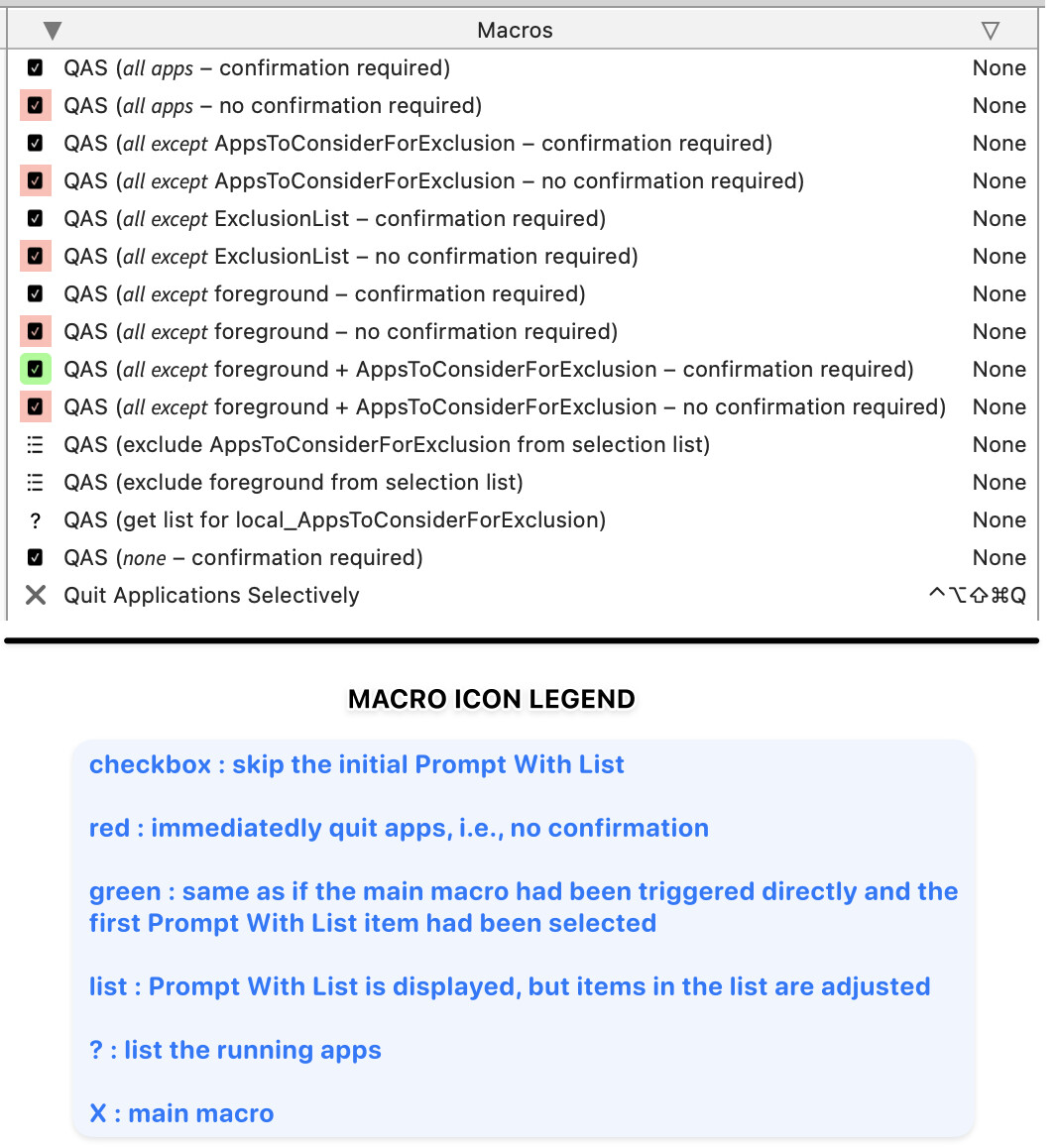
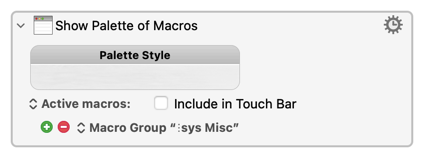
If you are interested in displaying a palette that includes all of these options, you can use the following action.
Show Palette of Macros.kmactions (726 B)