I created a macro and it's keystroke to run only in a specific application, but using that same keystroke for a different macro in a different app pops up a small dialog box to choose which macro I want to use.
Am I missing a setting that segregates the macros so the correct macro works only in the selected app? (The "Will execute the following actions:" field includes "Select menu in 'Pages'." The other app is 'Final Draft 11'.)
What you are seeing is the "Conflict Palette" which pops up whenever a hot key, typed string, or device trigger can trigger one of many macros.
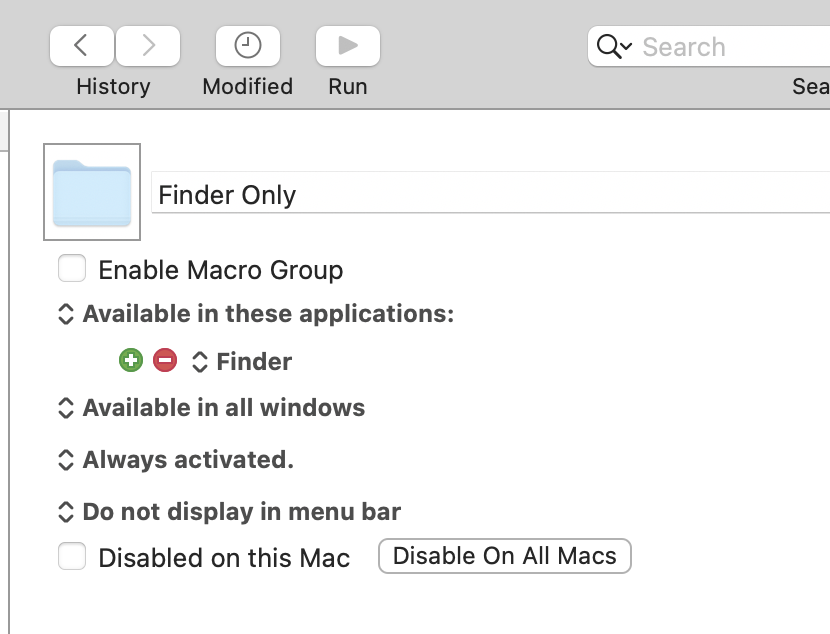
If you want macros to only be "active" when certain app(s) are frontmost you can put them into a Macro Group with the appropriate "availability". This macros in this Group will only available when Finder is frontmost, for example:
You can add multiple apps to the Group's availability, invert it so they aren't available in one or more apps, etc, etc.
What you're doing there is selecting a menu in Pages even when a different app is at the front.
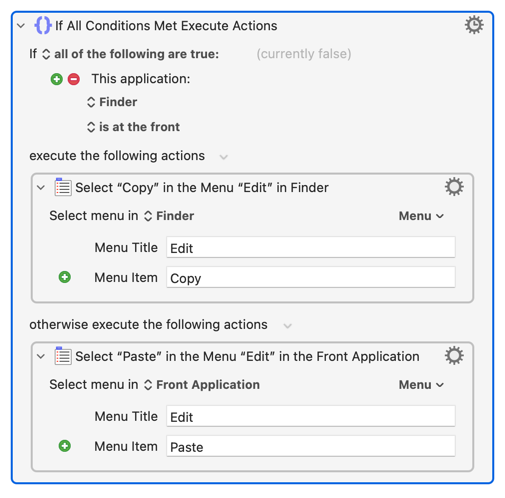
You can make a choice dependent of the frontmost app within the macro, using an "If" or "Switch/Case" action. So this would "Copy" if Finder is frontmost and "Paste" otherwise:
...but you should save that for when you've got a macro you want to run in many different contexts and does (or doesn't do) certain things depending on that context.