 Of course, search for something (almost) guaranteed to be in every note...
The trick, as with any structured data, is knowing where the data you want is within the structure. I'm no SQL guru, but a few simple commands let me go spelunking in Terminal.
Open the database in an interactive session (you can copy the path from the Finder, obvs):
sqlite3 ~/Library/Group\ Containers/9K33E3U3T4.net.shinyfrog.bear/Application\ Data/database.sqlite
You can then list the tables in the DB:
sqlite> .tables
ZSFCHANGE              ZSFNOTEFILE            Z_5TAGS
ZSFCHANGEITEM          ZSFNOTEFILESERVERDATA  Z_METADATA
ZSFEXTERNALCHANGES     ZSFNOTESERVERDATA      Z_MODELCACHE
ZSFINTERNALCHANGES     ZSFNOTETAG             Z_PRIMARYKEY
ZSFNOTE                ZSFPASSWORD
ZSFNOTEBACKLINK        ZSFSERVERMETADATA
ZSFNOTE looks promising (luckily they've used sensible table names!) so let's look at the schema of that to see column names (much data snipped from the following:
sqlite> .schema ZSFNOTE
CREATE TABLE ZSFNOTE ( Z_PK INTEGER PRIMARY KEY, ..., ZTEXT VARCHAR, ZTITLE VARCHAR, ZUNIQUEIDENTIFIER VARCHAR, ... );
...and we can guess that ZTEXT is the text of the note, ZTITLE is the title, ZUNIQUEIDENTIFIER the UUID. I've included the text so that, if you've two identical titles, you'll have some context when choosing.
The general form to get data out of the db is
SELECT columns FROM table WHERE condition
... and the WHERE keyword REGEXP says to match by regular expression, so we'll want to start with
SELECT ZTITLE,ZTEXT,ZUNIQUEIDENTIFIER FROM ZSFNOTE WHERE ZTITLE REGEXP ourRegex
...to get the title, text, and UUID for every note that matches ourRegex. But getting all the text seems excessive just for context, so let's get the first 20 characters by using the substring function on that part of the data:
SELECT ZTITLE,substr(ZTEXT,1,20),ZUNIQUEIDENTIFIER FROM ZSFNOTE WHERE ZTITLE REGEXP ourRegex
Change the shell script action in the macro form earlier to use that command
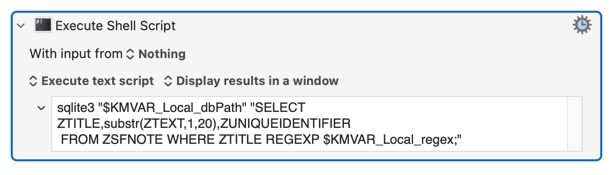
...and, given that we search for Third and there's a note titled "A Third New Note" in Bear, the result when the macro is run is:
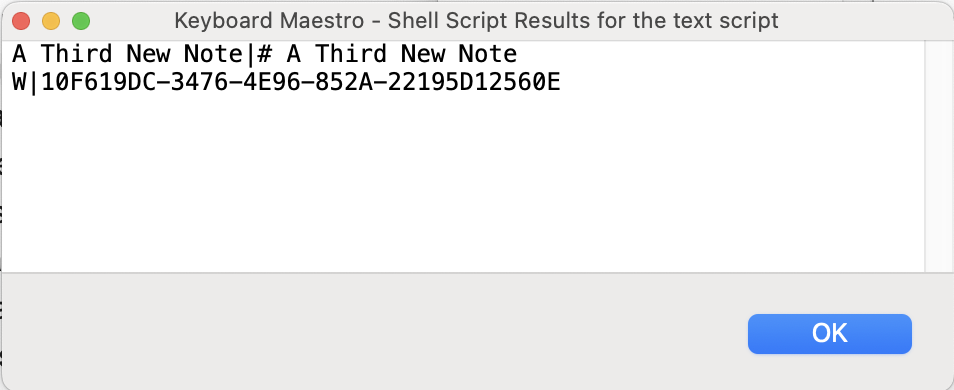
...and we see a couple of problems. It's worked, but those field delimiters probably won't be unique (eg shell script snippets could have pipes) and the text of the note (redundantly) includes the title and will contain linefeeds. For speed (because I've gone on long enough!), we'll deal with the text problems by upping the character count then using KM text actions to make sense of things. But the separators we can change in the sqlite3 command, and I'll go with "==myKMNew==" for record separators (otherwise differentiating between record-separator linefeeds and in-text linefeeds will be a pain) and "==myKMCol==" for the columns:
sqlite3 -newline '==myKMNew==' -separator '==myKMCol==' ...etc
All of which is far too much "tell" and not enough "show" -- but it hopefully sets the scene for the demo, if only to prove that I haven't clue and was googling most of this as I went 
Bear Find Note by Regex Demo.kmmacros (15.3 KB)

Perhaps someone who does know what they're doing (nudges @griffman...) will clear up any issues...