During zoom training, I often copy the same training PDF and paste it into the Zoom window (as a file to upload) for the participants. How can I make this into one macro? Thanks so much!
Can you share what you have so far
I'm afraid I don't have anything. I'm not sure how to do this.
ok, so, can you list down the steps that you do to share the file?
Ah yes. Gotcha.
I head to a folder and "copy" a specific PDF.
I reopen Zoom and "paste" the PDF to the chat (which uploads it to users).
I'm looking for a way to do a keystroke that does these two steps.
I think you only need these two actions:
It reads a file, copies it to your clipboard and then pastes it:
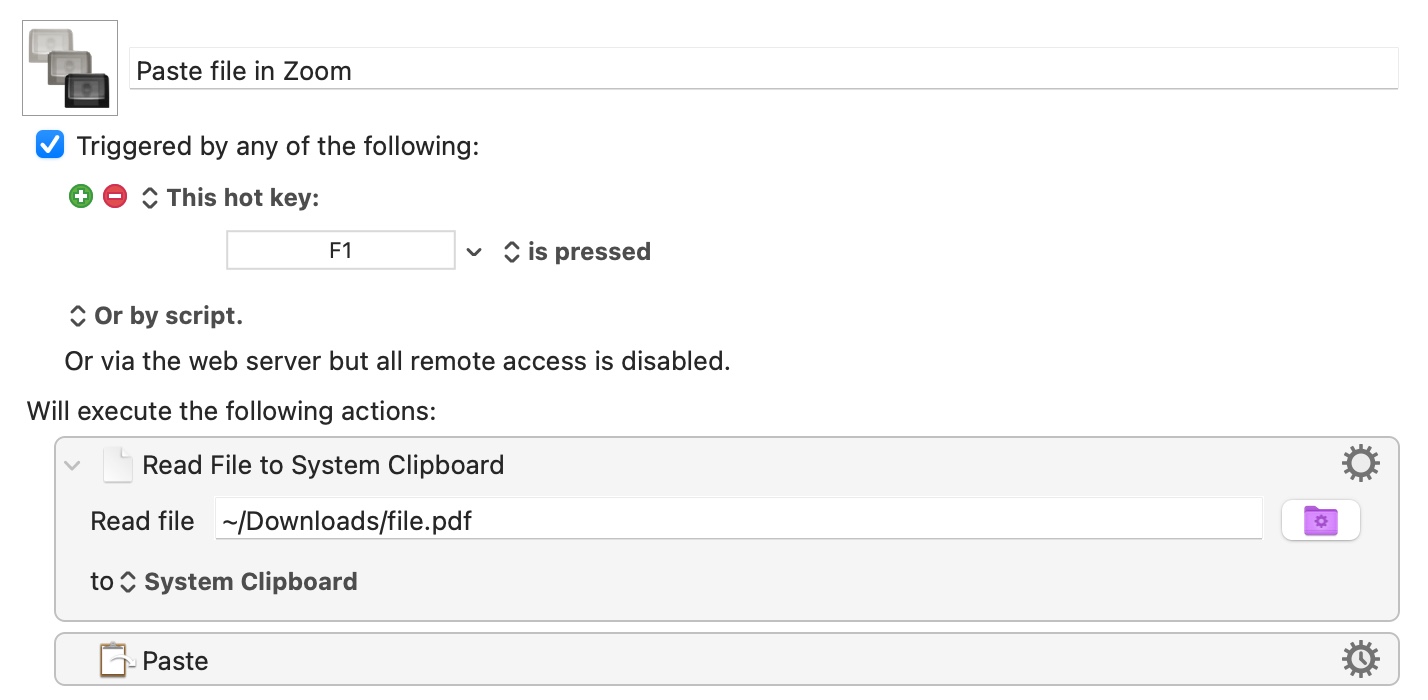
Uploading macro example, Trigger it with F1.
Uploaded in a disabled state, enable for it to work.
Paste file in Zoom.kmmacros (1.9 KB)
Thanks for this. I'm getting the following, but the file isn't actually pasting:
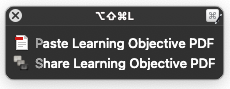
that's keyboard's maestro "Conflict Palette", it means you used the same shortcut in Two macros.
Either
- assign a different shortcut to one of them, or,
- type P to run the 1st macro, or type S to run the second one.
Thanks for this. One issue: Running the macro as written pastes a "PastedGraphic.tiff," rather than the actual PDF file.