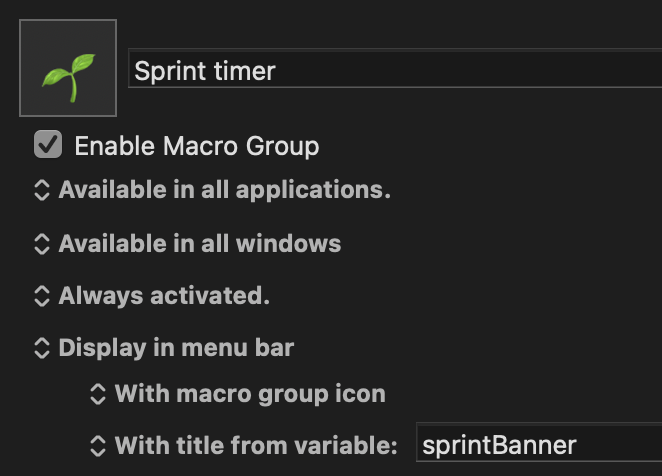
Just in case anyone else has seen this, the Keyboard Maestro menu bar item, though switched on in System Settings > Menu Bar, is invisible to me ... (since, just now, I upgraded, against better judgement, to Tahoe)
( but that's because everything in the menu bar is invisible – no control center icon, nothing )
Assuming you've already tried logging out and back in, then restarting and logging back in... Reboot in Safe Mode and see if that sorts it. If so, you might be able to log in normally after that, otherwise you're into a game of "find the conflict".
Curiously, it does all seem to pivot specifically on the Keyboard Maestro menu bar item.
I can restore the Apple basics (Control Centre, Clock, Wifi, Battery) by:
Disabling all 3rd party apps in Sytem Preferences Allow in the Menu Bar section
Logging out and back in
I then find that I can selectively enable individual app item menus one by one, until enabling the Keyboard Maestro menu bar item wipes the entire menu bar blank again.
Hypothesis to test:
Have I inadvertently set something up in Keyboard Maestro (a display in menu bar setting on one or more Macro Groups ?) which is simply too ambitious, and bids for more bar space than exists ?)
the sprintBanner variable was accidentally overpopulated (many long lines when it should have been a single very short line)
Mea culpa
Though perhaps there's a design flaw in Tahoe's menu bar logic ?
One might expect it to discard requests to display strings including newline characters, but instead it tries, and after two newlines the entire menu bar is blanked ... all the other items vanish.
First a text with no terminating \n
KM variable sprintBanner: Some text to display
Now we add an \n, and the text is pushed up the screen, but other menubar items are still unaffected.
KM variable sprintBanner : Some text to display\n
Finally, we add a second \n, and every menu bar item is wiped off the screen into invisibility ...
KM variable sprintBanner : Some text to display\n\n
@peternlewis perhaps a bug in an Apple (Tahoe) API ?
(The other menubar icons weren't occluded in Sequoia)
PS to restore the system (and application) menubar items after this experiment, I found that I had to:
Prune the newlines out of the Keyboard Maestro sprintBanner variable