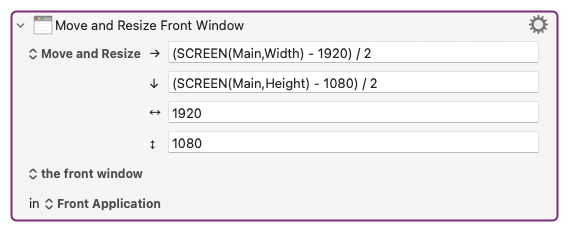
I've been having this issue for years (in multiple apps, not just KM) and I just found a fix that might help someone.
This may have been mentioned: the problem occurs when the resize makes the window hit the bottom or right edge of the screen, which stops it from expanding further.
If you always want your windows Centered like me, the solution is to move the window's top-left corner to where it's going to end up before resizing.
In the 4 fields below, replace both 1920 and 1080 with your desired window size.
This will place the top-left corner of the window, then stretch the bottom and right edges as needed.
Tip: use SCREENVISIBLE instead of SCREEN if you want the Centering to take the dock and menu into account.
If that works, it's a great solution. But I believe I posted an alternate solution a long time ago, in another thread perhaps, which was to move/resize the window inside a loop that checks if the window has reached the desired position. If the window has not reached the desired position, the loop makes further attempts. If I recall, this had a side effect of creating an animated movement of the window, which was entertaining.
Checking if something actually worked, rather than assuming something worked, is one of the principles I use in making robust KM code. And if my code fails to accomplish something that should work, I send a text message to my cell phone which means I get a message on my Apple Watch indicating what went wrong. (And my notification macro prevents the same message from being sent more than once.)
For what it's worth, in my mere hours of testing, it has worked 100% of the time. Once you figure out the cause, it no longer needs monitoring.
I saw "looping until it works" suggested somewhere, but the process is already slow with one action, so the idea of looping the action isn't an option for me.
Speaking of speed: it seems there's a ~300ms delay between the MOVE and the RESIZE parts of the action, which feels sluggish to me personally.
Even when I split it into 2 actions (move window and resize window) and set action delay to 0, window actions won't trigger within ~300ms. So maybe there's a minimum delay between window actions? I guess @peternlewis is the only person who'd know if there's a delay baked-in, perhaps even on the Apple side and not the KM side?
And I've uncovered a minor oddity that may explain why it takes so long: it seems that each move and resize command happens twice per action.
The oddity: if you do a move+resize command, and within 300ms of it completing trigger another move/resize macro, it does something funny. Visually, the new macro takes twice as many steps/twice as long. Under the hood, it seems that if the move and resize commands happen twice per action, then triggering another macro before the 2nd "subaction" will make them overlap and compete, e.g the 1st macro's 2nd resize command happens after the 2nd macro's 1st move command. Maybe that's intentional.
indicating what went wrong
I usually just check the KM Engine.log — do you automatically get extra debugging info that doesn't appear in the log?