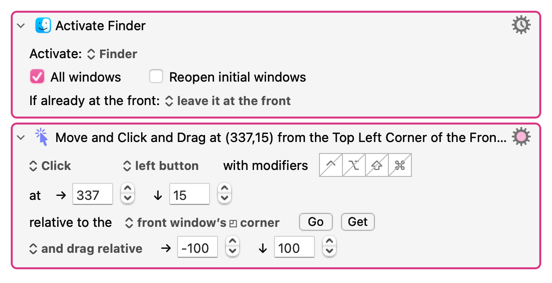
Hi all,
since updating to macOS 27, "Move or Click Mouse" with the option "and drag to" no longer drags anything for me. The mouse pointer is positioned correctly, but the drag itself never happens.
Minimal test macro:
- Activate Finder
- Move or Click Mouse: Click, left button, at (150,50) relative to the top left corner of the front window, "and drag to" (300,300)
Result: the pointer jumps to the title bar, but the Finder window does not move. Dragging the same window by hand works fine.
Details:
- Keyboard Maestro [version], macOS [27.x], MacBook Pro M4
- Accessibility permission for Keyboard Maestro is granted, normal clicks and mouse moves work
- Raising the DragDelayTime preference up to 2.5 made no difference
- "Click and Hold" followed by a separate Move/Release does not work either
In Logic Pro, I also cannot move plugin windows with Moom, BetterTouchTool, AppleScript or Rectangle, so this may be a change in macOS rather than in Keyboard Maestro.
Is this a known issue on macOS 27? Is there a workaround, or is it something Apple needs to fix?
Thanks!