I have many folders containing files and subfolders.
In each folder, there's a "Client" folder.
I'd like to create a shortcut to copy the selected file directly into this "Client" folder, in order to preserve the history of the client's previous files. And of course, this needs to work in each different folder.
Where is the selected file? Is there any way your macro can determine which of the many "Client" folders to move the file to (file name, parent folder name, or similar)?
The solution could range from trivially easy to near impossible -- the details really matter!
Chaque dossier a son propre dossier client.
J’ai un dossier_1 contenant des fichiers, et à l’intérieur un dossier « Client_1 ».
J’ai aussi un dossier_2 avec d’autres fichiers, et dedans un dossier « Client_2 ».
Je veux que les fichiers du dossier_1 se retrouvent dans le dossier Client_1, et ceux du dossier_2 dans le dossier Client_2.
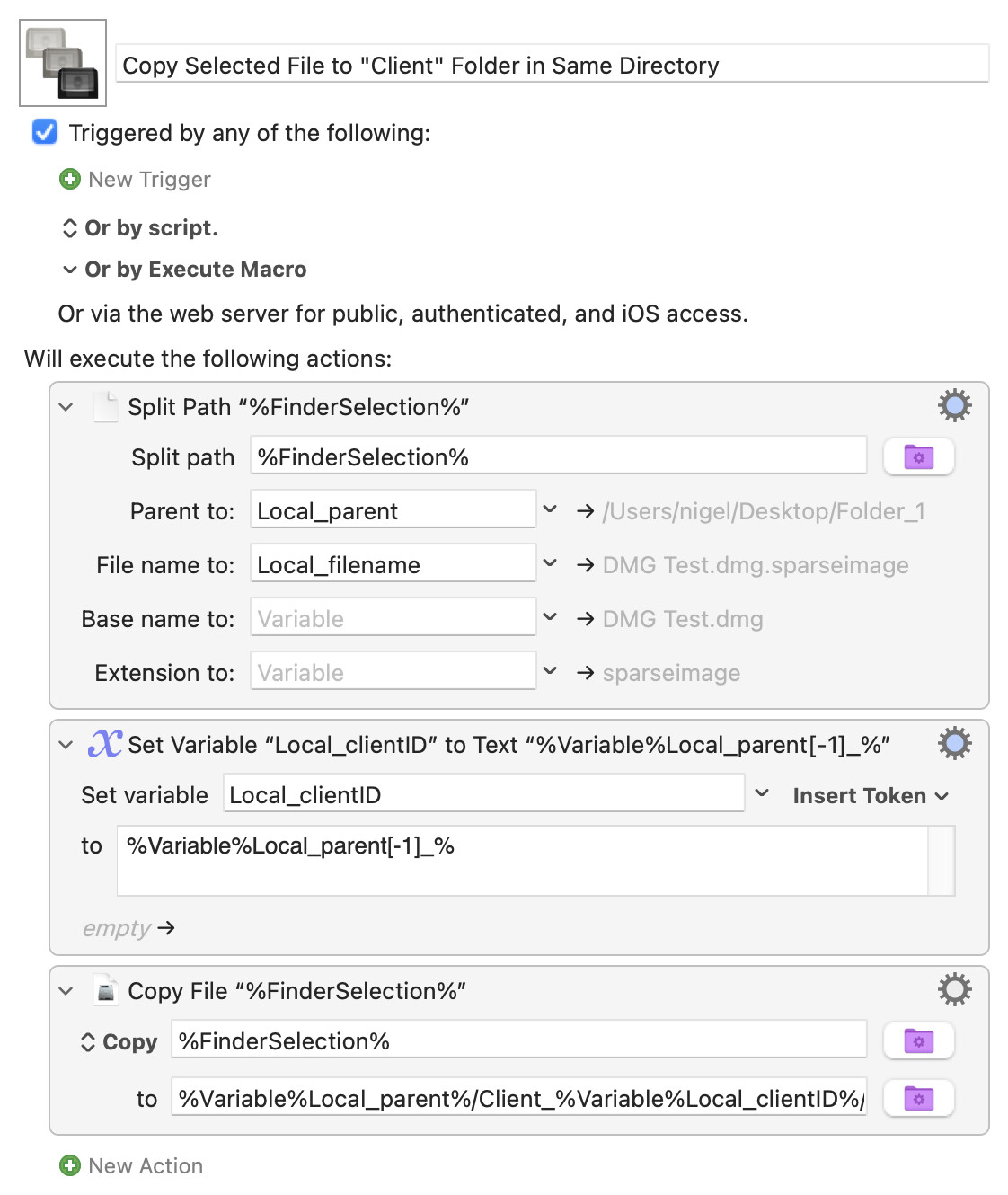
Since the selected file and the "Client" folder to copy it to are in the same "parent" folder, just extract the parent's path from the selected file's path and add the name of the client folder to it to create the copy target.
Taking you literally, where everything after the "_" in a name defines the client:
Again, I've taken you literally and copied the file rather than moving it -- that makes the "to" field of the final action more complicated because a "Copy" requires that a file name be included in the destination path (with a "Move" you can miss that out, just referencing the target folder).
You should be able to tweak the macro to suit your circumstance -- shout if there's anything in it you don't understand.
The OP might wish to bear in mind that if more than one file/folder is selected in the Finder, %FinderSelection% will be empty. The solution is in accordance with the specification of the problem, however (and the solution that I prepared was just a little overengineered ).
Merci pour la réponse, cela marche très bien. Je me rends compte qu’il faudrait ajouter une date à la fin du fichier : cela me permettrait d’avoir toutes les révisions du fichier que j’ai envoyées au client comme image_21_12_2025
 ).
).