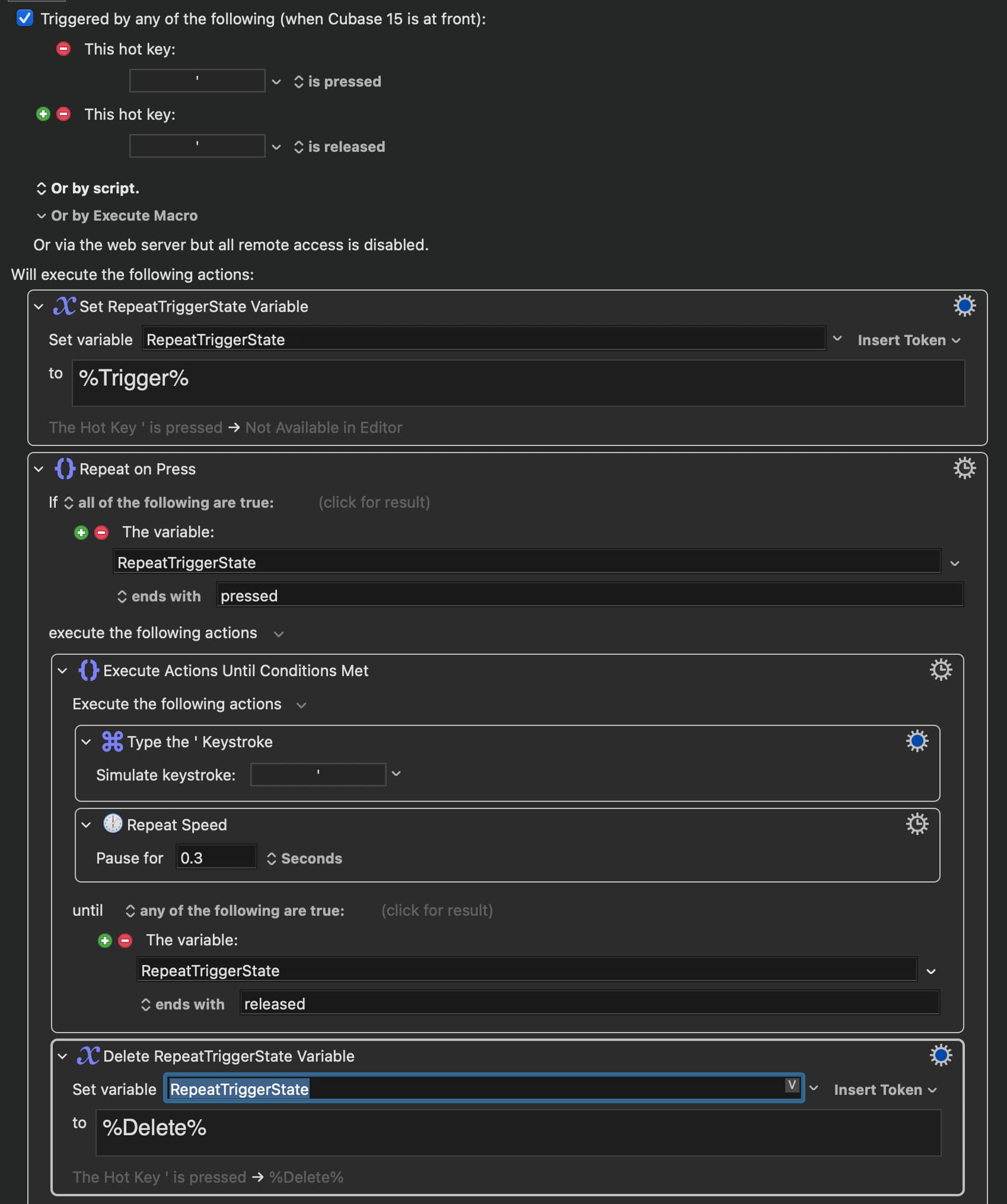
I’ve a question: I have 4 of these with separate control variables, but they won’t proc at once for some reason if I hold up multiple keys to which they are attached — any idea?
Microsoft 4000 Macros.kmmacros (113.6 KB)
I’ve a question: I have 4 of these with separate control variables, but they won’t proc at once for some reason if I hold up multiple keys to which they are attached — any idea?
Microsoft 4000 Macros.kmmacros (113.6 KB)
Sorry, I don't know what "proc" means.
But if you're trying to do multiple things at the same time, that's not going to end well.
I have a hold-to-repeat macro assigned to one key scrolling left, and to another scrolling down; they use differently named variables to start/stop, so they shouldn’t interfere with each other. But I can’t hold down both keys to scroll diagonally, for some reason. Wonder if it’s due to macro architecture or a limitation of scroll wheel emulation by KM (@peternlewis).
For reference this is on a huge keyboard with an up-down slider thing (originally zoom) and forward-back arrows near it, that I am trying to repurpose for scroll.
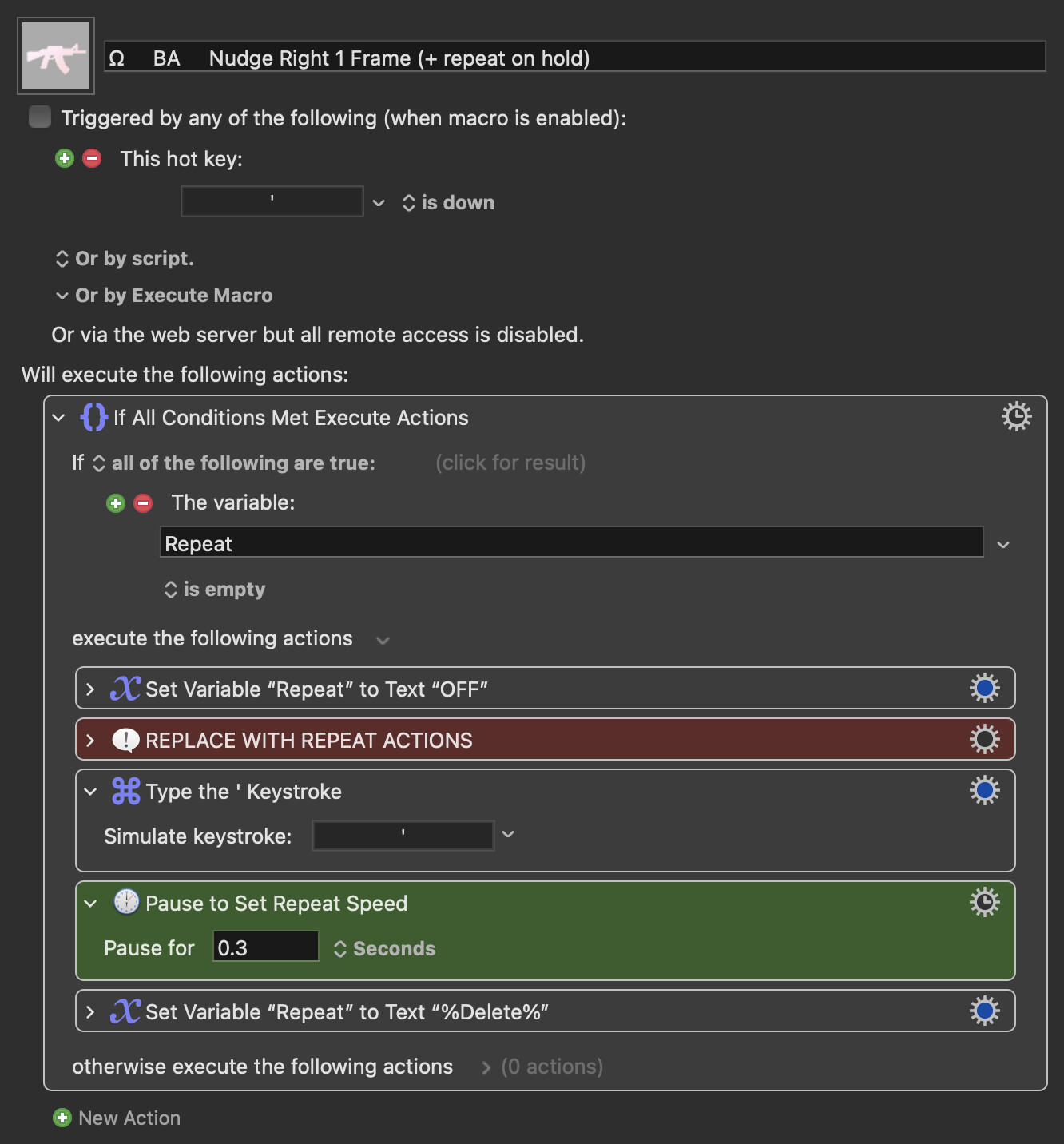
Hey @noisneil thanks for these macros. Was trying to test them in Cubase and I thought I had it figured out earlier today but now KM (or Cubase possible) doesn’t seem to like to end the loop. What could I be doing wrong here.
Ω BA Nudge Right 1 Frame (+ repeat on hold).kmmacros (16.4 KB)
Thanks
Sorry but I don't have Cubase so you'll need someone else to lend a hand here.
Appreciate the reply. I kind of don’t think it’s a Cubase issue though. Perhaps something about the way I set up the repeat until action?
.
Oh, I see...
You're using the Hotkey / USB version. Why not try the basic one?
Ω BA Nudge Right 1 Frame (+ repeat on hold).kmmacros (38 KB)
@noisneil You are the man. Yeah, this is working. The only issue I have with it is…well I want it to trigger a command that is not assigned to the hot key itself but another arbitrary one (bit hard to explain) but when I do this the macro starts stuttering, not nearly as smooth or as fast as it was before. I can’t wrap my feeble mind around why this might be.
Try this:
Create a separate macro that just simulates your arbitrary hotkey and replace the explicit hotkey simulation in the repeat macro with an Execute Macro action, which calls the new macro. This will fire the hotkey asynchronously and may make it smoother.
Yeah, I fooled around with that earlier, and just tried it again now…didn’t really change anything. Thanks again for your time @noisneil I’ll keep digging around here
What does that hotkey do? In theory, it should be firing every 0.3s but if the action it performs takes longer, that might be the issue.
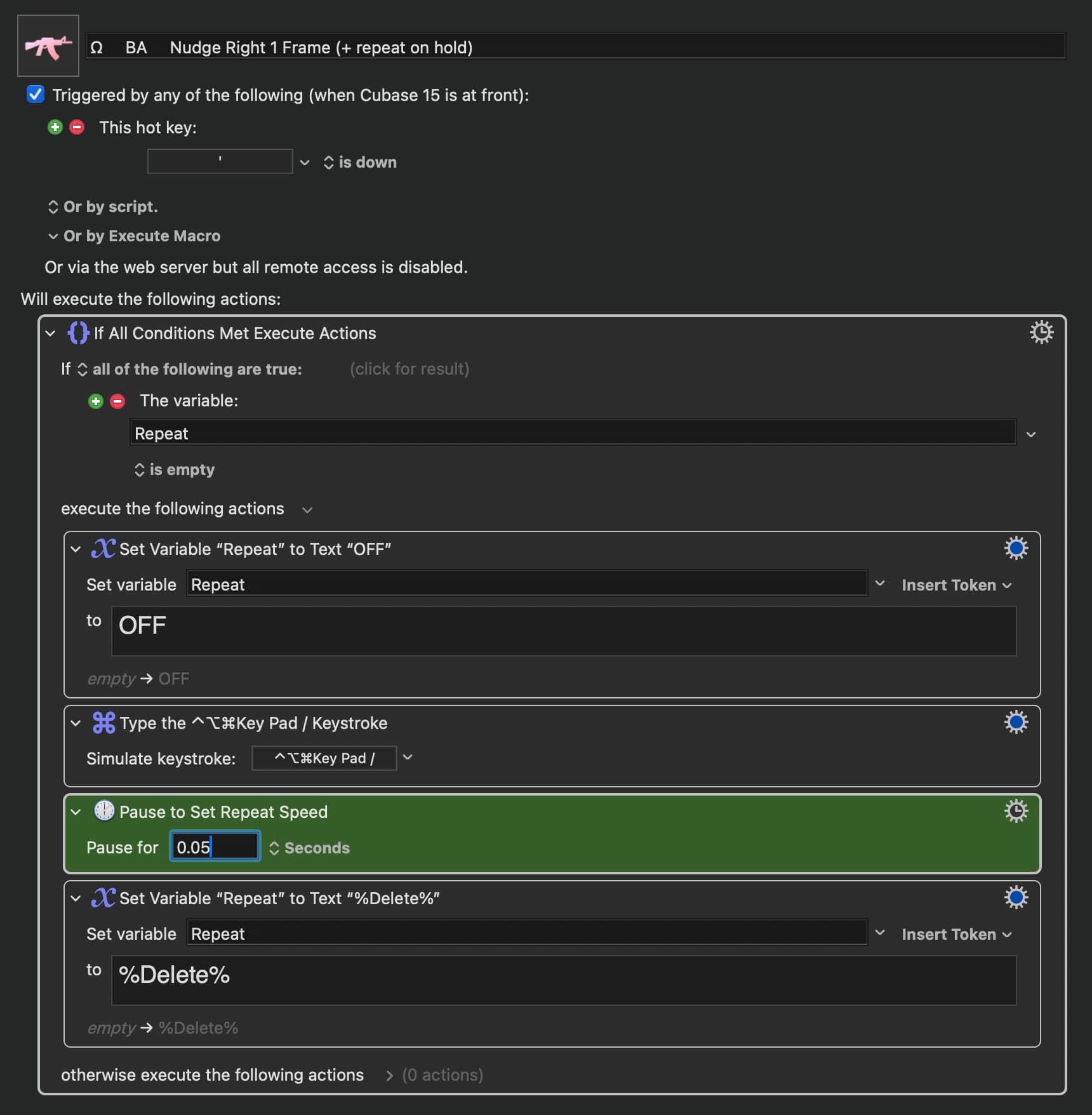
It is a Cubase command, “move midi events (notes) one frame to the right.” ⌃⌥⌘key pad/ is a dummy key I’ve assigned to this command in Cubase, but I want to trigger it via ‘ . Again the command works fine as long as I have the command in Cubase set to ‘ and the keystroke action set to ‘ . But as soon as I try to change it to ⌃⌥⌘key pad/ it slows down. Can’t really figure out why this would be the case
Oh and it also works fine if both the command and the trigger are set to ⌃⌥⌘key pad/. It only slows down when they are not the same…hmmm?
Possible conflict with macOS own key repeat when triggering via a held typed character...? @peternlewis would know.
Type a Keystroke includes a short delay after the keystroke to ensure that the system/applications don't get overloaded.
For regular keystrokes, it is 0.001s (which is basically as fast as Keyboard Maestro goes anyway, so it likely means about 500 characters per second).
But for command keys it is 0.15s.
So that could be the difference?
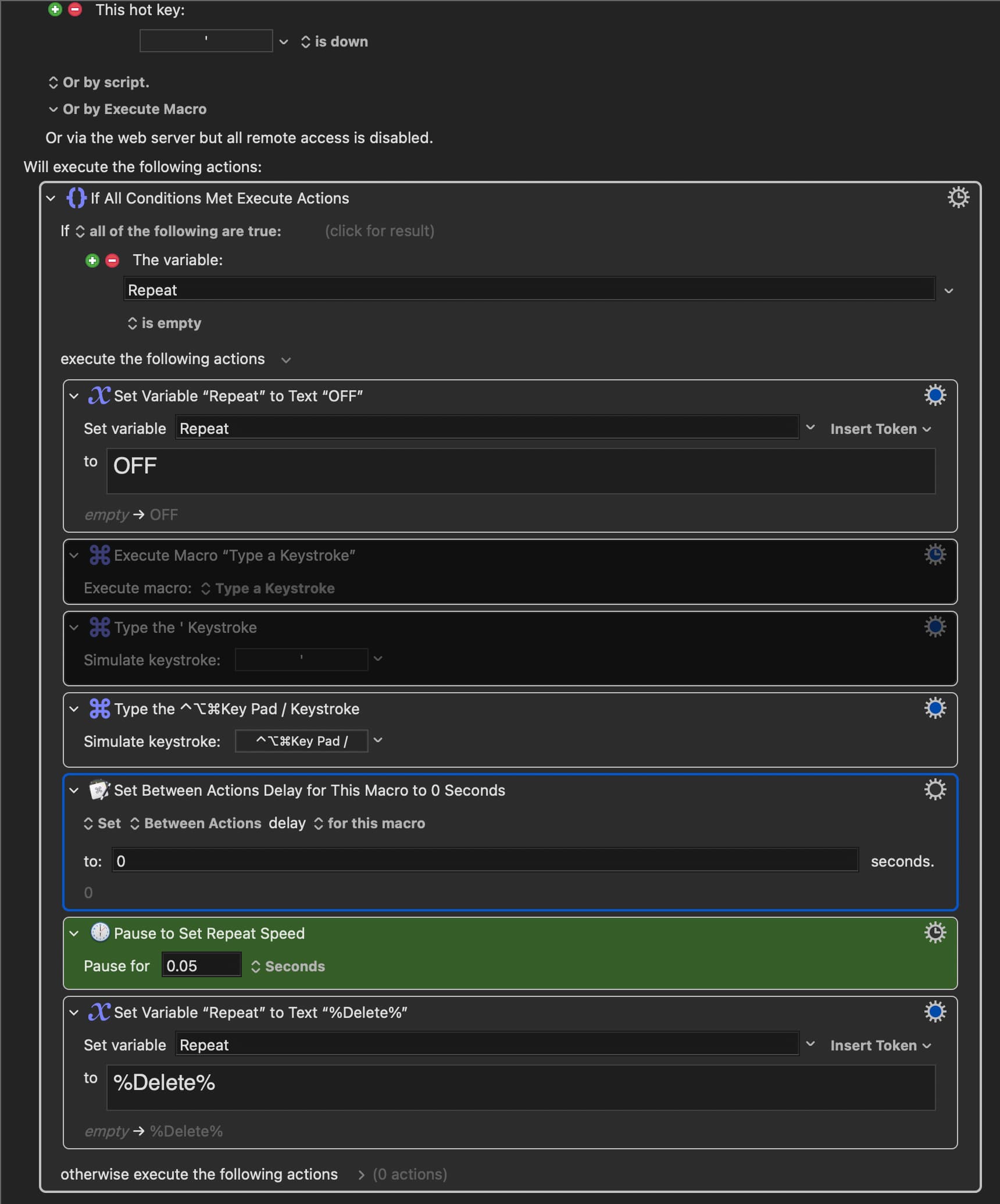
The Set Action Delay action can adjust this - I strongly discourage using the permanent setting, but the this macro setting should be fine in this case.
Wow, thanks for all the input @peternlewis @noisneil Very much appreciated. I just experimented a bit with the Set Action Delay action but it didn’t seem to help anything. I wasn’t sure where to place it with the macro either, and didn’t see anything in the literature about it (or missed it), so tried placing it at every stage of the macro but nothing seemed to help 
Put it before the action(s) you want it to modify the delay of.
You can put a corresponding "reset" after the action(s) or (assuming you've sensibly set the modification to only be "for this macro") let everything reset to default when the macro ends.
The action has its own Wiki page. The easiest way to find the documentation for any action is to right-click the action (outside a field!) and select "Help" from the resulting menu.
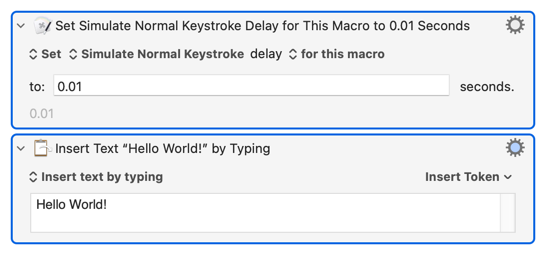
You'll generally use "Set Action Delay" to increase the delay from the default, not to set it to 0 -- for example, KM's "Insert text by typing" can out-run some apps so you slow it down from the default 0.001s between each character:
That "slowdown" is the speed it should be running at. What you think is "works fine" is actually broken -- the held-down trigger keys are actually going through to the OS at its "Key Repeat" rate instead of triggering the macro (and being swallowed by the KM Engine). You can see this for yourself by looking at the latest entries in the Engine log (~/Library/Logs/Keyboard Maestro/Engine.log) -- when trigger and simulated keystrokes are different you will see multiple "Execute macro..." messages while the hot keys are held down, but when they are the same you only get one.
My uneducated guess is that sending a simulated keystroke that's the same as the hot key interrupts KM's "the keys are down", and then there's no new "key down" to restart the trigger (that is, "is down" is actually "when the key is pressed and while it is held down").
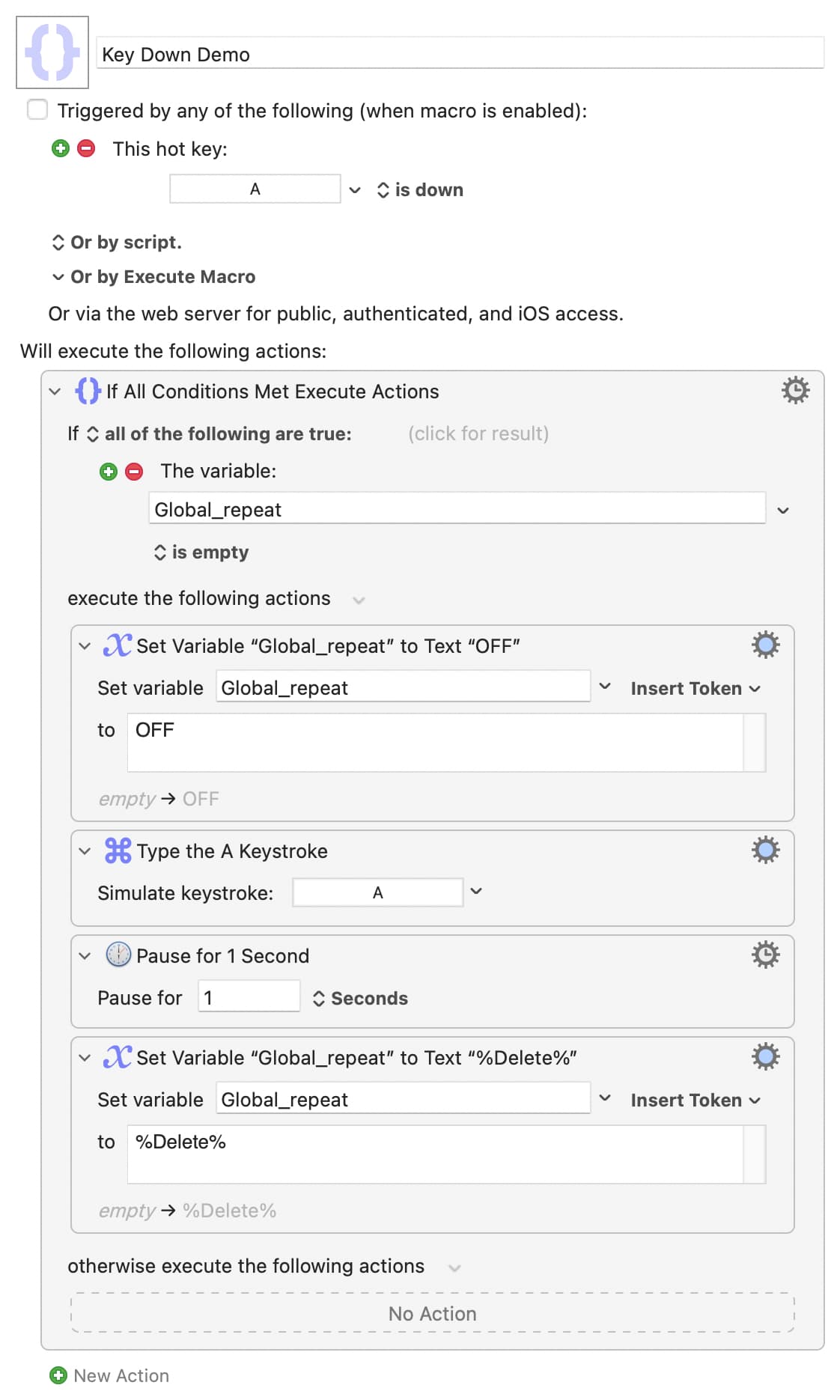
Simple demo that should be run with a TextEdit document or similar frontmost:
Key Down Demo.kmmacros (3.4 KB)
As written it will type a at your OS's "key repeat" speed and you'll see one trigger message per key-down in the Engine log. Change the simulated keystroke to b and the macro will type at 1 character per second, as intended, with multiple trigger messages while you keep the keys pressed.
Yup @Nige_S you’re right! When setting the repeat speed 1.0sec the macro works properly and moves the event every one second when the hot key differs from the command, but when they are the same the action is repeated as before, at a rate much higher than 1x/sec. I also confirmed this through the Engine Log. Yup, when the trigger and command are the same nothing is registered to the log.
So good news is everything is working as it should. The bad news I guess is that the speed I preferred and was hoping to achieve is really a quirk in OS behavior and probably can’t be utilized when the hot key trigger differs from the command itself.
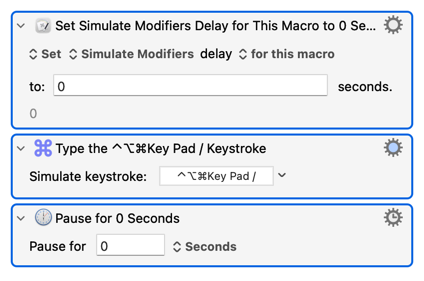
Don't give up yet! As written, your macro has a 0.15s (default for the simulated keystroke) plus 0.05s (the "Pause") delay between repeats. So play around with those, for example:
It's a balancing act. Both real and KM-simulated keystrokes are put into the event queue, your app will pull from the queue when it is ready for the next event. If you add events faster than the app processes them the queue will build -- you could have extra simulated keypresses after letting go of the trigger keys or even overflow the queue with events you'd expect to be sent being silently dropped.
So play with the numbers to get the fasted rate with the minimum of problems.
Thanks again @Nige_S. I tried adding the 0sec pause as you suggested, played with the numbers of everything and order but still, nothing seems to help
The only thing that seems to make it work is to have the trigger as the same button as the key command. I feel like I’m going down a logical loophole here but there’s no way to simulate a key stroke with the same hot key and then use that to simulate another…man, even saying out loud sounds stupid