Hi everyone,
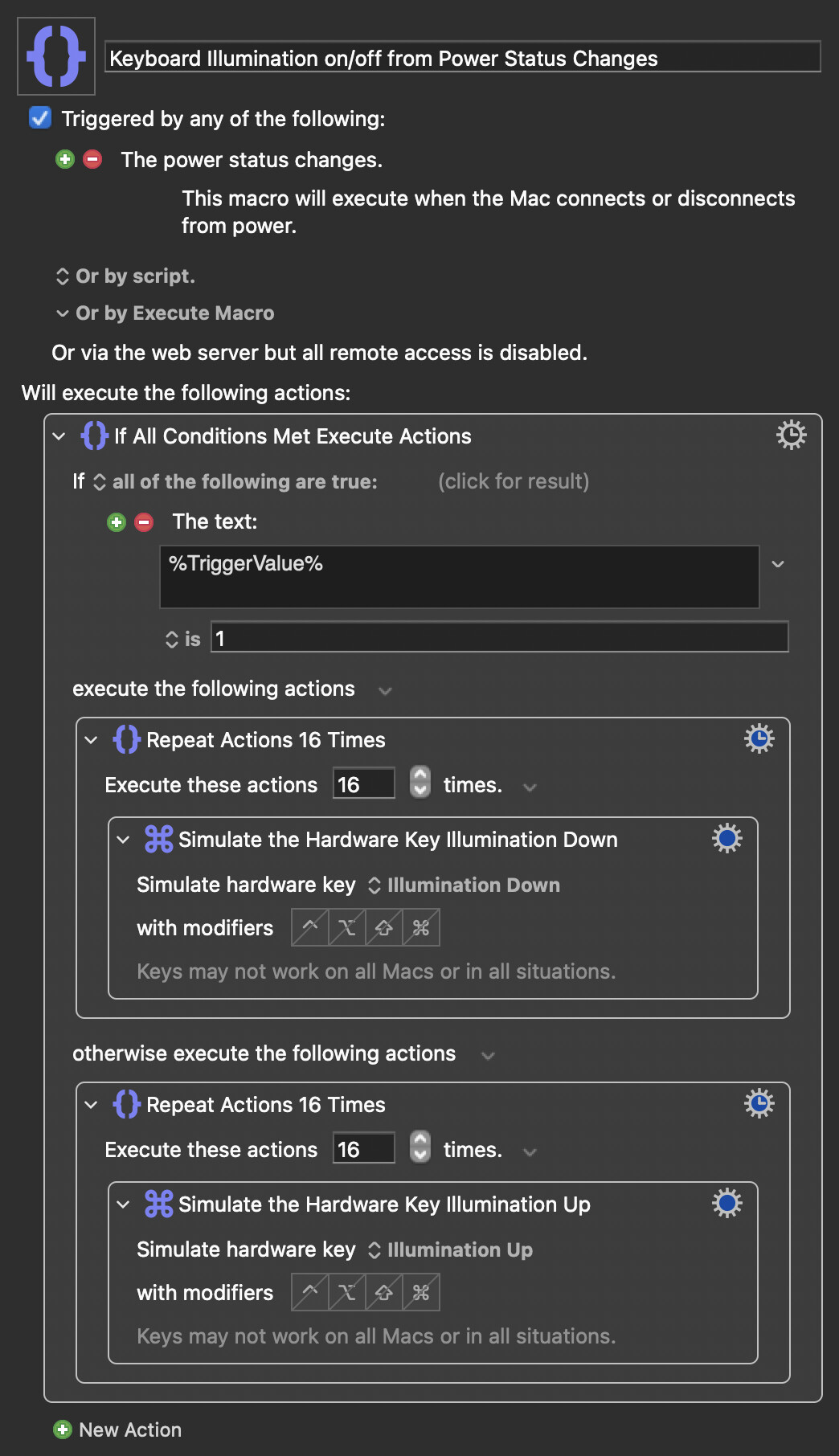
I’m trying to create a Keyboard Maestro macro for my MacBook Pro that automatically controls the keyboard backlight depending on the power source.
What I want to achieve:
When my MacBook switches to battery power:
- Turn the keyboard backlight completely off
When my MacBook is connected to AC power:
- Turn the keyboard backlight back on, or increase it to a usable level
I would strongly prefer a solution that does not rely on Terminal, Homebrew, shell scripts, or external command-line tools. Ideally, I want this to be done only with native Keyboard Maestro actions.
I tried making a macro using a power-status-changed trigger and actions related to keyboard backlight / illumination, but I could not get it working properly. I may be using the wrong internal action names or the wrong macro structure.
I also tried using simulated hardware keys such as Illumination Down / Illumination Up, but I’m not sure if my macro is built correctly, or whether this works reliably on Apple Silicon MacBooks.
Could someone please help me create a working .kmmacros file that I can import directly into Keyboard Maestro?
Ideally, I would like:
- One single macro
- Triggered when the power source changes
- If power source is Battery: turn keyboard backlight off
- If power source is AC Power: turn keyboard backlight on or raise brightness
- No shell script if possible
- Importable as a downloadable
.kmmacrosfile
Here is the type of logic I’m looking for:
Power source changes
→ Check whether Mac is on battery power
→ If battery: keyboard backlight off
→ Else: keyboard backlight on / increase illumination
My Mac specs from the attached screenshot:
MacBook Pro
13-inch, M1, 2020
Chip: Apple M1
Latest currently available Keyboard Maestro version:
Keyboard Maestro 11.0.4
Thank you very much for any help. I would really appreciate it if someone could attach a working macro file or show the exact Keyboard Maestro actions needed.