Hello,
I’m a Day Trader, and sometimes a stock will hit my scanners that is moving up very fast.
I don’t want to miss the move, but before I do anything, I need to enter the stock ticker into 2 different charts, as well as my Buy/Sell Broker window, and of course, need to do this rapidly, and in succession.
So, is there a way to set up a Macro where, once I trigger the Macro, I could have a “Wait for Return Key Press,”, and set up a task were as soon as I trigger the Macro, it records any/all keystrokes that happen between the triggering of the Macro, and the “Return” press?
What I’m trying to do is get that stock ticker symbol I type, after the triggering of the Macro, and before the “Return” key press, to be recorded, so that I can have the Macro move the mouse to various stock charts, and my broker’s window, click on them (respectively), and paste/return that stock ticker symbol into chart window / my brokers window to load that stock’s ticker into each window (respectively).
So, here’s the flow I”m trying to accomplish:
- Stock hits my scanner.
- I trigger the Macro (it waits for me to hit the Return key).
- I type in the stock ticker, and hit the Return key.
- The Macro records the keystrokes to the clipboard.
- The Macro then quickly moves the mouse to various windows, and does a Paste/Return function.
Thus, all of my charts, and my broker’s window are “auto-populated” VERY quickly with the stock ticker I typed in after I activated the Macro, so that I can jump into a trade, without having to manually move my mouse all over the place, take my hands off the mouse at each window to jump on the keyboard to retype the stock ticker, again, etc., etc.
So, is there a function that I can put within a Macro that will copy whatever I type between triggering the Macro, and hitting the “Return” key, to the clipboard?


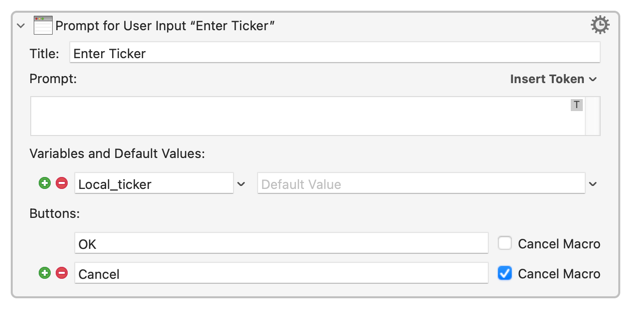
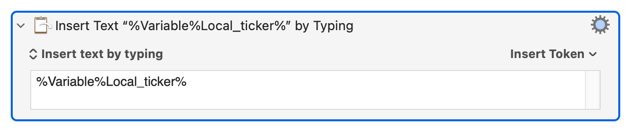
 ).
).