New to keyboard Maestro [navigation in Numbers app]

I have tried using the record feature, but the macro completely is too fast, and it never touches the app (Numbers)

I simply want to record “short cut keys” to navigate in the Numbers App.(iMac)

The focus is to delete the 1st row and then use

CMD + Down Arrow to get to the last row.

Thank you for your reply

1 Like

Is your macro in a macro group that is set to be active only when Numbers is the active application? (See Macro Activation [Keyboard Maestro Wiki]).

Also, bear in mind that the Record Quick Macro action is only suitable for creating simple macros—and frankly, even in the case of most simple macros, you will be better off in the long term if you get used to making macros by combining actions.

That’s well specified. I presume that you mean to delete the first data row, after the header row. I hope that this macro will do what you want.

Always save and back everything up before testing a macro, just in case something goes wrong.
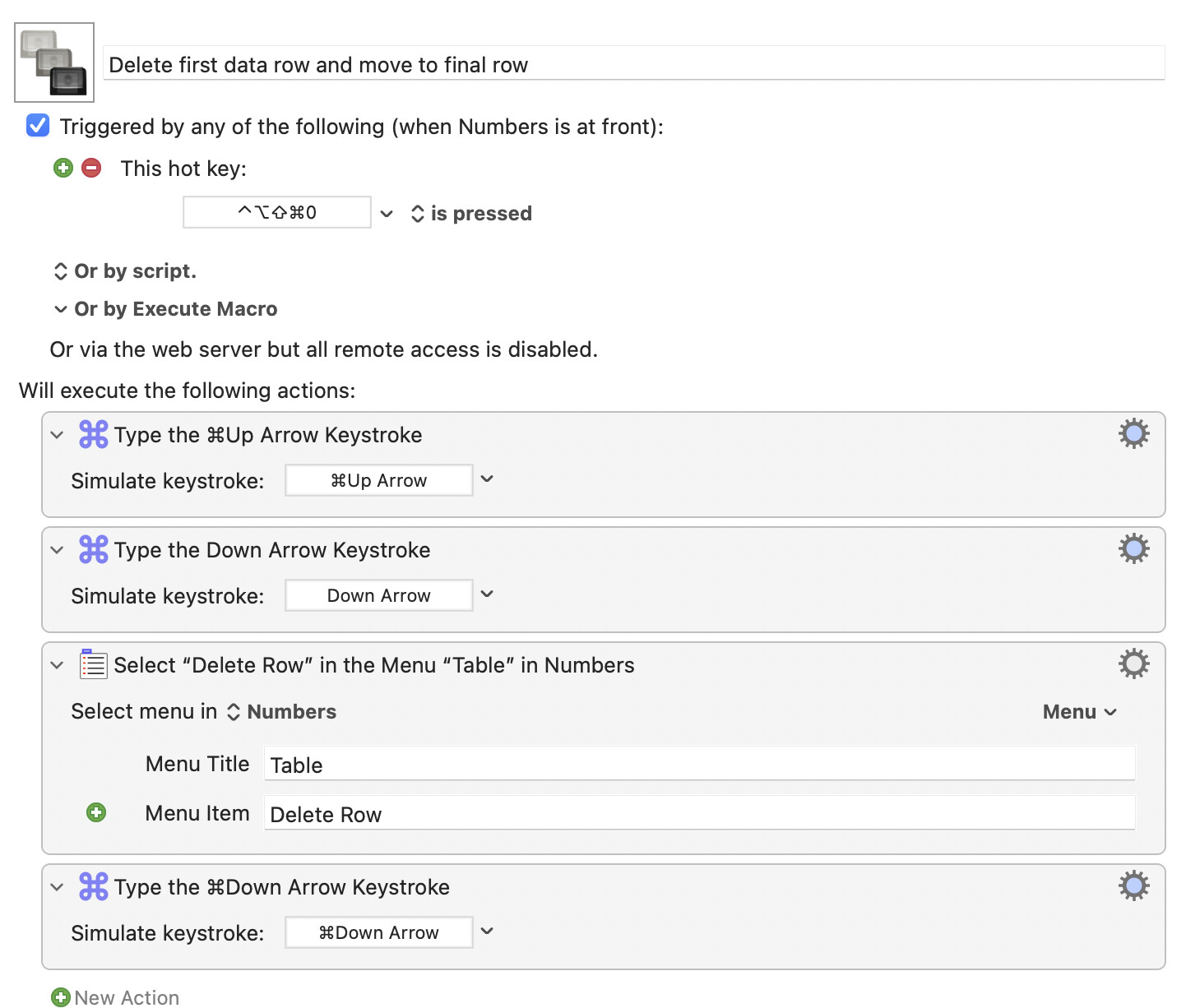
Delete first data row and move to final row.kmmacros (3.4 KB)

This macro will be found in a macro group called “Numbers”, which you will need to enable.

2 Likes