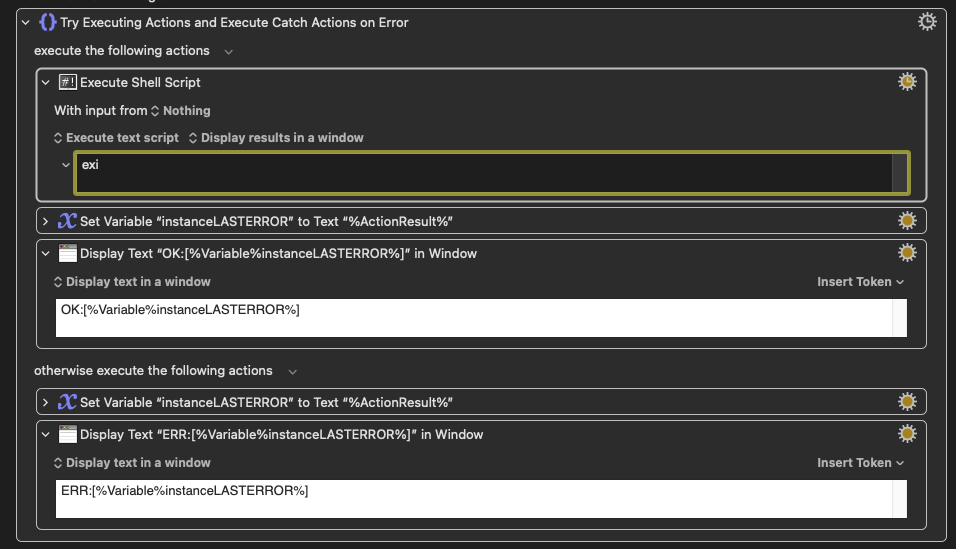
The execute shell script is “exi” and so throws an error. As it should.
I then change it to “exit 0” and run it, it throws the error again. I then run it again without any changes and now it is OK.
Again I change “exit 0” back to “exi” and run it, it says OK. I run it again with no changes and now it correctly shows the error.
It seems to be caching something, is there any way to fix it or am I doing somerthing wrong?
I have seen similar behaviour as if it caches the macros themselves, I make a change then run it, the old one runs, run it again and the updated one now runs. Very irritating.
I am using 11.0.4 on Monterey (I have an iMac and it can’t upgrade and if I bought a new one - which is a definite non-starter for many reasons - then my drobo’s won’t work).
Not in front of my machine but I have seen some issues like this. However, it’s normally related to syncing macros. Are you syncing macros with any other machines by chance? If so, I’m guessing sometimes it takes a while to settle after a change.
If you are having "delayed updates" like this you'll need to force a plist update, which will in turn cause the Engine to reload the plist so you are executing your latest version. Selecting a different macro then going back to the one you are editing should be enough.
Like @kcwhat I also see this sometimes, I have no idea why, but it always catches me out until I realise what's going on...
If you make the change and immediately press the trigger, then yes, there is a slight delay after making changes to the macro before the Engine is updated to the new changes. You can actually see the small "dirty" mark at the bottom right corner of the window. Changes are merged together for a while before updating the macro plist and reloading the engine (otherwise every character you type would result in the macros being saved).
If you run it using the Run button, then the macro is run as the editor sees it.
So yes, if you are making changes, you need to take a breath before triggering the macro to get the updated changes.