What would be the macro setup to open one or more selected files in a designated application? I thought it might be Move file action, but I'm not sure if that's it, or how to use it. Will it require an AppleScript? Thanks for your help.
Never mind, I figured it out. 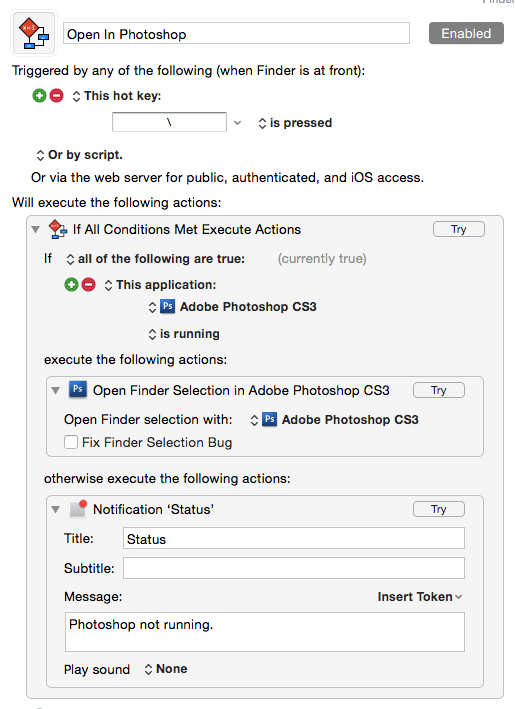
Hey Bakari,
That works well if you’re wanting to open files with a specific app.
If you want to open files with their default app then use the Finder instead of CS3 in Keyboard Maestro.
Here’s how to do both with AppleScript:
Default:
# Open Finder Selection with Default App for Each File.
tell application "Finder" to open (get selection as alias list)
App-Specific:
# Open Finder Selection with Specific App.
tell application "Finder"
  set finderSelection to selection as alias list
end tell
if finderSelection ≠ {} then
  tell application "TextEdit"
    activate
    open finderSelection
  end tell
end if
–
Best Regards,
Chris
2 Likes
Awesome, thanks. Look forward to using this one.
Hi!
Which action is shown at the top ("Open in Photoshop")? I can't seem to find it. I just want to open a file highlighted in the finder in a specific application.
I tried this one, which says to option click on the file chooser icon in the action, but I think I'm doing something wrong or this is the wrong action?
https://wiki.keyboardmaestro.com/action/Open_a_File_Folder_or_Application
Thanks!
It's actually the Open Finder Selection action. It changes its name in the KM editor when you specify a different application; here are a couple of examples:

Here's the wiki page:
https://wiki.keyboardmaestro.com/action/Open_the_Finder_Selection?s[]=open&s[]=finder&s[]=selection
Hey thank you!
All working now.
Thanks again!
1 Like