Is there a way of feeding variable values into the JS text of an Execute Javascript in [browser] action ?
We can certainly use such actions to place key:value pairs for subsequent use by further actions of this kind (see below), but I'm not sure whether the text of these Execute Javascript actions is computationally accessible ?
( No problem if not, there are clearly routes in through execute shell script actions )
Rob
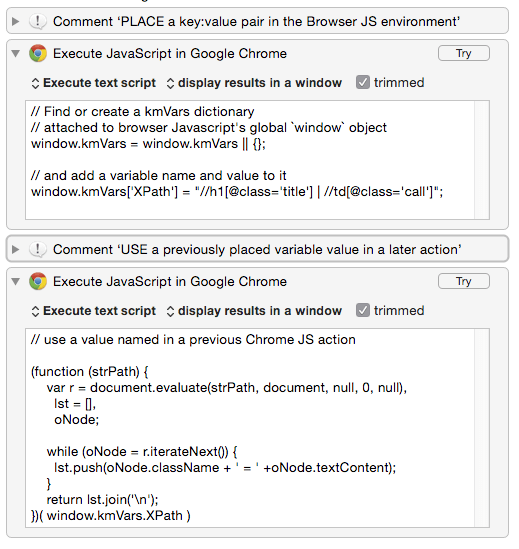
// Find or create a kmVars dictionary
// attached to browser Javascript's global `window` object
window.kmVars = window.kmVars || {};

// and add a variable name and value to it
window.kmVars['XPath'] = "//h1[@class='title'] | //td[@class='call']";
then later, in another action ....
// use a value named in a previous Chrome JS action

(function (strPath) {
    var r = document.evaluate(strPath, document, null, 0, null),
      lst = [],
      oNode;

    while (oNode = r.iterateNext()) {
      lst.push(oNode.className + ' = ' +oNode.textContent);
    }
    return lst.join('\n');
})( window.kmVars.XPath )
( FWIW – the slightly more circuitous route ... )
Passing a KM variable into the Browser Javascript context ( using an Execute Shell Script action to place the variable before an Execute Javascript in [Browser] action which uses the variable.
Capture Google search results as Markdown links.kmmacros (17.2 KB)
First Execute Shell Script to pass the KM variable value to the browser
osascript -l JavaScript <<JXA_END 2>/dev/null
function setBrowserVar(strKey, strValue) {
    window.kmVars = window.kmVars || {};
    window.kmVars[strKey] = strValue;
    // check
    return window.kmVars[strKey];
}

(function (strKey, strValue) {
    var appChrome = Application("Chrome")
    lstWins = appChrome.windows(),
    oWin = lstWins.length ? lstWins[0] : null;

    return (oWin) ? appChrome.execute(oWin.activeTab, {
        javascript: "(" + setBrowserVar.toString() + ")(\"" +
            strKey + "\", \"" + strValue + "\")"
    }) : "No Chrome page open";
})("pathToSearch", "$KMVAR_somePath");
JXA_END
Then use the KM variable value in an Execute Javascript in Browser action
// use a value named in a previous Chrome JS action

(function (strPath) {
    var r = document.evaluate(strPath, document, null, 0, null),
      lst = [],
      oNode;

    while (oNode = r.iterateNext()) {
      lst.push('- [' + oNode.text + '](' + oNode.href  + ')');
    }
    return '### ' + document.title + '\n\n' + lst.join('\n');
})( window.kmVars.pathToSearch )
Man, does nobody memorise the documentation and all its fine print? 
In the Scripting section of the documentation there is hidden in the fine print:
JavaScript can access the variable values by using the document.kmvar dictionary, like document.kmvar.Variable_Name (spaces are converted to underscores).
As with environment variables, this is one-way, into the script, not out. To retrieve multiple values from a JavaScript, as you note, it is easy to store values and retrieve them in sequential Execute JavaScript actions, or alternatively you can package them up into a single string and then unpack them in Keyboard Maestro actions.
wow ... and there they are ....
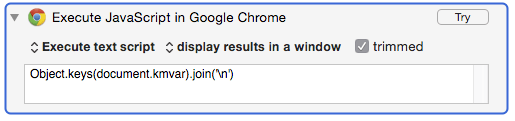
Object.keys(document.kmvar).join('\n')
thank you – that's more than I expected !
( and I hope it's not too exasperating to find that people have thundered straight through the documentation on horse-back, without noticing all the fine and subtle work – it's a wonderful scripting environment to work in – I shall study more attentively hereafter : - )
Its not exasperating at all - heck I forget some of the things Keyboard Maestro can do!
Its why it is hard to justify spending more time on the Documentation (that and the fact that its already 100+ pages!). Writing more documentation just obscures other details.
Your new macro showing all the entries in the documentation matching a specific term is an amazing addition!