I just installed KM. I noticed soon after that Ctrl+Shift+C and Ctrl+Shift+V no longer worked in MS Word for copying and pasting the text format/style. I think I created a KM that copies the style, but I can’t find an action to choose from the pastes the style. Does someone know either (1) how to get the original functionality back or (2) how to create new macros that do what these keyboard combinations used to do
Check this page out in the KM Wiki.
Thank you. I have been looking at this and experimenting with it but am a bit lost.
I think that you might find it easier to use the Select or Show a Menu Item action.
I don’t use Microsoft Word, but here is an example of using that action with Apple Pages:

You can complete the “menu title” and “menu item” fields either by typing or by simply selecting the menu item from the “Menu” er... menu... in the top-right of the action.
In the Keyboard Maestro Editor, you can look in the Macros column to see if those key combinations have been assigned to a macro.
Hi, Kevin, Thanks for this! - Macros performing other functions had indeed been pre-assigned to cmd+shift+C and cmd+shift+v. For the time being, I’ve disabled (rather than deleting) those macros, and that allowed the Word functions to work again.
Kevin, This is helpful in showing me the powerful things I look forward to being able to do.
That’s great.
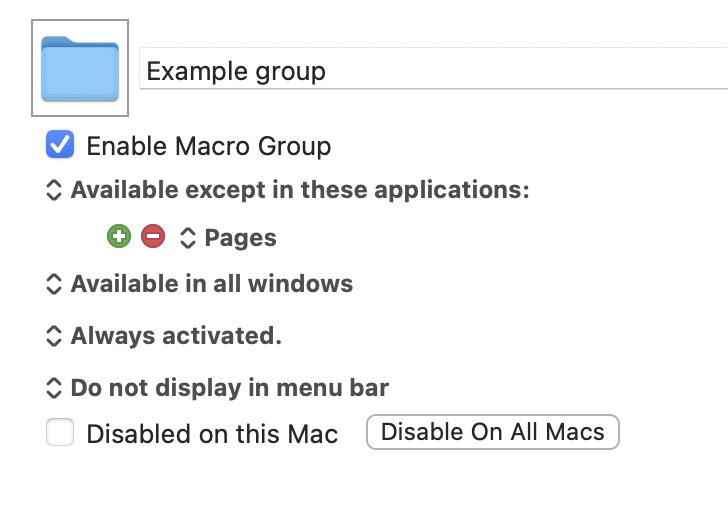
Always remember that you can set up a group of macros such that its macros will only run in some applications. This means that you could, for instance, have a macro with the trigger ⇧⌘V that is active except when you are using Microsoft Word Apple Pages.  That would leave the same key combination available for use in the usual way in Word, and even for use with other macros in other macro groups.
Further reading: