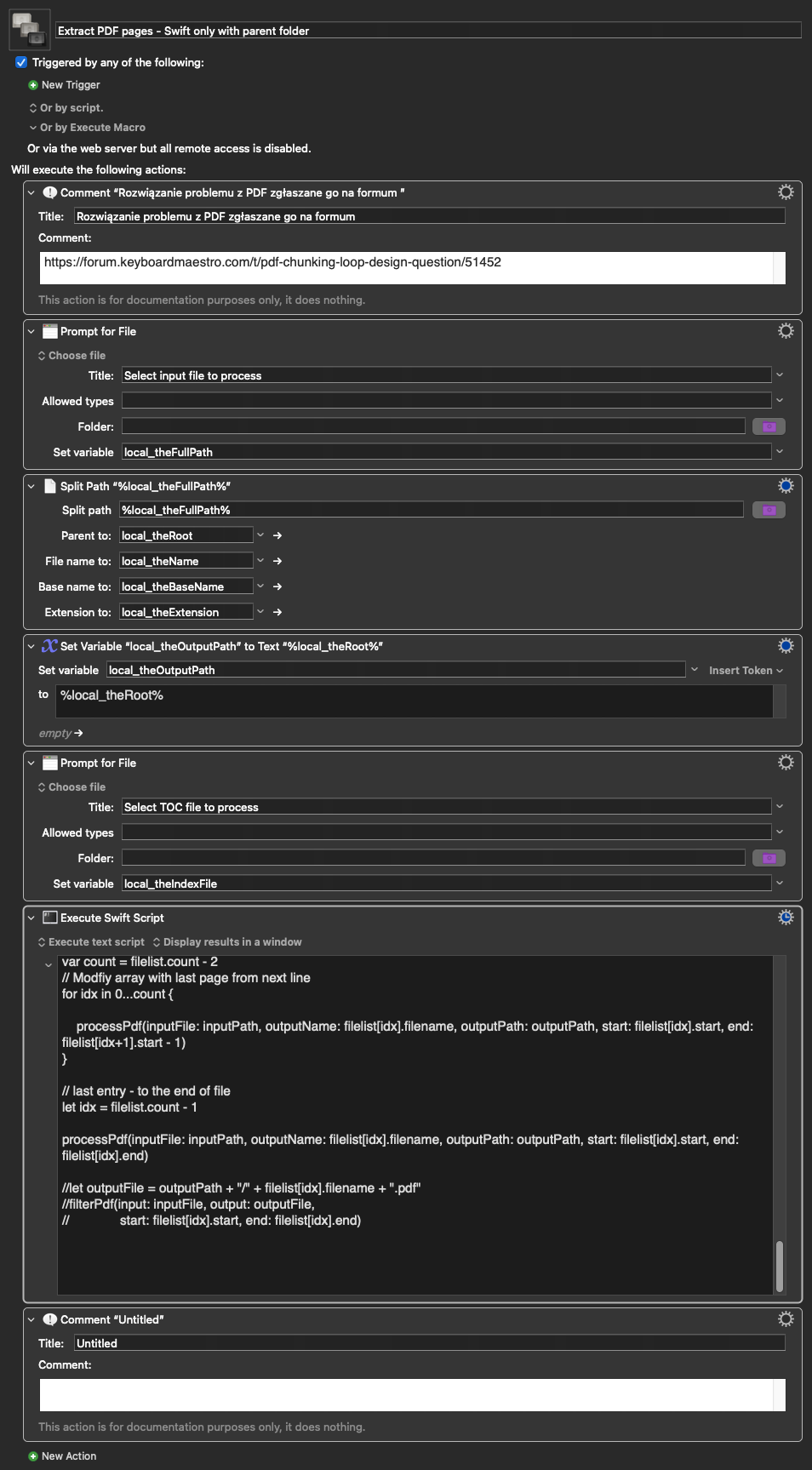
Context (brief):
I work with large reference books in PDF format — 500 to 2000 pages.
Each book is organized into chapters. I am preparing these reference books for research in DEVONthink 4. I need to extract each chapter
as its own PDF file, named after the chapter title, automatically.
I have a prepared TOC text file for each book. The macro reads the TOC,
calculates page ranges, and uses Griffman's Swift/PDFKit script to extract
each chapter. No Python. No shell scripts.
The specific problem:
Inside a For Each loop, I need to look ahead to the next line to calculate
the end page of each chapter. Is the pseudo-array approach the right way
to do this in KM?
The look-ahead problem in detail:
Each line of the TOC file looks like this:
[[Chapter Name]] ((TOC_page_number))
For each chapter the macro needs:
pdfStart = TOC_page[i] + offset
pdfEnd = TOC_page[i+1] + offset - 1
The end page requires the start page of the NEXT chapter.
For the last chapter there is no next line — I use a user-supplied
last page number instead.
My planned approach:
Current line: %Variable%Local_toc[%Variable%Local_i%]\n%
Next line: %Variable%Local_toc[%Variable%Local_i% + 1]\n%
If/Then/Else: if i < totalLines → calculate pdfEnd from next line
else → use Local_LastPage (supplied by user at start)
Is this the right approach, or is there a cleaner native KM solution?
Full macro for those who want the detail:
02a Chunker_pdf for Single book Forum.kmmacros (6.4 KB)
(The last parts of the macro are not finished, although Claude has outlined them below.)
Actions in order (setup — runs once):
-
Prompt for File → Local_FilePath
(user selects the book PDF) -
Filter Variable with Parent Path → Local_BookFolder
(extracts folder path — learned from earlier work that this is
more reliable than Prompt for Folder) -
Split Path → Local_BookName
(captures folder name e.g. "Arthropods_Vermeulen" — used in output filenames) -
Set Variable → Local_outputFolder
Value: %Variable%Local_BookFolder%/CHUNKS_FINISHED -
Set Variable to Contents of File → Local_toc
File: %Variable%Local_BookFolder%/CleanTOC.txt
(loads entire TOC into one variable) -
Set Variable to Calculation → Local_totalLines
Value: LINES("%Variable%Local_toc%") -
Read first line of TOC → regex extracts TOC page of Chapter 1:
Set Variable → Local_firstLine
Value: %Variable%Local_toc[1]\n%
Search Variable Using Regular Expression
Regex: (((\d+)))
Capture 1 → Local_TOCPage1 -
Prompt for two numbers:
- Local_PhysicalStart — PDF Expert physical page number of Chapter 1
- Local_LastPage — PDF Expert physical page of last page of final chapter
(user reads these directly from PDF Expert — no arithmetic required)
-
Set Variable to Calculation → Local_Offset
Value: Local_PhysicalStart - Local_TOCPage1
(KM calculates the offset between TOC page numbers and physical PDF pages)
Actions inside the loop:
-
For Each: Local_i in Range 1 to Local_totalLines
-
Set Variable → Local_currentLine
Value: %Variable%Local_toc[%Variable%Local_i%]\n% -
Search Variable Using Regular Expression on Local_currentLine
Regex: [[(.?)]].(((\d+)))
Capture 1 → Local_ChapterName
Capture 2 → Local_tocStart -
Set Variable to Calculation → Local_pdfStart
Value: Local_tocStart + Local_Offset -
If/Then/Else:
If Local_i < Local_totalLines:
Set Variable → Local_nextLine
Value: %Variable%Local_toc[%Variable%Local_i% + 1]\n%
Regex on Local_nextLine: (((\d+)))
Capture 1 → Local_nextTocPage
Set Variable to Calculation → Local_pdfEnd
Value: Local_nextTocPage + Local_Offset - 1
Else (last chapter):
Set Variable → Local_pdfEnd
Value: Local_LastPage -
Set Variable → Local_theNewFile
Value: %Variable%Local_outputFolder%/%Variable%Local_ChapterName%_%Variable%Local_BookName%.pdf -
Execute Swift Script (griffman's PDFKit script)
Receives: KMVAR_Local_FilePath, KMVAR_Local_theNewFile,
KMVAR_Local_pdfStart, KMVAR_Local_pdfEnd
TOC file format:
[[Acari (Mites & Ticks)]] ((1))
[[Crustaceans]] ((89))
[[Insects]] ((181))
Output filename format:
Acari (Mites & Ticks)_Arthropods_Vermeulen.pdf
Thank you