I ran into a nit when scanning files (i.e., receipts, etc.).
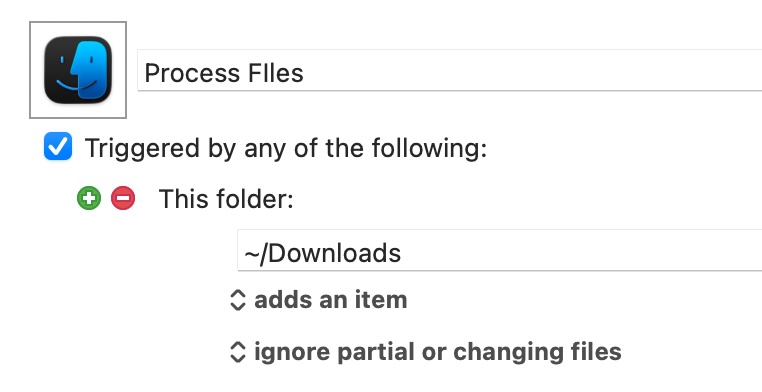
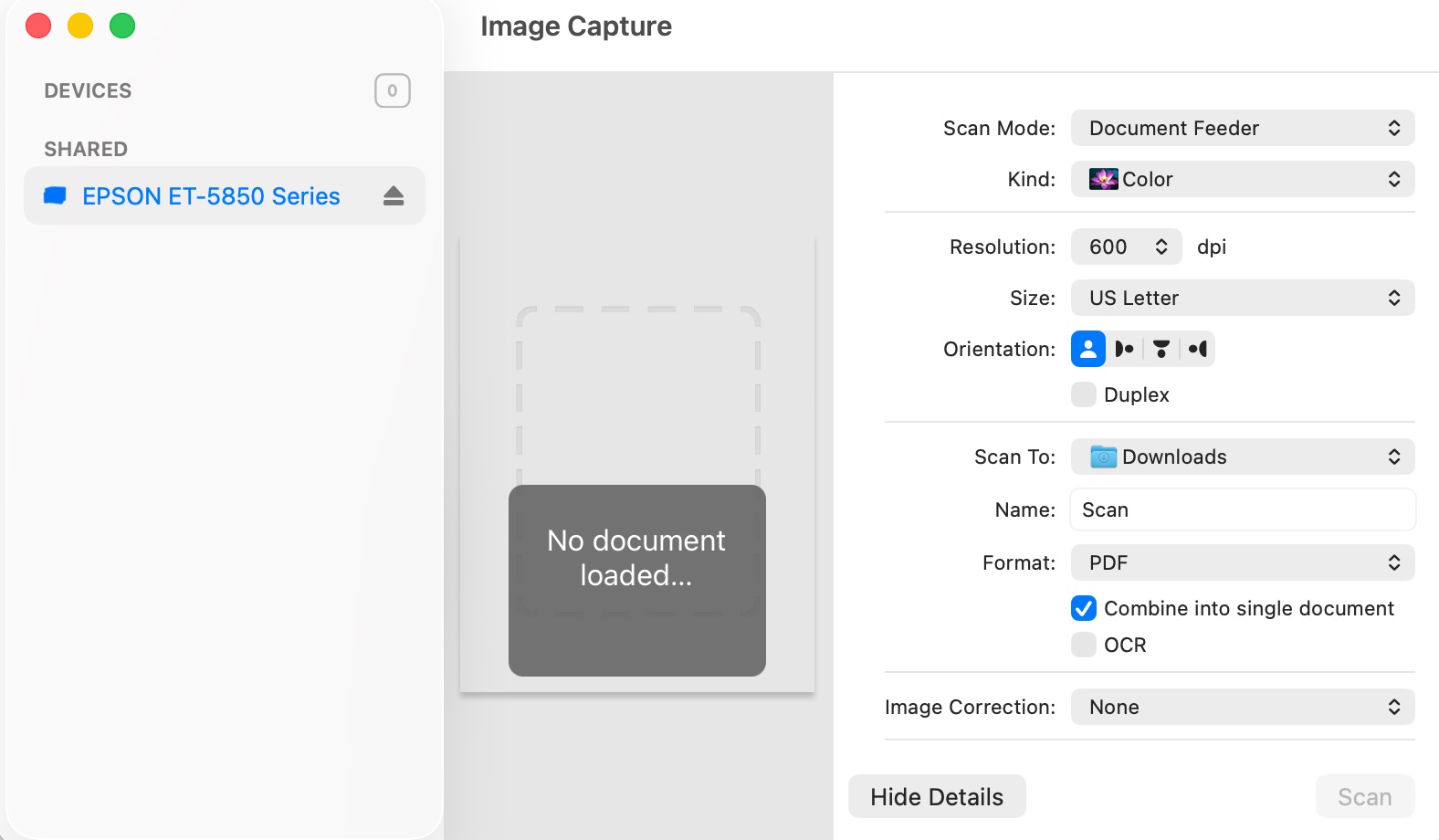
I have, as can be seen in the below image, i) the trigger set to ignore partial and changing files and ii) the scanning software set to combine into single files (so that all scanned pages appear in 1 PDF file).
The nit I am running into is that the while the pages are being scanned into one file, Keyboard Maestro is triggering each page separately (as though the time between pages is too long resulting in Keyboard Maestro treating the file as complete when it is not).
The workaround I have thought about so far is to create a new macro that will scan the file into a different folder (i.e., ~/Desktop) and then, once the san is complete, move the file to the ~/Downloads folder for processing. While it should work, I am not crazy about this as:
The macro will involve image recognition which I am not a big fan of (too many timing issues);
The solution is not elegant (i.e., scan here to go there, why not just scan where you need to be).
Wondering what better / other ideas there are before I start the build.
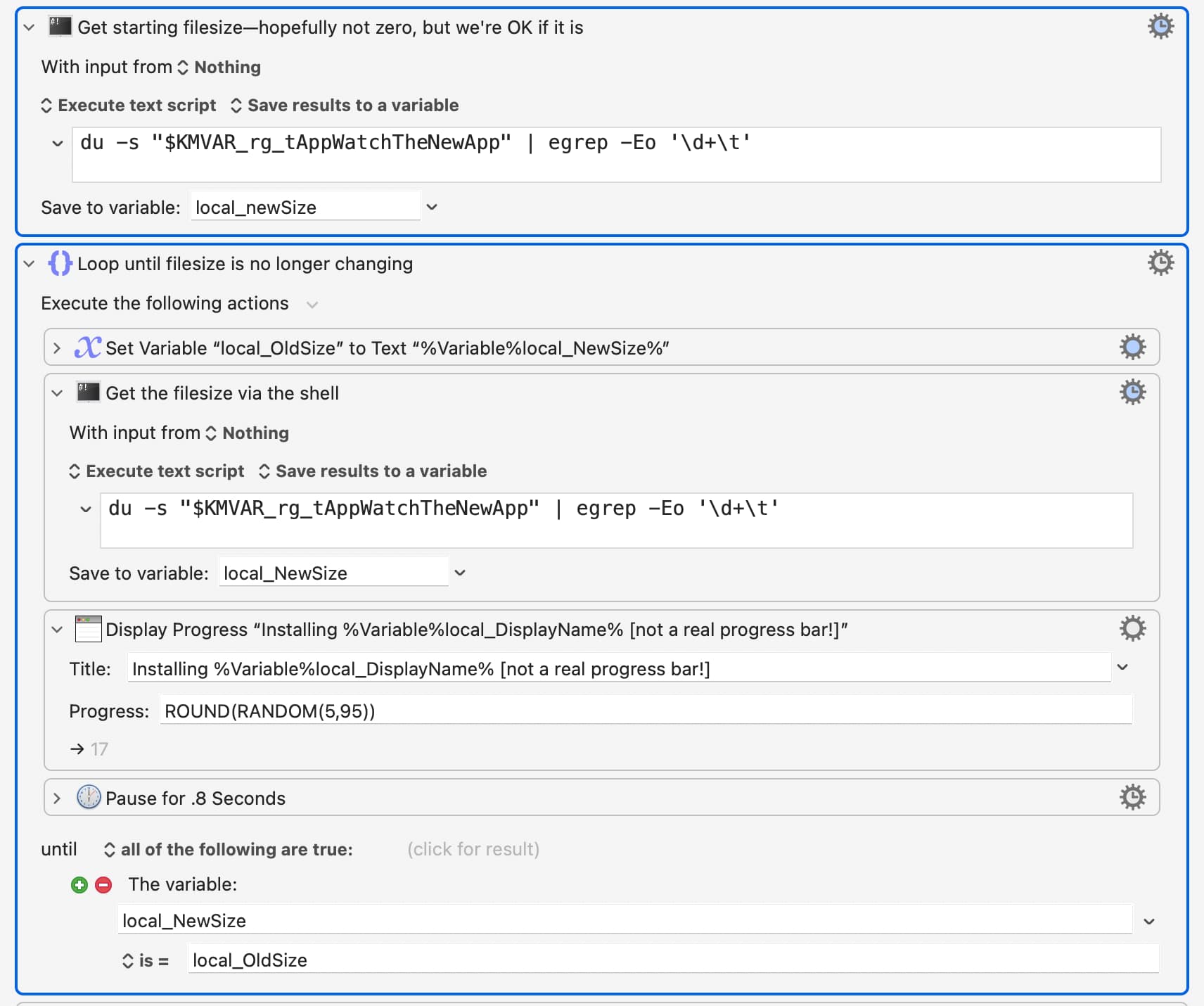
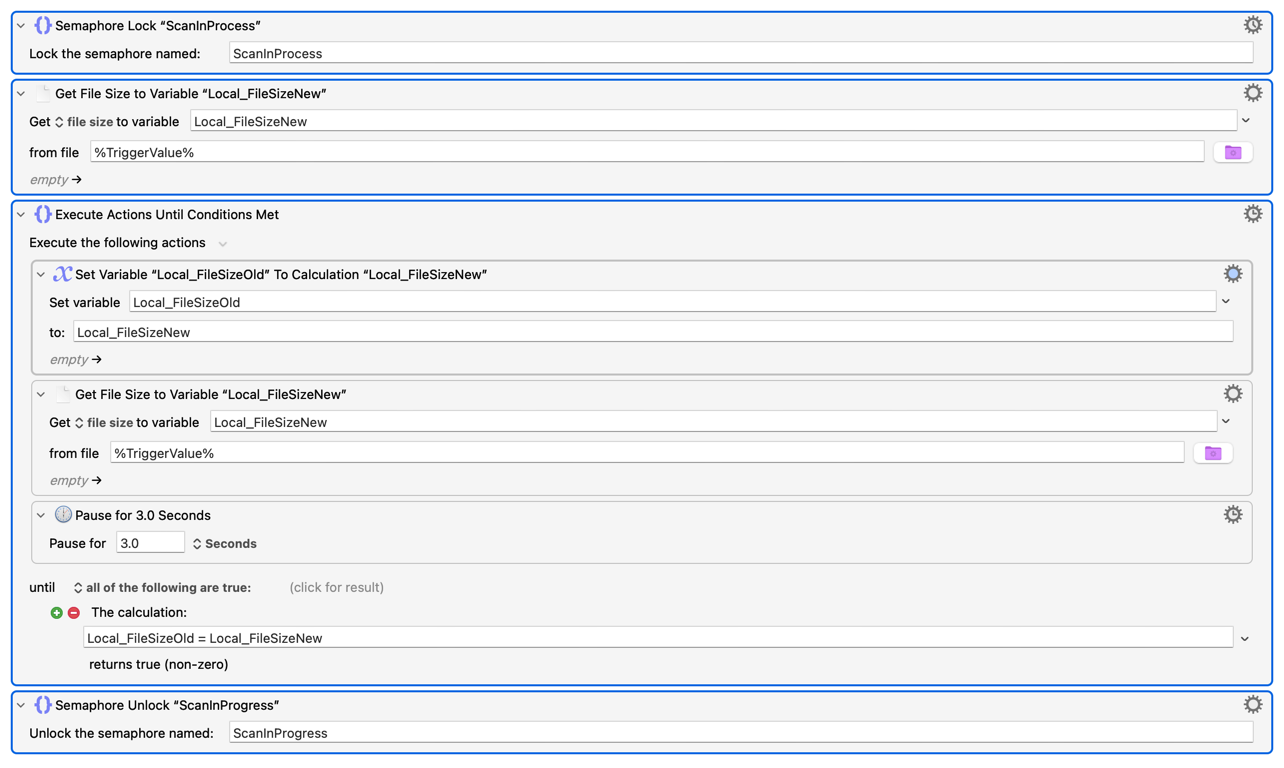
The problem is the OS tells Keyboard Maestro the file is complete, even though it's not. I use a construct like this that loops until the file size stops changing:
The key part is the just the shell command that extracts the disk size. I then store than in one var, and compare it to a previous value. If they're the same, then the file is done writing. If not, update old value to new value, and test again.
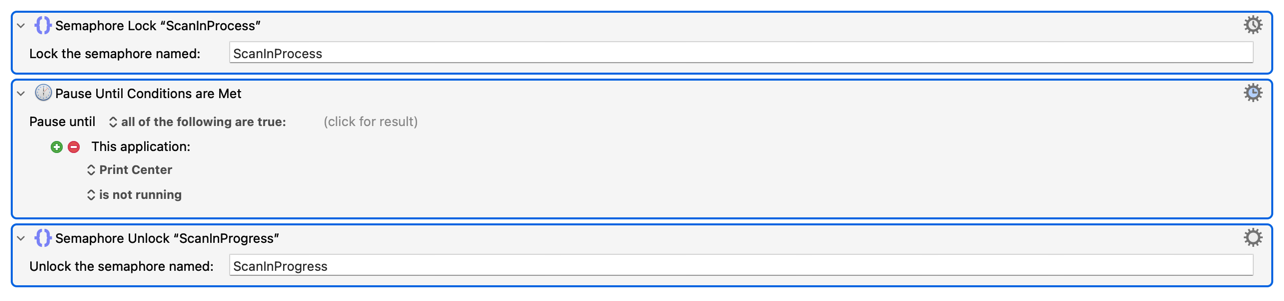
What do you do when you finish scanning a document? If you always Quit or background Image Capture then you could use that to pause/resume your macro. Put an auto-abort "Semaphore Lock" at the top of the macro so you only get one instance per file, no matter how many times the file is updated and the macro triggered, and follow that with a "Pause Until: Image Capture is not running" (or "not at the front").
Another method is the same semaphore, but test the file size then loop with an n second pause until the file size stops changing -- where n is long enough for a "slow" page to be processed but no so long it'll block you from scanning the next document. Search the Forum for examples, it's been done plenty of times.
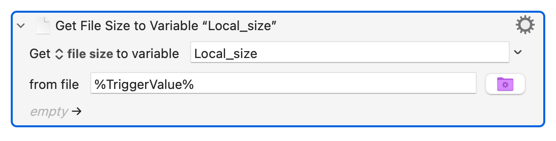
Ah, I see @griffman's already there! He's gone shell, but you can also use KM's "Get Attribute" Action:
In both cases you should release the semaphore as soon as the file is "complete" so you can scan another doc, and so fire another instance of the macro, while the first PDF is still being processed.
Brilliant -- I think -- because I want to make sure I understand it.
The solution is to put your above actions as the very start the macro which will pause the macro until the folder / file size is unchanged (i.e., the scan is completed) noting:
Do I have this right?
Is my understanding correct that I replace $KMVAR_rg_tAppWatchTheNewApp" with "$KMVAR_/User/joel/Downloads"?
Which, assuming the above is correct, is preferred between:
a. "$KMVAR_/User/joel/Downloads" (which excludes the filename and gives me flexibility as to what I want to name the file) OR
b. "$KMVAR_/User/Joel/Downloads/scan.pdf" (which includes the filename and uses a common scanned file name)?
While GREATLY APPRECIATED -- and it is -- I really need to develop / learn shell script and probably python!
If both are correct then I am leaning towards 2 as I am free to do what I want on my desktop!
And again, at the risk of being overly repetitious, Rob, you, et. al. are GREAT for taking the time to answer all my questions. It is GREATLY APPRECIATED! Thank you!
Yes, the second approach looks correct, at least during a quick pre-lunch review :). Test it with some bigger dummy files that you copy from another location, and see how it works.
(The first is probably fine as well, but I haven't done any file completion testing with semaphore locks, so I can't say much from my perspective.)
Although this was a ton of fun to work on, I am way behind on work and will pay for it by working well into the night but, well worth tit!
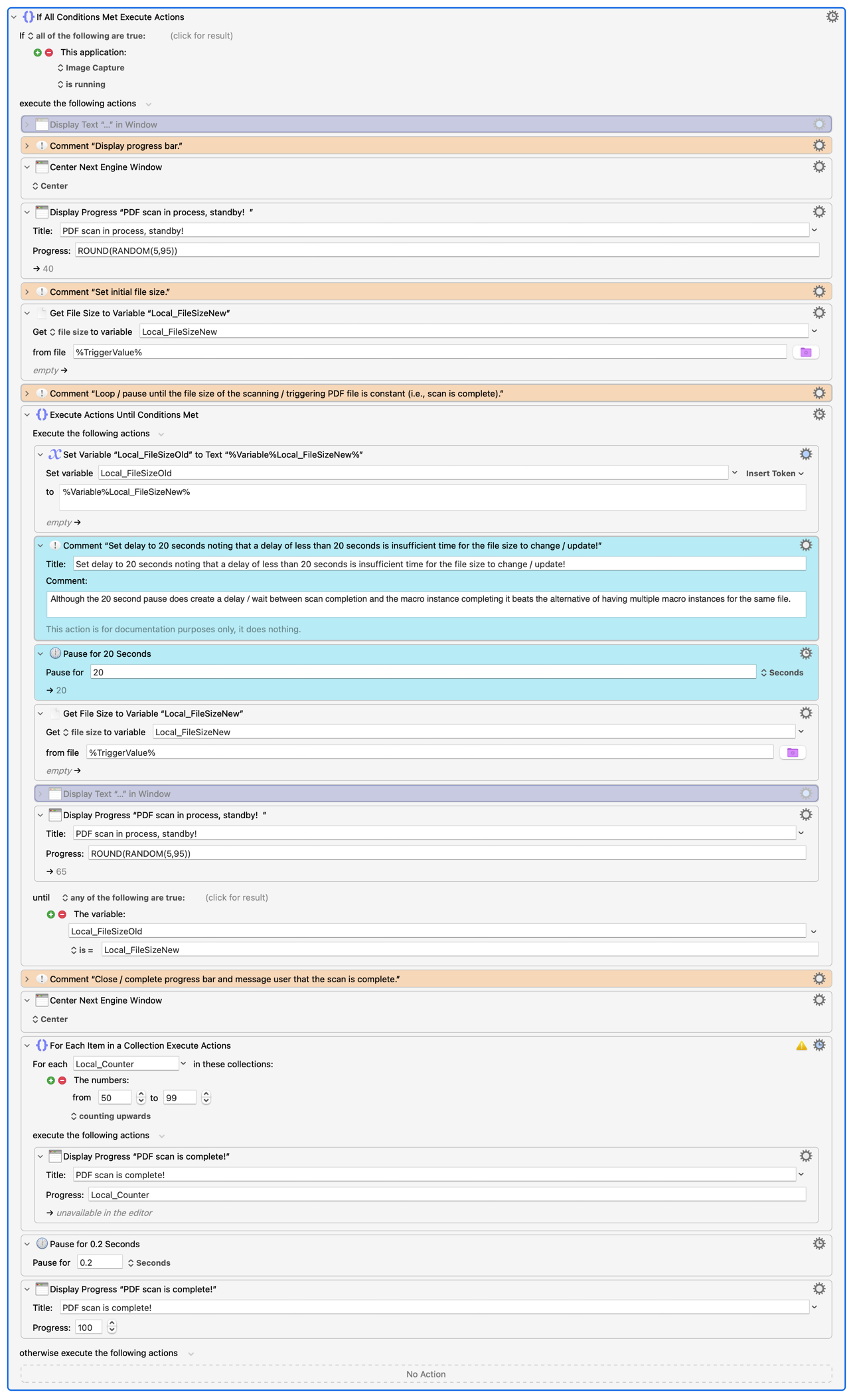
As a result of testing option 2, I determined that I do not need a Semaphore Lock as I discovered that the Loop Until is sufficient (i.e., it delays / "traps" the scan until it is complete).
In testing the timing I discovered the following:
a. I had to add an IF THEN block to only delay the processing as downloaded PDF files appear -- at least to date -- to be properly handled by the trigger "ignore changing and partial files".
b. Timing is very tricky for a number of reasons including:
i. A lot of factors impact the timing including resolution, kind (back and white vs color vs text), size (letter versus legal), etc.
ii. A scanned file does not appear in the Download folder until after the first 1 to 1.5 pages are scanned.
iii. File size -- depending on the factors noted in 3.b.i. -- are not necessarily updated more frequently than every +/- 18 seconds which is why the delay (see teal coloured actions) is so long. This explains why Keyboard Maestro was sending pages through the macro before the scan completed (i.e., there was a +/- 18 second long delay with no file size change so...).
iv. Large scanned files significantly slow down the macro between i) scanning time and ii) OCR → text conversion BUT IT STILL WORKS.
v. There can be an up to 20 second delay between the scan completing on the scanner and the scanned file being further processed by the macro depending on where in the Loop Until loop the scan finishes (i.e., if it completes just after a 20 second pause it will take another 20 seconds to exit).
The asks: I would really appreciate comments / thoughts on the following:
Any ideas how to expedite exiting the Loop Until when the physical scan completes (see 3.b.v.). I tried adding the condition of "When Image Capture is not running" but that did nothing because the 20 second wait time still had to first complete before testing.
Comments / thoughts on how to improve the actions.
I will steal your code but have one follow up, do I use the path inclusive or exclusive of the filename to have more flexibility on what I name the name the file but, if needed, I can use a fixed file name (i.e., /Users/joel/Downloads/ versus Users/joel/Downloads/scan.pdf)?
You could try watching Activity Monitor while this is going on, and see if there's a process that stops when the file is done being created ... but it will be very tough to spot such things in the display.
At this point I am going to sleep on it but if you have any other ideas please share, I am happy to test.
Stepping back and looking at the big picture this has been a great learning exercise for me, fun (maybe too much) and the resulting macro will save me lots of time so, if a 20 second wait the once to three times a day that I scan a file remains unresolved, I will still be way ahead of the game.
Yes, that was me not knowing how Image Capture does this -- I assumed it was saving each page as a file then combining them, hence the semaphore so the macro didn't (re-)trigger for each page. As it is updating the file in place instead there's no addition to the watched folder so no extra triggers.
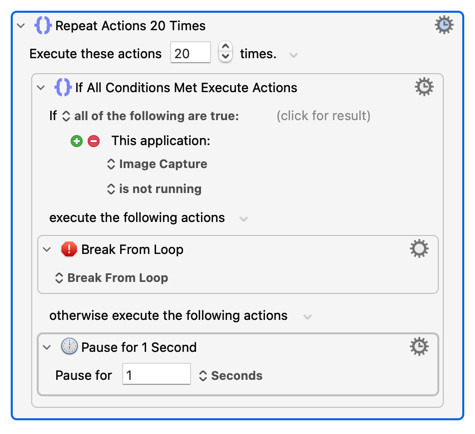
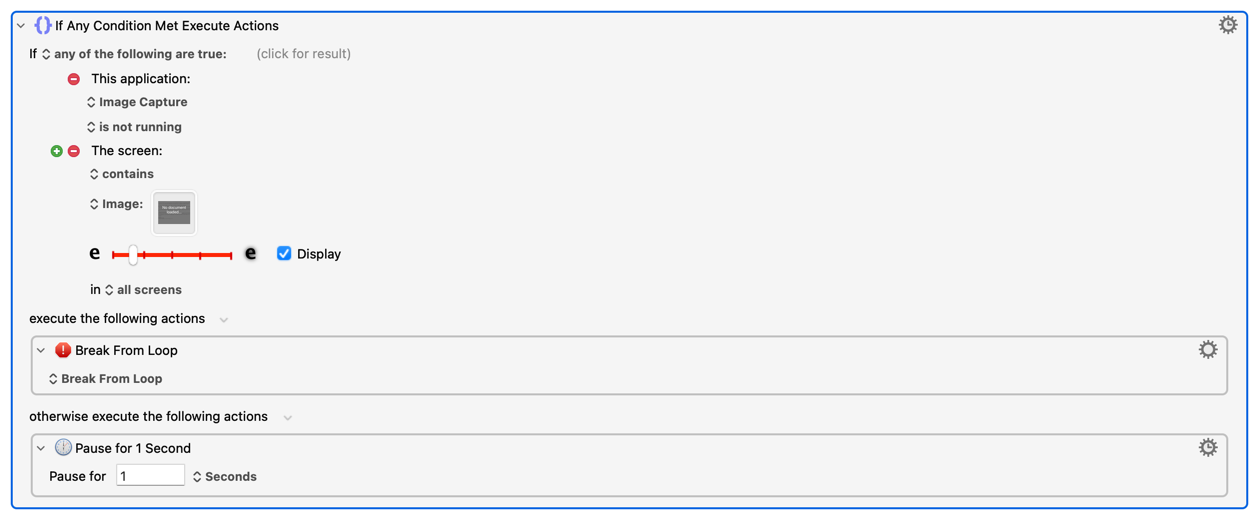
I replaced the 20 second pause with your above action. When Image Capture is done I had to close it in order to jump out of the Until Action that is measuring disk size (i.e., Break From Loop action stopped BOTH the Repeat Action and the Until Action).
It is much better than it was before though I would still love a way of exiting without having to close Image Capture (i.e., when Image Capture is done scanning it is still running).
One idea I have is that when Image Capture is done scanning it displays an image which reads no documents loaded. What if I were to change to "Any of these conditions" and add the condition from i) Image Capture is not running to ii) Found Image condition and the image "no documents landed image".
Perhaps I should give that a go (as much as I don't like using Found Image conditions)?
Thank you.
PS. I am working on the log file for the next enhancement to this.
You could check the menus: Find an entry that's only enabled (or disabled) while scanning is active, then based your loop around the state of that menu item.
It exits (almost) immediately once teh scan is completed which is easy to tell / note because I have Display ticked so I can see it read the image by the "green overlay"!
Don't dismiss image detection out of hand. It shouldn't be your go-to when there are other, more reliable, options -- but if you set it up properly and control the conditions it works well.
So you're using an ADF? That would have been useful information! Have a look at the device's web interface and see if it somehow indicates that there's something in the ADF -- if so then you should be able to get that page and parse the contents, replacing your image detection test. There's no need to do that, but it would be a fun addition