Placing both RTF and HTML flavours on the clipboard from a Custom HTML Prompt

I have a Custom HTML Prompt that shows a report with a Copy button. The same report needs to paste correctly into three applications: Word, Excel and TextEdit.

Word and Excel both read the HTML version off the clipboard and behave well. TextEdit is the problem. TextEdit needs RTF, because when it is given HTML it runs its own conversion to produce the rich text it displays, and that conversion throws away all column widths. A table that should have a wide first column and two narrow ones arrives split into equal columns instead, so the layout collapses and the figures no longer line up. Nothing I have put in the HTML changes this; I have tried pixel widths, percentages, point widths, widths on the columns, widths on the cells, fixed layout and automatic layout. The only way to control what TextEdit displays based on my testing is to hand it RTF directly.

Before asking, I tested the following.

1. The prompt window cannot put RTF on the clipboard. I tried every name for it: text/rtf, public.rtf, application/rtf, text/richtext and com.apple.flat-rtfd. Every one appeared to succeed, with no error of any kind. But nothing arrives in the RTF slot. The data is diverted into a private slot called com.apple.WebKit.custom-pasteboard-data, which only web pages can read. TextEdit looks in the RTF slot, finds it empty, and falls back to converting the HTML, which is exactly the problem I am trying to avoid.

2. Read File to System Clipboard handles RTF very well. Reading a hand built .rtf file preserves the exact column widths through the round trip, and it pastes into both TextEdit and Word correctly. That solves TextEdit completely.

3. Read File to System Clipboard always converts to styled text. I fed it a .webarchive containing an HTML table, hoping the HTML version would then appear on the clipboard. It did not. Keyboard Maestro read the file happily, but what it placed on the clipboard was styled text, not HTML. Pasting into Excel put every single table cell on its own row down one column, and the column widths and number formats were lost.

So Keyboard Maestro can create the RTF version of the clipboard, but I cannot find any way to have it create the HTML version. Every Set Clipboard action seems to replace whatever was on the clipboard rather than adding to it, so I cannot build one up in stages. Keyboard Maestro can also tell me which versions are currently on the clipboard, and it can delete versions I do not want, but I can find nothing anywhere that adds one.

My two questions:

  1. Is there a supported way to have Keyboard Maestro put an RTF version and an HTML version on the clipboard at the same time, so that each application can take whichever one it prefers?

  2. Is there any way for a Custom HTML Prompt to put RTF on the clipboard itself? The only route I have found is to send the RTF across as ordinary text using Trigger, and have a macro place it on the clipboard at the other end (see next paragraph).

What I have working today, in case it is useful to anyone else: the HTML Prompt window sends both the HTML and RTF versions across as the trigger parameter to a Keyboard Maestro maKeyboard Maestro macro, the macro writes them to a file, and an Execute Shell Script action which places both versions on the clipboard together using NSPasteboard. It works reliably, but I would much prefer to use native actions if they exist and I have simply missed them.

Much thanks.

KM supports calling AppleScript and Javascript for Automation, so if you are willing to use those KM actions, then the answer to your question is yes. Of course, you are still responsible for creating the different flavours of text. Have you already accomplished that step?

The above page shows you how to run AppleScript inside the Custom HTML action. And of course, you can run Javascript inside any AppleScript.

If you run your Javascript for Automation inside the CustomHTML prompt, I would think so. KM has an action for doing this: Execute Javascript in Front Window, and you might also be able to include the Javascript directly when you create your HTML code in the CustomeHTML prompt.

If you haven’t tackled the actual text conversion yet, you should get familiar with the macOS command ‘textutil’ which can convert between the data types that I think you want.

If you aren’t sure how to test which flavours are in your clipboard, get familiar with this command:

osascript -e 'the clipboard as record'

In fact, I would recommend creating a macro that displays the flavours that are on the clipboard in real time on the macOS system menu bar, which is something a simple KM macro could do, and I would be happy to write that for you for my standard fee of $0.00. In fact, I’ll probably just write that right now since I think it’s a great idea.

P.S. I’m a lot dumber than I look. But I like a challenge, so I did my best to answer your question. Don’t expect a lot more from me, as I’m not a real programmer.

I created a macro that might help you. It displays, on the menu bar, all the flavours of every clipboard as they are created.

Hello @DocOck & @Joel :waving_hand:

The Action you’re referring to, is supposed to be used as controlling an manipulate the DOM (Document Object Model) of the HTML Prompt window by the given ID. So this Action is meant to be used with JavaScript as it it’s used in the web.

JXA (JavaScript for Automation) is AOM (Application Object Model) and as of this - even though it has nearly the same power like JavaScript for the web, thanks to the JavaScriptCore Framework Implementation from Apple, it is meant to only work with Applications.

But as I said giving you access to many basic resources of JavaScript is the only thing they have in common - what gets enhanced by the direct implementation of Apple‘s ObjC Frameworks including many many C-Pointer based API‘s via the ScriptingBridge.

I hope this makes everything more clear.

Greetings from Germany :germany:

Tobias

How?

Show, don't tell. You could have avoided writing most of your OP if you'd uploaded a macro containing your styled HTML table, complete with Copy button.

Try using a Named Clipboard as a holder. Build there, put back on the System Clipboard (if necessary) when done.

Do you need the HTML flavour -- have you tried converting to RTF and using that in both Office and TextEdit?

DocOck, your steer was the right one and it works. Nr.5, your distinction was exactly the point I had muddled: we needed JXA at application level, not Execute JavaScript in Front Window. Nige_S, your two questions turned out to be the most useful things in the thread and I have answered both to the best of my ability below.

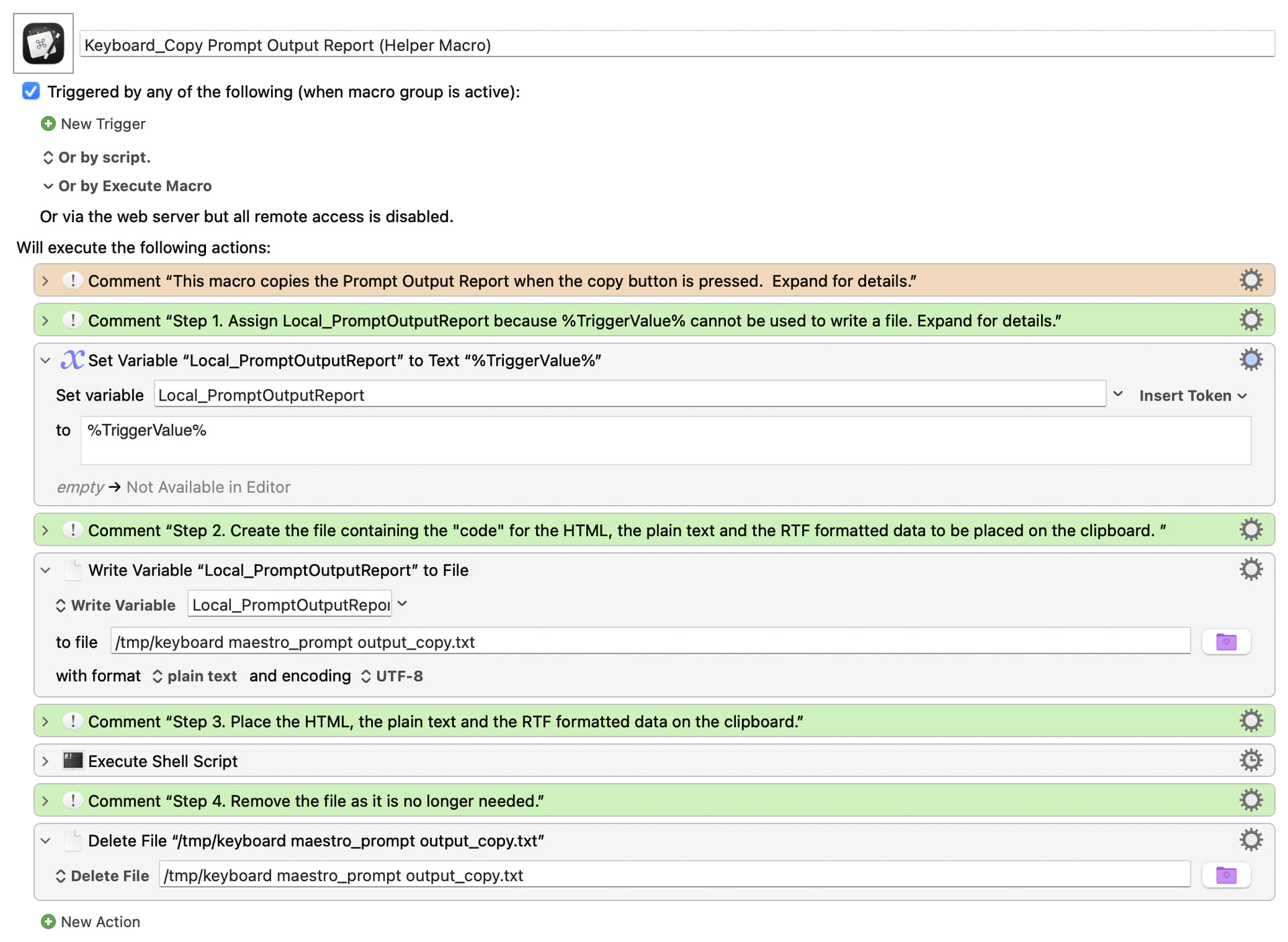
The design. The Custom HTML Prompt builds three versions of the report, stacks them into one string separated by a marker, and passes the lot to a helper macro as the trigger parameter. The macro is four actions: set a variable from %TriggerValue%, write it to a temporary file as UTF-8, run a shell script, delete the file. The macro, which is well commented, is below:

Keyboard_Copy Prompt Output Report (Helper Macro).kmmacros (28.6 KB)

Macro Image

The script places all three flavours on the clipboard in a single operation:

Shell Script
osascript -l JavaScript <<'JXA'
ObjC.import('AppKit');
var P  = '/tmp/keyboard maestro_prompt output_copy.txt';
var fm = $.NSFileManager.defaultManager;
if (!fm.fileExistsAtPath(P)) throw new Error('hand-off file missing');
var s = $.NSString.stringWithContentsOfFileEncodingError(P, $.NSUTF8StringEncoding, null).js;
var parts = s.split('\n@@KMCLIP@@\n');
if (parts.length !== 3) throw new Error('expected 3 parts, got ' + parts.length);
var rtf = parts[0], html = parts[1], text = parts[2];
var d   = $.NSString.alloc.initWithUTF8String(rtf).dataUsingEncoding($.NSUTF8StringEncoding);
var att = $.NSAttributedString.alloc.initWithRTFDocumentAttributes(d, null);
if (!att || att.isNil()) throw new Error('RTF will not parse; clipboard left untouched');
var pb = $.NSPasteboard.generalPasteboard;
pb.clearContents;
pb.setStringForType($(rtf),  $('public.rtf'));               // TextEdit reads this
pb.setStringForType($(html), $('public.html'));              // Word and Excel read this
pb.setStringForType($(text), $('public.utf8-plain-text'));   // everything else
JXA

That RTF check before clearContents earns its place: if the incoming RTF is ever malformed the script stops and the user's existing clipboard survives, rather than being wiped and replaced with rubbish.

Nige_S, on Named Clipboards. I tried but I curl not get to work, and I checked properly rather than guessing. Here is Keyboard Maestro's complete list of clipboard actions:

ACopyClipboard  ARemoveClipboardFlavors  ASetClipboardToText
ASetClipboardToImage  ASetClipboardToFileReference  ASetClipboardToPastClipboard

There is no add, no append, no set-flavour. Every Set replaces the entire clipboard and Copy Clipboard duplicates one wholesale. So a Named Clipboard will faithfully preserve every flavour of something it captures, but nothing anywhere lets you build one up in stages: the moment you write the HTML you have destroyed the RTF, Named Clipboard or System.

Nige_S, on whether RTF alone would do. Very nearly. RTF alone serves TextEdit and Word correctly. Excel is the holdout: it needs the HTML, so both have to be present together. That is the entire reason for the exercise.

Five things I learnt (with Claude Code's help), in case they save someone else a day.

1. A Custom HTML Prompt cannot place RTF, and it fails silently. I tried text/rtf, public.rtf, application/rtf, text/richtext and com.apple.flat-rtfd. Every one is accepted with no error and none arrives. WebKit diverts the data to com.apple.WebKit.custom-pasteboard-data, which only web pages can read. There is nothing to catch, so it is very easy to believe this is working when it is not.

2. %TriggerValue% carries RTF perfectly. I worried about the backslashes, so I tested it with backslashes, escaped backslash pairs, braces, newlines, a dagger, and the literal text %TriggerValue% and %Variable%Local_Foo% embedded inside the payload. All 263 characters arrived byte for byte identical, and Keyboard Maestro did not attempt to expand those embedded tokens a second time.

3. Read File to System Clipboard is excellent, with one limit. Pointed at a .rtf file it delivers genuine rich text and preserves exact column widths through the round trip; I measured 390pt / 10.5pt / 67.5pt in and the same out. But it always converts to styled text. I fed it a .webarchive containing an HTML table hoping to reach the HTML flavour, and it placed styled text instead, so pasting into Excel put every table cell on its own row down one column. If you only need RTF it is the simplest possible answer and needs no scripting at all.

4. Three RTF traps, all of which cost me a round of testing.

  • \cellx alone is not enough for column widths. A row carrying only \cellx parses as widths of zero and the reader spreads the columns evenly. You need \clwWidth with \clftsWidth3 on every cell.

  • "No border" is \brdrnil, not \brdrnone. \brdrnone is not an RTF keyword, so a reader ignores it silently and falls back to drawing its own full grid. The tables printed with a grid because the instruction was never understood, not because it was disobeyed.

  • Avoid horizontally merged cells. I used \clmgf and \clmrg for full-width section headings, the natural equivalent of colspan. TextEdit does not lay a merged row out against the table's own columns; it redistributes them evenly, so the strip came out narrower than the table and its label wrapped. Emitting one cell per column, shading them all and putting the text in the first, looks identical and survives layout.

5. A control word runs until a non-letter. \intbl followed directly by text swallows the first word, so \intblTest Personal Checking loses the "Test". Close every control word with a space.

On textutil, gently. It is the same converter TextEdit uses on pasted HTML, and it discards every column width. I tried pixel widths, percentages, point widths, widths on <col>, widths on <td>, fixed layout and automatic layout: seven forms, all discarded. Interestingly colspan does survive as a genuine cell merge, so a uniform grid plus colspan is the one way to express proportions through it. For our case we bypassed it and generated the RTF ourselves.

The result is that one Copy button now serves all three applications: Word, Excel and TextEdit each take the version that suits them, with shading, alignment, rules, bold, footnotes and Excel's number formats all intact. TextEdit in particular has never worked properly in any previous attempt at this, until now.

One caveat worth stating plainly, since it cost me most of a day. Excel will not take column widths from a paste, from any source. Not from our HTML, not from HTML that Windows itself built as CF_HTML, and not from XML Spreadsheet, Excel's own native clipboard format, created inside Windows so nothing was lost in transit. In that last case Excel took the data and applied the number formats and still ignored the widths, and did not even offer Keep Source Column Widths. The same HTML opened as a file sets the widths perfectly, so the markup is not at fault: pasting drops content into a sheet that already has its own columns, and Microsoft documents column width as a separate opt-in paste option rather than part of an ordinary paste. So Excel arrives with correct content, formatting and number formats, and default column widths. A double-click on the column edge fixes it, and nothing I send can (at least that I thought of trying). If you have a solution, please let me know.

Thanks again, all three of you.


...is not included in your upload, and that is the important piece.

And similar works for Named Clipboards. The downside is that yes, the format will "devolve" to RTF and plain text -- but how could it be otherwise? You need a common denominator when combining styled text from different sources, and "styled text" is it.

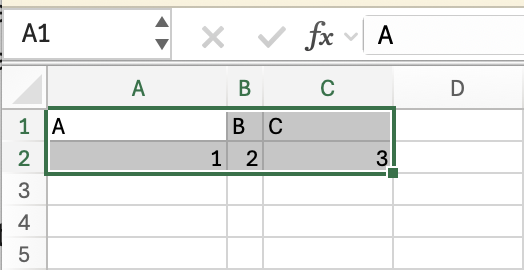
Yes it will. But column width is a column property -- you have to select entire columns, not a range of cells within columns. Copying this:

...won't transfer widths, but this:

...will. And it's the same reasoning for why opening an HTML file works.

Apologies, below is an MVP version:

<!-- Minimal filterable list for a Keyboard Maestro Custom HTML Prompt.
     IN : Local_PromptListItems  one item per line
          Local_PromptListTitle  optional heading
     OUT: Local_PromptListChoice the chosen line, empty if cancelled          -->
<style>
  :root{ color-scheme:light dark; }
  body{ margin:0; padding:14px; font:13px -apple-system,system-ui,sans-serif; }
  h1  { margin:0 0 10px; font-size:17px; }
  #q  { width:100%; box-sizing:border-box; padding:8px 10px; font:inherit;
        border:1px solid rgba(128,128,128,.4); border-radius:8px; }
  ul  { list-style:none; margin:8px 0 0; padding:0; max-height:320px; overflow:auto; }
  li  { padding:7px 10px; border-radius:6px; cursor:default; }
  li.sel{ background:Highlight; color:HighlightText; }
</style>

<h1 id="title">Choose</h1>
<input id="q" autofocus placeholder="Type to filter &middot; Esc to cancel">
<ul id="list"></ul>

<script>
var KM = window.KeyboardMaestro;
var get = function(n){ try{ return (KM && KM.GetVariable) ? (KM.GetVariable(n)||'') : ''; }catch(e){ return ''; } };

var ITEMS   = get('Local_PromptListItems').split('\n').filter(function(s){ return s.trim(); });
var visible = ITEMS.slice();
var cursor  = 0;
var title   = get('Local_PromptListTitle');
if (title) document.getElementById('title').textContent = title;

function draw(){
  document.getElementById('list').innerHTML = visible.map(function(item,i){
    return '<li class="'+(i===cursor?'sel':'')+'" data-i="'+i+'">'+
           item.replace(/[<&]/g, function(c){ return c==='<' ? '&lt;' : '&amp;'; })+'</li>';
  }).join('');
  var sel = document.querySelector('li.sel');
  if (sel) sel.scrollIntoView({block:'nearest'});
}

document.getElementById('q').addEventListener('input', function(e){
  var needle = e.target.value.toLowerCase();
  visible = ITEMS.filter(function(s){ return s.toLowerCase().indexOf(needle) > -1; });
  cursor = 0; draw();
});

document.addEventListener('keydown', function(e){
  if (e.key === 'ArrowDown'){ cursor = Math.min(cursor+1, visible.length-1); draw(); e.preventDefault(); }
  else if (e.key === 'ArrowUp'){ cursor = Math.max(cursor-1, 0); draw(); e.preventDefault(); }
  else if (e.key === 'Enter'){ finish(visible[cursor] || ''); }
  else if (e.key === 'Escape'){ finish(''); }
});

document.getElementById('list').addEventListener('click', function(e){
  if (e.target.dataset.i !== undefined){ finish(visible[+e.target.dataset.i]); }
});

/* Write the result, THEN close. Submit() ends the window, so anything after it
   may never run. */
function finish(choice){
  try{ if (KM && KM.SetVariable) KM.SetVariable('Local_PromptListChoice', choice); }catch(e){}
  try{ if (KM && KM.Submit) KM.Submit(choice); }catch(e){}
}

draw();
</script>

Ahhhh, don't I feel stupid! :face_with_peeking_eye: :flushed_face:

Appreciated, I don't know whether I can replicate that since I am copying from within an HTML form and not from Excel itself. I will need t think about this.

It also appears that for teh past to work I need to select a column, not a cell, At least that is what my testing revealed.

That's the HTML for the prompt, not a macro or Action, and there's no mention of the "Copy" button referenced in your OP.

Without having the Prompt containing at least a representation of the report plus the button and function you are doing the "copying" with it's going to be difficult to get anywhere!

Apologies...

Keyboard_Copy Prompt Output Report (Helper Macro).kmmacros (28.5 KB)

I have the copy working perfecting rom TexEdit and Word. I am stuck on Excel format wise, the information does paste. I still think I am stuck because I do not have the Excel sheet with the "columns to copy" as you note above.

Isn't that the "helper" you posted earlier?

What we need is the macro that puts up the Prompt, complete with table (or a spoofed version if that's filled with data from elsewhere) and "Copy" button. That's what's producing the "original data" that you seem to be passing to this helper (which then writes to disk, reads, and processes to Clipboard).

Rather beside the point, but is there some advantage I'm not seeing in executing your JXA via a shell script Action rather than an "Execute JavaScript for Automation" Action?

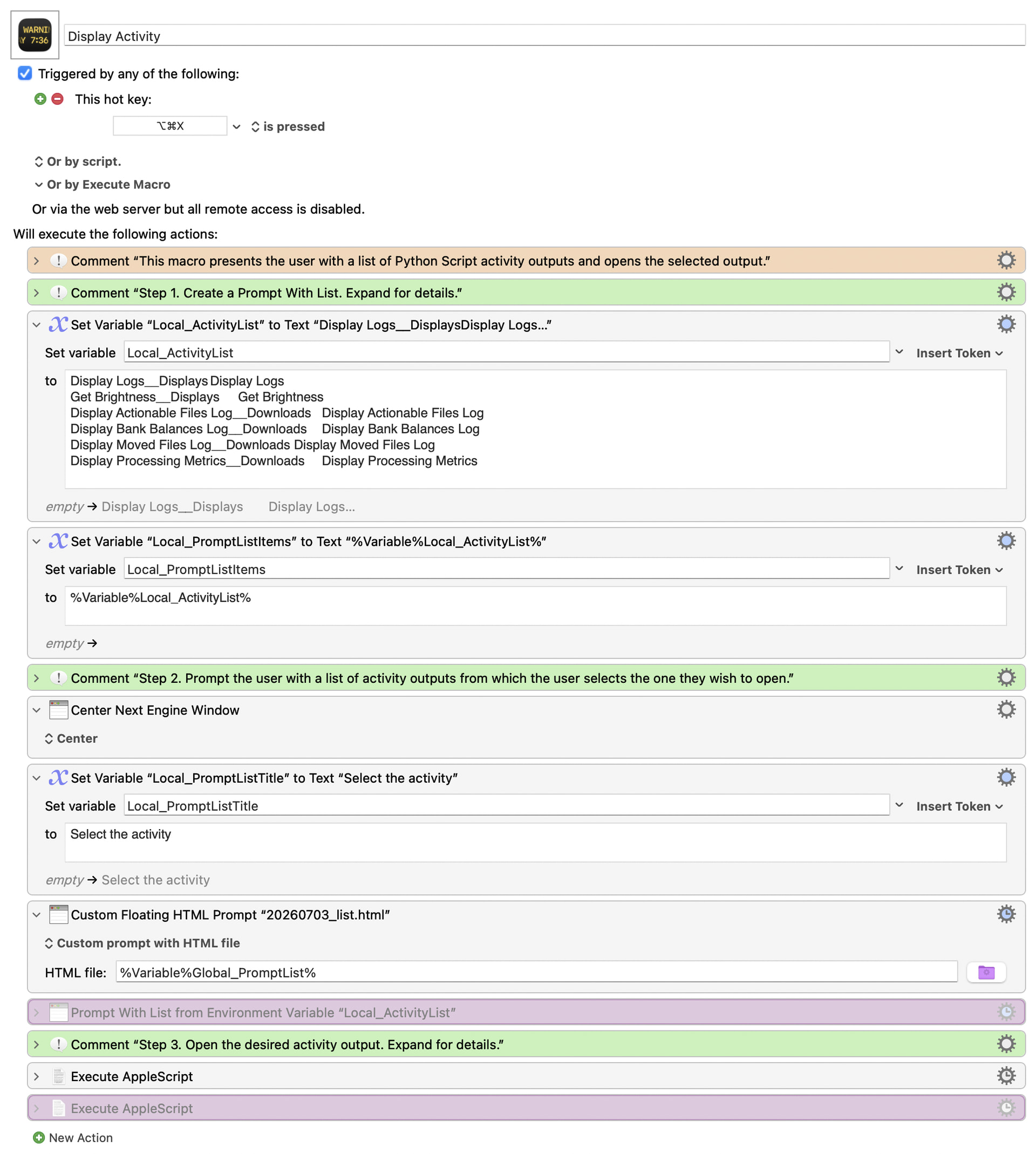
Apologies, here you go...I know it seems a bit convoluted but it is set up t un both Keyboard Maestro Prompt With List and my Custom HTML Prompt, that is why it looks somewhat "repetitive"

Macro Image

Display Activity.kmmacros (23.1 KB)

A sample table:

Ahhh, good catch, I will make the change!

Since I've no Global_PromptList variable nor an HTML file on disk to point it at, I took a punt and put your earlier HTML code in there and got a "Choose" prompt.

Of course, that's useless because I've got none of the macros that create the report, and with no way to generate the report there's no way to view the HTML nor find out what the "Copy" button does.

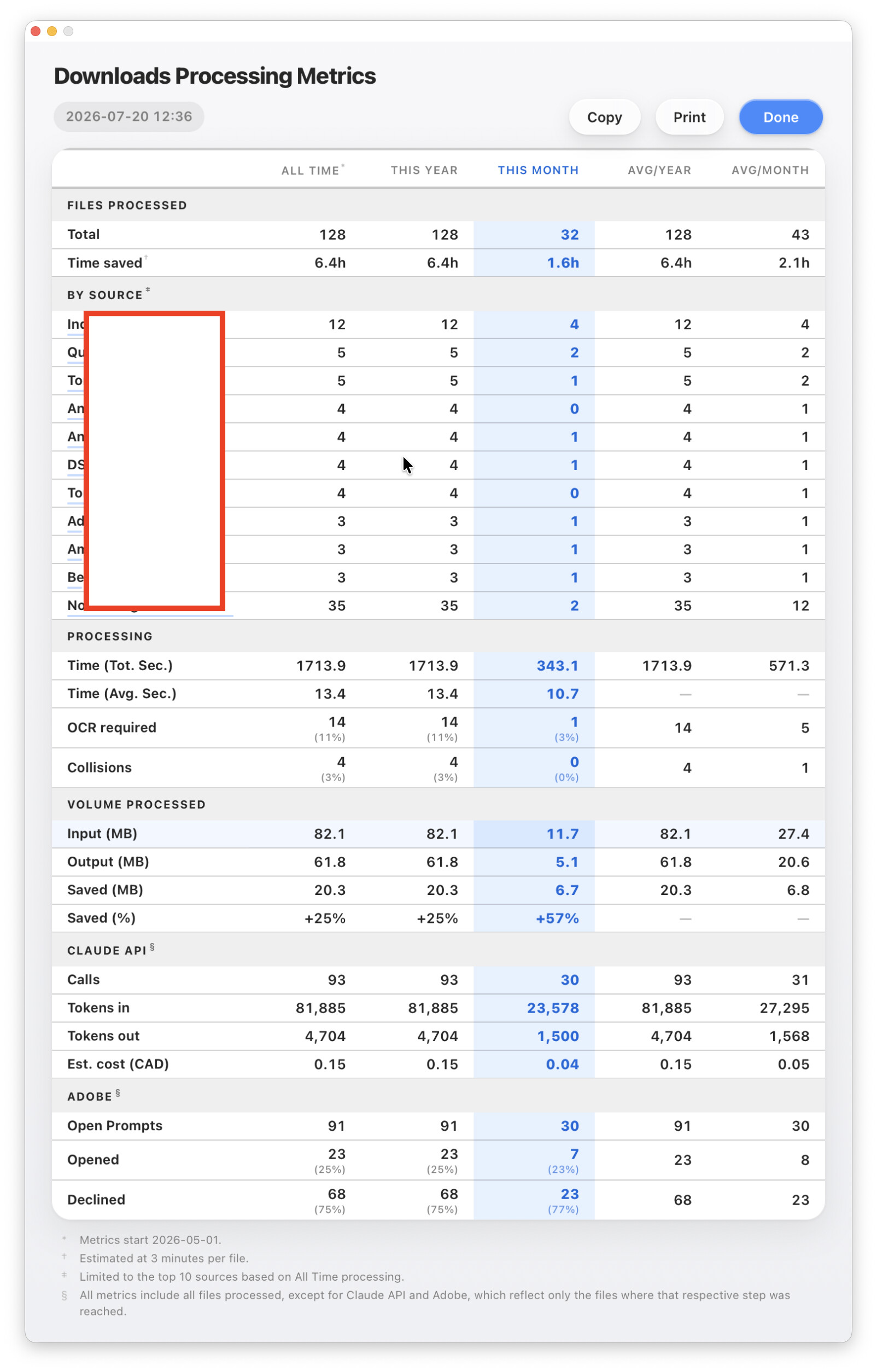
You'll need to post the HTML for the screen shot above -- down to "Time Saved" will be more than enough, as long as that includes the buttons and their attached functions. That's what matters -- it'll show what you are "copying" and how.

Agreed ad apologies.

Import the following and run the DEMO macro therein, you will find everything that you need!

KMPrompt clipboard demo.kmmacros (16.1 KB)

A follow up response...

Thanks Nige, I chased down both of your points properly, and both are dead ends for this particular case, but for reasons worth recording.

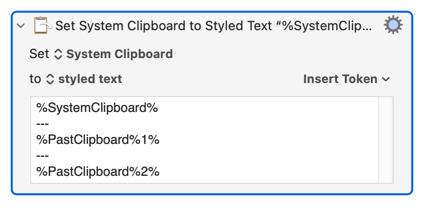
On the styled-text approach (three variables, then Set System Clipboard to Styled Text). You are right that it works and it is simpler than a script, and you are also right that it "devolves". I tested exactly what it places, and the mechanism is clear: when you hand macOS styled text, AppKit serialises public.rtf and public.utf8-plain-text, and no public.html flavour is created at all. So the method delivers RTF and plain text cleanly, and that is genuinely all.

For my case that is the problem. TextEdit is happy with the RTF, but Word and Excel need the HTML, and specifically my hand-built HTML: it carries mso-number-format so Excel applies the right number format per column, and a colgroup so Word keeps the column widths. The styled-text path cannot carry any of that, because it never produces an HTML flavour to carry it in. That is the "devolve" you flagged, and it is why I ended up placing all three flavours myself with NSPasteboard: it is the only way to put the hand-built HTML on the clipboard alongside the RTF. If I did not care about Excel number formats and Word column widths, your way would be the better choice.

On Excel column widths. You are completely right about Excel: select entire columns, copy, and the widths transfer, even across workbooks; select a cell range and they do not. I dug into why, because I wanted to know if a Custom HTML Prompt could reach it.

It cannot, and here is the tell. I dumped the Windows clipboard after a full-column copy, and the widths are present in the HTML flavour, which looked promising. So I took Excel's own exact HTML, the bare <col> elements with point widths and all, put my data in it, and pasted it as HTML. Widths ignored. I then tried pasting into selected destination columns rather than a cell, in case the gesture was the trick. Still ignored.

That settles it: Excel's own HTML, delivered without Excel's native clipboard format alongside it, does not carry widths on paste. So Excel never reads widths from HTML; it reads them from its native format, and the HTML copy merely contains them as a record. A Custom HTML Prompt can only place HTML, RTF and plain text, never Excel's native format, and the nearest thing, XML Spreadsheet, I placed directly on the Windows clipboard via PowerShell as a test and Excel still ignored the widths. So the full-column transfer you demonstrated rides on Excel's native format, which is exactly the one thing I have no way to produce.

Net result: everything else survives, the RTF table for TextEdit, the number formats and structure for Excel, the column widths for Word, and Excel column widths are the single thing that does not, for a reason I now understand precisely rather than guess at. Both of your points sent me somewhere useful even though both closed doors. Much appreciated.

I suspect that is not the Prompt from your OP :wink:

I further suspect that you were never, ever, trying to put anything on the System Clipboard from the prompt window (point 1 of OP) -- which is why I wanted to see the Prompt code, to find out how you were doing that. It looks like you've always been returning plain text for further processing.

I have to say -- in brief tests (and having to hack about to grab your Prompt HTML output only, which may have changed things!) a simple HTML -> RTF -> clipboard via textutil seems to work for both Word and TextEdit Pasting, including column widths, and could probably get near-enough-for-beer if the CSS was done better (by me in my tests, not you in your macro).

Excel's a lost cause :wink: Though I'm not sure what you are trying to achieve there, especially with respect to column widths. If it's a new Workbook it sounds like you could write the HTML to file then open it. If you are pasting into an existing Workbook then Excel will always honour the Sheet's existing column widths (it would be odd if it didn't) -- either Paste into pre-sized columns or Paste-then-resize.

Regardless -- you've got to where you want and have good results for both Word and TextEdit, plus as good a result as Excel will allow. I won't pretend to understand how you're combining the flavours into a single Clipboard record, but if it works, it works! I did think about doing that with AS -- before KM and it's flavour removal I would do things like:

set clipBits to (get the clipboard as record)
set theRTF to «class RTF » of clipBits
set theString to string of clipBits
set the clipboard to {«class RTF »:theRTF, string:theString}

...to remove all flavours except RTF and the various strings -- for example, when an app had a preference for public.html but interpreted it badly -- but building your HTML and RTF data blobs from scratch is beyond me :frowning:

Thanks Nige, genuinely useful, and I appreciate you hacking about to grab the output to test it.

For anyone arriving cold: the Copy button sits on a themed Custom HTML Prompt window I use in place of Display Text. A script hands its text to the window, the window renders it as a formatted, themeable report, and Copy is how that report leaves the window intact for Word, Excel, TextEdit or plain text. The clipboard juggling below is just that last step.

It is original version of it. Albeit, a very highly edited version thereof.

Full Disclosure: All / most of this is significantly well over my head and was only made possible through a lot of help with Claude Code. I did ask a ton of questions and try to learn as much as possible along the way.

Yes and no. The intermediate goal was the System Clipboard but the ultimate objective was to paste formatted text from the HTML prompts that I created into Excel, Text Edit or Word.

On textutil: you are right that HTML → RTF → clipboard is the low-friction route, and it does carry into both TextEdit and Word. I went and looked at what textutil actually emits, because I wanted to understand why my own early attempts drifted.

For a two-column table sized 240 to 90, textutil records the true proportions in the cell preferred width (\clwWidth 4800 vs 1800), but it sets the actual column boundaries (\cellx ) to equal halves. TextEdit, being the same Cocoa text engine, honours the preferred width and lays the columns out correctly; Word tends to lay out from \cellx , so the widths can come out even. That is, I think, exactly why you landed on "near enough for beer" rather than exact: the fidelity depends on which field the receiving app trusts.

That is the one reason I hand-build the RTF rather than let textutil do it. I compute \cellx directly, so the widths are exact and identical in TextEdit and Word, and I can control the things a generic importer flattens: the hairline gridlines, the shaded section strips, the single top rule, tabular figures, and the footnote spacing. It is more code, but it takes the receiving app's interpretation out of the equation. Your route is the right first reach if someone wants ninety percent for ten percent of the effort.

On Excel: you have named the ceiling exactly, and to be honest, yes, pushing our own widths in was the goal for a good while. I went at it hard: ordinary Paste, Keep Source Formatting, Paste Special as HTML, and finally Excel's own native XML Spreadsheet format placed on the clipboard from inside Windows so nothing crossed the Parallels bridge. Every time, Excel took the data and the number formats and ignored the widths, and it never once offered Keep Source Column Widths, because that option only exists for a copy made inside Excel. It does honour widths on file-open, which is precisely your "write the HTML to a file and open it" suggestion. So in the end I stopped fighting the paste: the HTML flavour lands the numbers in the right cells cleanly, Excel sizes them as it likes, and if exact widths ever matter I open the file. Your file-open point is the escape hatch.

On combining the flavours: the window itself cannot place RTF at all (WebKit quietly swallows it), so the window builds all three representations and hands them to a small helper macro through Trigger.

The helper drops them onto a single NSPasteboard item in one Execute JavaScript for Automation action, public.rtf and public.html and public.utf8-plain-text side by side, and the receiving app picks the one it understands. Same shape as your old AppleScript approach, just moved into JXA because Keyboard Maestro's own clipboard actions collapse everything to a single flavour. So TextEdit takes the RTF, Word and Excel take the HTML, everything else takes the plain text, all from one Copy.

Here's a generic demo adapted from this thread:

How Do I Set Clipboard (Pasteboard) to Both Rich Text (RTF) and Plain Text? - AppleScript - Late Night Software Ltd.

I doubt it will have much bearing on the specific issues hashed out here, but might serve as a starter for anyone attempting the task of this thread's title (like me :relieved_face:).

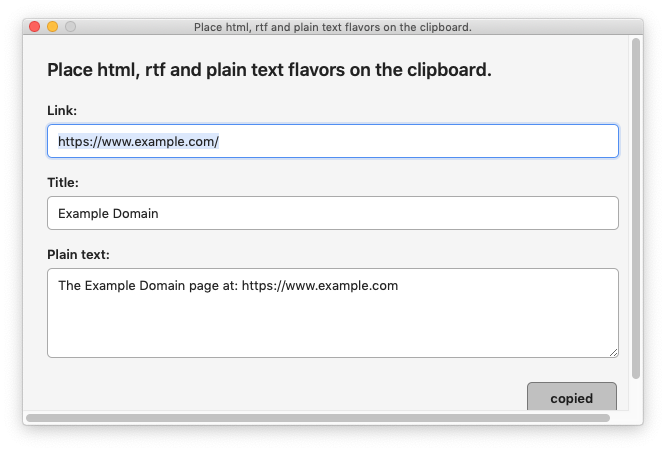
The demo takes a web Link, Title and plain text from Custom HTML Prompt fields and places on the clipboard:

  • a clickable link as public.rtf
  • plain text as public.utf8-plain-text
  • html as public.html

USAGE:

Enable and run the macro.

It presents a Custom HTML Prompt like this:

After typing in the fields, click the Copied button.

An AppleScript makes a html link from the Link and Title fields.

AppleScript
use AppleScript version "2.4" -- Yosemite (10.10) or later
use framework "Foundation"
use framework "AppKit"
use scripting additions
property author : "@CRLF"
property kminstance : missing value

set kminstance to system attribute "KMINSTANCE"
--┏━━━━━━━━━━━━━━━━━━━━━━━
--┃ PURPOSE: Set the clipboard to flavors:
--┃  public.utf8-plain-text
--┃  public.html
--┃  public.rtf (from html)
--┗━━━━━━━━━━━━━━━━━━━━━━━
-- INPUT: 
set kminstance to system attribute "KMINSTANCE"
tell application id "com.stairways.keyboardmaestro.engine"
	set theLink to getvariable "localLink" instance kminstance
	set theTitle to getvariable "localTitle" instance kminstance
	set thePlainText to getvariable "localPlainText" instance kminstance
end tell

set theHTML to "<a href=\"" & theLink & "\">" & theTitle & "</a>"
set theHTML4RTFConversion to theHTML


set pb to current application's NSPasteboard's generalPasteboard()
pb's clearContents()
if thePlainText is not "" then
	copyToClipboardPlainText(thePlainText, pb)
end if

if theHTML is not "" then
	copyToClipboardHTML(theHTML, pb)
end if

if theHTML4RTFConversion is not "" then
	copyToClipboardHTMLAsRTF(theHTML4RTFConversion, pb)
end if
set text item delimiters to linefeed
set theTypes to pb's types as list as text

return theTypes


on copyToClipboardPlainText(thePlainText, pb)
	return pb's setString:thePlainText forType:(current application's NSPasteboardTypeString)
end copyToClipboardPlainText

on copyToClipboardHTML(theHTML, pb)
	set htmlData to (current application's NSString's stringWithString:theHTML)'s ¬
		dataUsingEncoding:(current application's NSUTF8StringEncoding)
	return pb's setData:htmlData forType:(current application's NSPasteboardTypeHTML)
end copyToClipboardHTML

on copyToClipboardHTMLAsRTF(theHTML4RTFConversion, pb)
	set rtfData to htmlToRTF_Data(theHTML4RTFConversion)
	pb's setData:rtfData forType:(current application's NSPasteboardTypeRTF)
end copyToClipboardHTMLAsRTF

on htmlToRTF_Data(theHTML)
	set htmlData to (current application's NSString's stringWithString:theHTML)'s dataUsingEncoding:(current application's NSUTF8StringEncoding) --👈🏽 Correctly deal with NSUTF8StringEncoding (so that glyphs will render).	
	set readOptions to {CharacterEncoding:4, DocumentType:"NSHTML"}
	-- readOptions =  the record coerced from: 
	-- (current application's NSDictionary's dictionaryWithObjects:{current application's NSHTMLTextDocumentType, current application's NSUTF8StringEncoding as integer} forKeys:{current application's NSDocumentTypeDocumentAttribute, current application's NSCharacterEncodingDocumentAttribute}) as record
	set {attString, theError} to (current application's NSAttributedString's alloc()'s initWithData:htmlData options:readOptions documentAttributes:(missing value) |error|:(reference))
	if attString is missing value then error (theError's localizedDescription() as text) number -10001
	-- convert to RTF data
	set rtfData to attString's RTFFromRange:{0, attString's |length|() as integer} documentAttributes:(missing value)
end htmlToRTF_Data

on htmlToRTF_DataViaTextUtil(theHTML)
	set shellCommand to ¬
		"/usr/bin/printf '%s' " & quoted form of theHTML & ¬
		" | /usr/bin/textutil -stdin -format html -convert rtf -stdout"
	
	set rtfText to do shell script shellCommand
	
	set rtfData to ¬
		(current application's NSString's stringWithString:rtfText)'s ¬
		dataUsingEncoding:(current application's NSUTF8StringEncoding)
	
	return rtfData
end htmlToRTF_DataViaTextUtil

It sets the clipboard to the plain text field.

It places the html on the clipboard as public.html

It converts the html to rtf via NSAttributedString and places that on the clipboard using NSPasteboard. (a textutil conversion command would look like this:

set shellCommand to ¬
	"/usr/bin/printf '%s' " & quoted form of theHTML & ¬
	" | /usr/bin/textutil -stdin -format html -convert rtf -stdout"

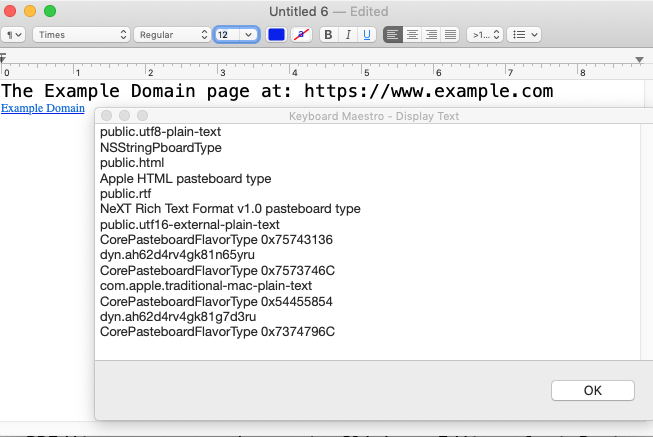
It then returns the flavors on the clipboard to a variable, as reported by NSPasteboard.

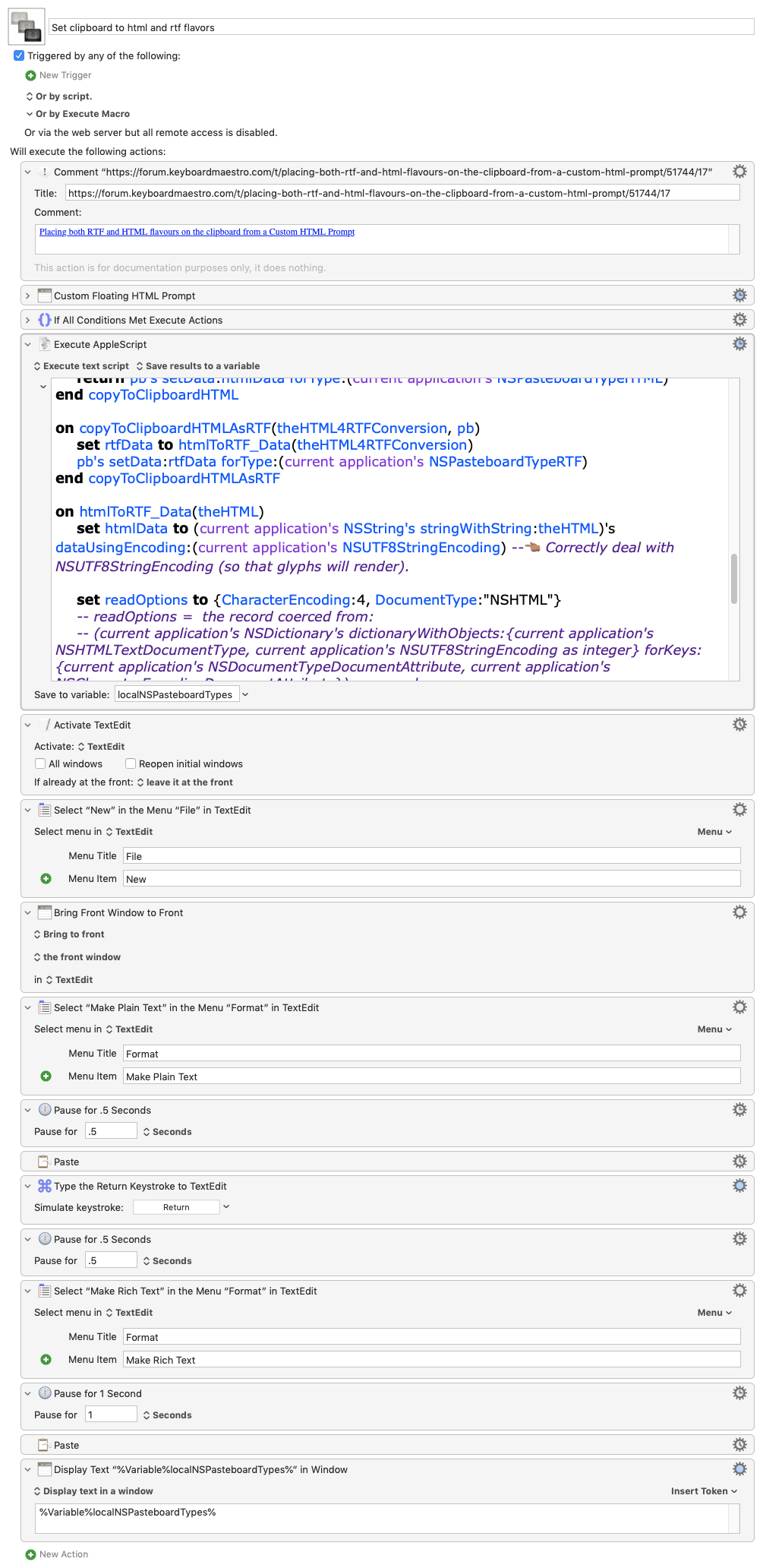
The macro goes on to activate TextEdit and opens a new document.

It selects Format --> "Make Plain Text" menu item.

Then pastes the clipboard. You should see plain text.

Then selects Format --> "Make Rich Text" menu item.

Then pastes the clipboard. You should see the clickable link.

Those are shown in a Display Text in Window action.

Finally, it shows the clipboard flavors--previously saved--in a Display Text in Window action.

TextEdit, as far as I know, has no mode to receive the public.html flavor.

(If you have BBEdit, open a new document. Click on Edit, select Paste submenu and select HTML. You should see the html.)

Image

Set clipboard to html and rtf flavors.kmmacros (18.4 KB)