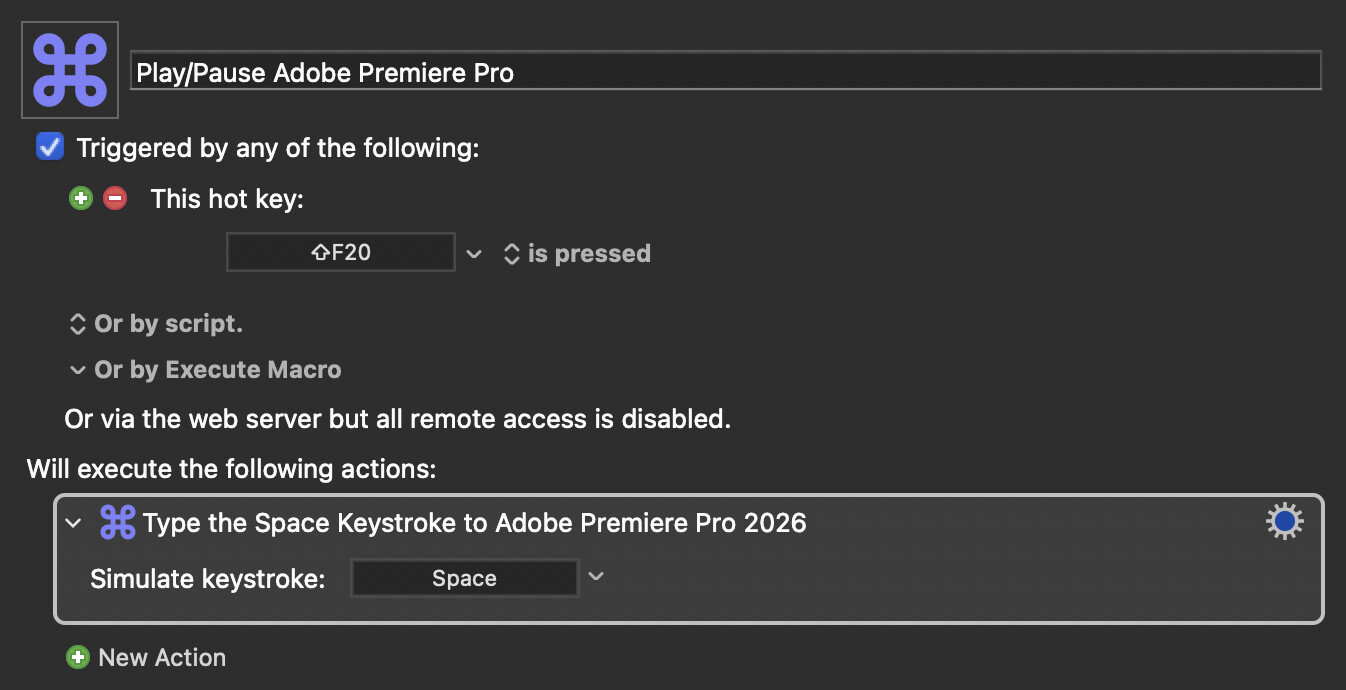
Hi guys, fairly simple macro here I can’t get to work to play in Adobe Premiere Pro, just pause if it’s already playing. It should do both. Any ideas?
Is there a play/pause menu item? If so, that might be the better approach. That way, you won't accidentally type a Space somewhere you don't want it.
And Keyboard Maestro can use regular expressions for menus, so if it's one that changes, you could do something like this
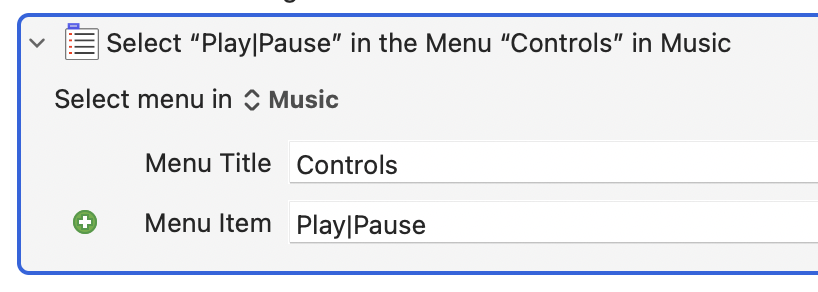
That works for Music's Play and Pause menu item; the pipe symbol is "or" in a regular expression.
-rob.
1 Like
You would think so, but Adobe, in all their wisdom, decided no menu item was necessary. 
Always one or two steps ahead, Adobe is . My guess is that, when paused, the Space character is being eaten by (some input area that may not even be visible), but that's not happening when in playback mode. But that's a total guess.
I guess another approach would be to click the onscreen Play/Pause button—if it's always at the same location, that's easy; if it moves, you'd have to use two images (one for each state) to find its location onscreen,
-rob.
1 Like
There will however be menu items for other functions, and I wonder if some of those functions—and therefore their menu items—will be made unavailable when Play is activated. If that does turn out to be the case, then you could test for the availability of such a menu item in an if action to determine whether play is in progress.
2 Likes
Can you "Keystroke: L" instead of using the space bar? IIRC, a single tap of "L" is play forward at x1 speed in Premiere.
1 Like
I think you’re right that screen click may be my best option here. Unfortunately, the button doesn’t work unless Premiere was already active. So I’d have to click, pause, and click again. Yuck.
That’s a brilliant idea, though it still doesn’t give me a way to actually execute the play command.
I had the same idea. Same problem—just doesn’t work.
I also tried setting a custom weird shortcut for play (⌘⇧⌃P). Same results again.
Or preface the click action with an Activate action.
-rob.
1 Like
Try the following AppleScript Action -- to be executed when Premiere is frontmost:
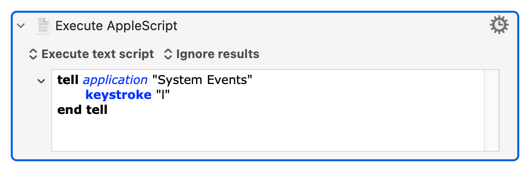
There's an Event hierarchy -- it may be that Premiere is "listening" earlier* in that hierarchy than KM's simulated keystrokes are placed. AS/System Events keystrokes seem to happen easier than KM's so Premiere match catch those.
If the above works you might be able to avoid foregrounding Premiere by sending the keystroke to the Premiere process. But one step at a time.
*I'm not sure "earlier" is right with respect to hierarchies, but "higher" or "lower" would imply I know which way up the hierarchy is! And "closer to the physical keyboard Event" is a bit of a mouthful...
1 Like
Thanks, @Nige_S. This does work, but keeping Premiere in the background is the goal. I didn’t spell that out earlier.
Then we can move on to the next bit, which is
But before going any further -- I'm not a Premiere user, but doesn't it have (at least) two Play/Pauses, for Source Monitor and Program Monitor? Which are you trying to toggle?
1 Like
But before going any further -- I'm not a Premiere user, but doesn't it have (at least) two Play/Pauses, for Source Monitor and Program Monitor? Which are you trying to toggle?
More or less, yes. You can also press play when the timeline panel is in focus, and that will play the program monitor as well.
Sadly, nothing I've tried will achieve this. Premiere's AppleScript dictionary is all but non-existent and Adobe's decision to roll their own interface (because cross-platform consistency is, apparently, more important than letting users take advantage of features a particular platform may offer) means no UI elements are exposed to System Events.
You might be able to do something via Premiere's built-in scripting, but even that is changing so a lot of web advice is out of date. I don't know if you can call Premiere scripts from the "outside" anyway -- some pages I've seen suggest that you can on Windows, but not on macOS.
I hate giving up, but this one's got me stumped... Hopefully someone smarter than me will step forward!
1 Like
I hate giving up, but this one's got me stumped... Hopefully someone smarter than me will step forward!
I sincerely appreciate the effort!
Does it still fail if you set a custom keyboard shortcut for Play-Stop Toggle in Premiere? Maybe it’s the spacebar tripping it up.
Also, you can have KM send keystrokes directly to any application, focused or not. I do that with my media players so they don’t have to be called forward just to skip, pause, etc.
1 Like
Does it still fail if you set a custom keyboard shortcut for Play-Stop Toggle in Premiere? Maybe it’s the spacebar tripping it up.
Unfortunately it does still fail. I tried ⌘⇧⌃P (just to pick something wacky I knew wouldn’t conflict with something else somehow).