Hi there, I’m probably doing something wrong, but was utterly stumped by this tonight. I see that in 2018 there may have been another post/bug about Copy to Named Clipboard but it looks like differing behaviour.
I’m in FileMaker Pro, parked in a field with selected text in it, and using this, when there’s text to copy - it works great!
However, if there’s nothing at all in the field, it seems that it doesn’t copy nothing (like it can’t copy NULL) to the clipboard and seems to CANCEL the rest of the macro (as though it was Canceling All Macros). Feels like it just bombs the macro.
I’m on KM11.0.4 … is it possible that Copy To Named Clipboard can’t handle NULL?
I’ve used the clipboard inspector and previously copied values are maintained, ie. ““ or NULL isn’t being pasted to the clipboard.
My reason for using user clipboards was to keep the regular clipboard clear for use. (My understanding of the main reason for user clipboards existing.)
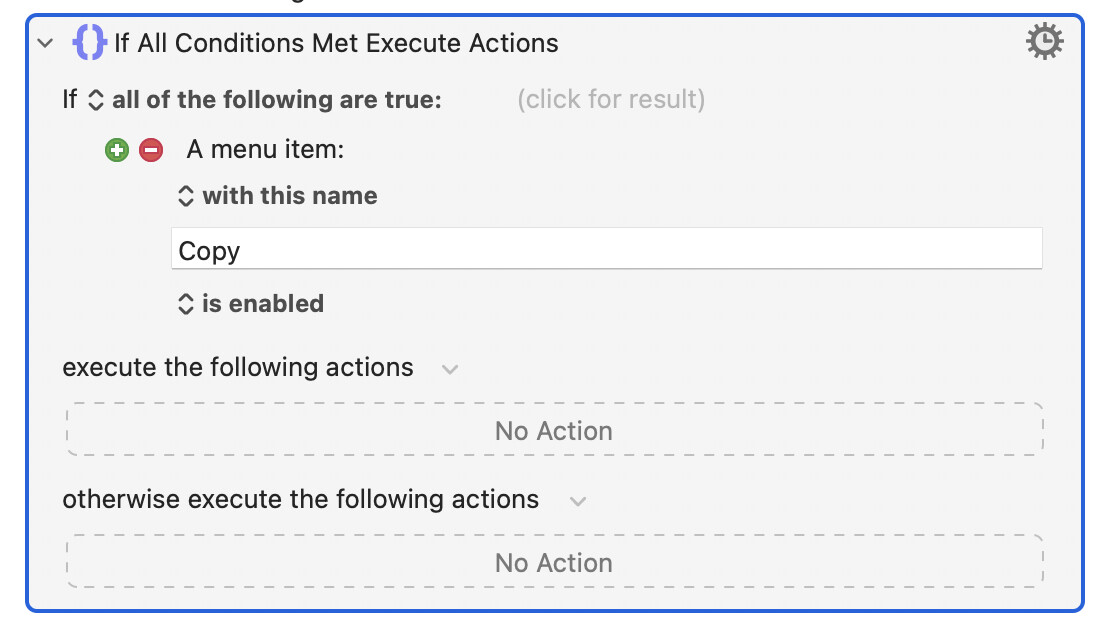
One way around this is to make sure that the Copy menu is enabled in the app before you try to copy. So just put your Copy action inside an "if" based on the Copy menu being enabled:
Thanks guys. @griffman This is a good pre-check. Filemaker does indeed grey out the Copy option when there’s nothing to copy. @peternlewis I was too scared to remove the timeout but I understand now.
Set the named clipboard to whatever you want it to be when empty (eg "" - which is technically not empty, it is plain text with no characters).
Set the timeout on the Copy to Named Clipboard action low, and turn off notification and aborning on timeout.
You may still hear a beep when the Command-C goes unprocessed.
Alternatively, you can use the If Then Else action and the Menu condition to check if the Copy menu is enabled (although applications are not always good at updating such menus appropriately - updating them only when you actually do the Command-C or select the menu).
Not really -- all Copy and Paste is done via the System Clipboard, so you're actually Copying to the System Clipboard then making a copy of that on your Named Clipboard. You can see this if you leave the Clipboard History Switcher open.
Thanks NS, I’m not sure I knew this. Brain going too fast – in fact it’s the offloading of timecode and other text clippings to longer term storage in Named Clipboards that frees up front burner use of System Clipboard that’s the draw in my case. (Was extrapolating an assumption from previous use.) Am heavily referencing Clipboards [Keyboard Maestro Wiki] now, which was very clear about System Clipboard use in this regard. Thanks again.
This idea is too advanced for the little script I’m doing, but: is it possible to use AppleScript or some other coding to directly read/write from/to clipboard-like memory, or does it all have to flow through the System Clipboard I/O ‘pipeline’? I’m guessing if there was any back-end way to read/write Named Clipboards without involving the System Clipboard, Peter would have coded that.
But there's a lot of magic that happens when going through the System Clipboard -- Copy some formatted text in FileMaker and it'll be available to other apps (and even FileMaker) as formatted text, plain text, etc -- that you'll otherwise have to reproduce, so why bother?
There may be better ways to do whatever you are doing in FileMaker using AppleScript, because FileMaker is very scriptable. But Copy and Paste probably isn't one of them!
I hear this. In this hypothetical I would be looking to get plaintext/UTF-8/ASCII moving between apps, but I agree there are too many better (and easier) options.
I should share that the task which started this conversation was copying unstyled text from Filemaker Pro to a Smartsheet (generic web-based spreadsheet platform) in Firefox. FMP field records copy; Firefox:Smartsheet row cells paste. Simple navigation in sync between fields; next row setup...and loop… After a long day, I just forgot to prep NULLs in FMP as ““ or “(placeholder)” for transfer to Smartsheet. My workaround was as lame as to auto-enter “ “ in FMP as default presence of characters in the pertinent transfer fields. Won’t win any programming contests but gets things done against the deadline.
Don't forget you can Copy a FileMaker Pro record in one operation, getting you a line of tab-delimited text that you can then work through in your macro.
Yes, I've seen that issue too, but offhand I can't remember the problematic apps.
@renton, if you download and install the following macro, you'll find a technique that is fast and robust:
You'll want to replace the actions in the otherwise clause with your unique actions . If you try this out and have any questions, please let me know.
That's been my observation, although I've heard a pop rather than a beep. The macro above includes actions to mute all alert sounds for that brief period.
There are occasionally ways to read or write things via the accessibility API or via AppleScript (for example in a web browser you can use the Set Front Browser Field to Text action to set the field without going through the clipboard.
But there is no general way to insert text at the insertion point that works across applications like pasting via the system clipboard does.