One of the major reasons I reverted to MacOS Sierra 10.12 after provisionally updating a couple of years ago was that the newer system had eliminated from Core Services the very useful Network Diagnostics tool, which told you if your Internet connection was working or not. I recently had to update regardless (to Mojave 10.14, the most recent I can use on my late-2013 MacBook Pro) in order to be able to use a certain device, so I again faced the lack of this often-used utility. I asked Peter about this and he kindly sent me this:
You could presumably use a simple network test via an Execute a Shell Script action (action:Execute a Shell Script [Keyboard Maestro Wiki]).
For example:
Keyboard Maestro Actions.kmactions (1.0 KB)
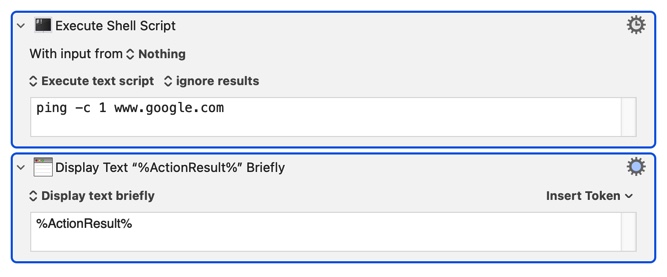
This says "OK" if there's a connection and shows an error message if there isn't. It did the job, but I wanted to avoid the error message and had the further whim that I'd like to see a green or red bullet as Network Diagnostics had displayed. I found that I could put these into two named clipboards, and then I also discovered the Speak Text action and so I threw that in there as well. I couldn't avoid the unwanted error message with %ActionResult%, so I found I could do an if/then based on whether the result of the shell script contained "PING" or not. I put this result in the system clipboard, but may change it to a named clipboard so as not to lose the system clipboard (though this doesn't matter much because I use the Jumpcut clipboard utility). Anyway the macro doesn't restore the full functionality of Network Diagnostics (which you could leave running and it would show you exactly when your connection came back), but it's adequate for my purposes and may interest and/or be of use to someone here.
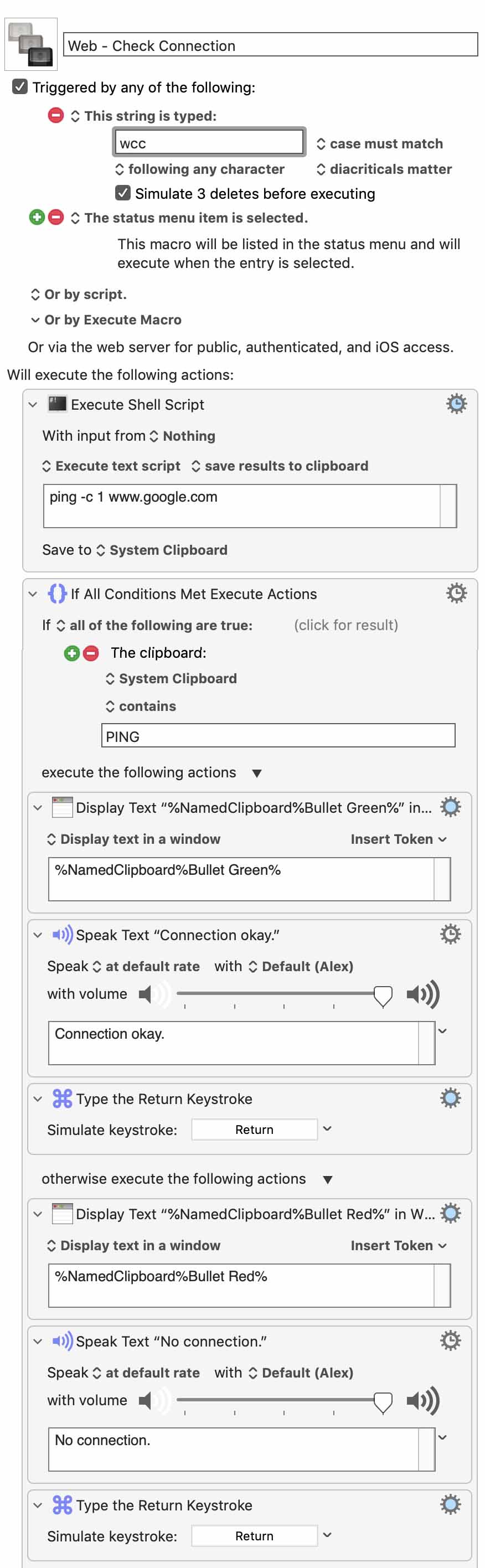
Web - Check Connection.kmmacros (7.2 KB)
