Apple Music likes to launch itself automatically after using AirPods. I don’t like that, and I haven’t found a way to disable this annoyance. KM to the rescue. I still haven’t found a good trigger for this macro. I’ve tried “the audio output device changes,” but no luck with it so far.
What macOS and what is the model of the AirPods?
Tahoe, but it really doesn’t matter because this is a feature that has been in macOS for years. There is also an app called noTunes that was created specifically to stop this nonsense.
Extract from a ChatGPT request
Chat GPT Request
Apple Music likes to launch itself automatically after using AirPods.
What are the options to stop that?
Chat GPT Response
⸻
 2. Disable AirPods “Automatic Connection” (more targeted)
This prevents macOS from automatically selecting AirPods as the audio output, which is what triggers Music.
System Settings → Bluetooth → AirPods → Connect to This Mac → When Last Connected to This Mac.
This is currently the most effective fix for many users.
⸻
I don't have AirPods so I can't test it for you.
I'd install NoTunes via homebrew or compile the xcode project if you feel adventurous!
If you want to do this with KM, see if this works -- it should insta-Quit Music if it is launched by any other method except this macro.
Music Launch Fixer.kmmacros (4.3 KB)
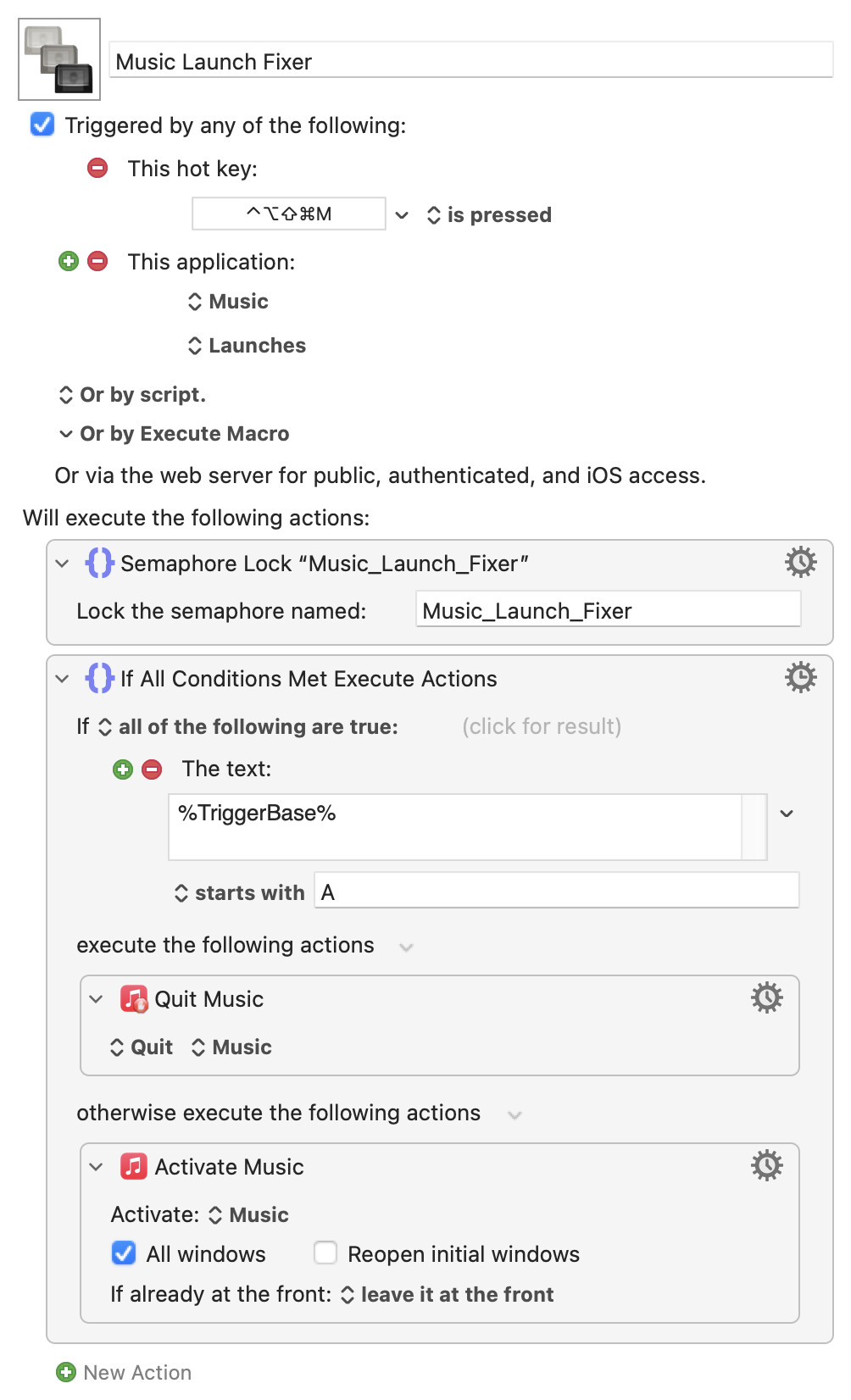
I'm not following this:

How does that work?
My guess is that matches either the "Audio Output Changed" trigger or the "Application" Trigger, and that's what you want. But it leaves open that if Peter ever adds a new type of trigger that just happens to have a name that starts with "A", that could be a very hard to track down bug.
Does it really save anything to do it that way rather than this less ambiguous (more instantly intelligible), more verbose way?:
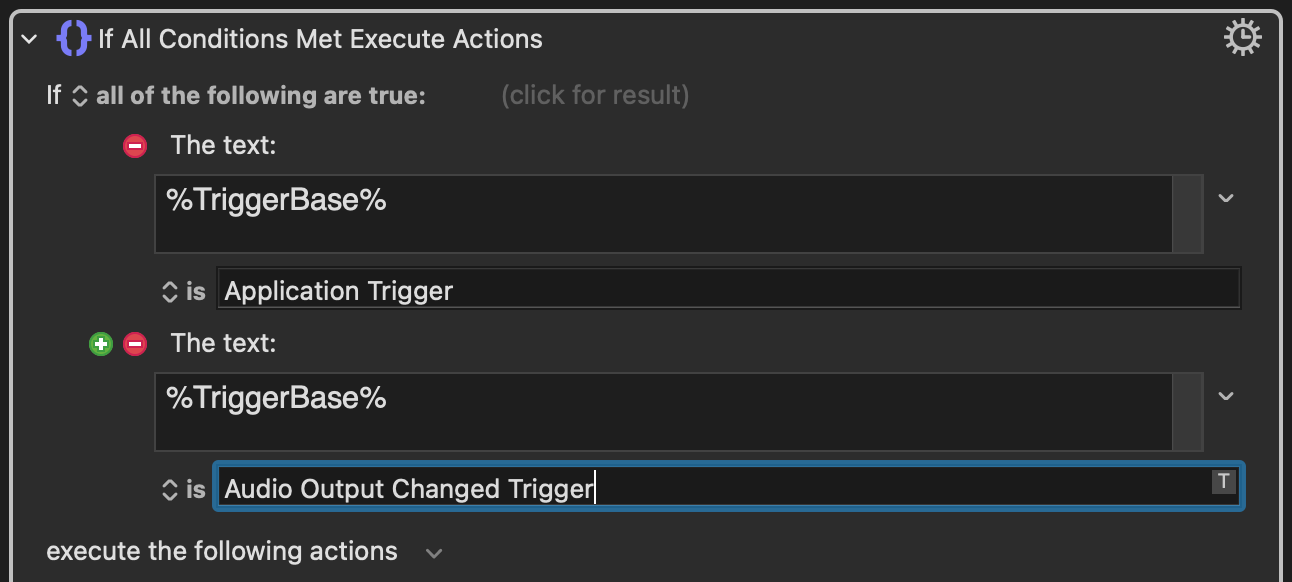
I was going to say "The macro has only two triggers...". Of course, that's not true -- as well as "Hot key" and "Application" there's also "Editor", "URL Scheme", "keyboardmaestro" (the command line utility), "Applescript" (unfortunately...) and the other "Or by script" options...
So, more correctly, under expected use the macro has only two triggers: "Hot key" and "Application". It doesn't matter if Peter adds more "A..." triggers unless we also add them to this macro. Which means we can differentiate between the two by first letter (we could also reverse the logic and use "starts with H").
Using the full "is: Application Trigger" would certainly be more explicit and self-documenting. Two reasons I didn't:
- "Starts with" will be faster, reaching a decision after only one character test. A negligible gain in the grand scheme of things
- I was too lazy to find out the complete
%TriggerBase%string to match against
If this was to be more than a quick test to see if it solved OP's problem then yes, the match should be changed to "is: Application Trigger" for both precision and ease of maintenance.
Hello August (@August)
I’m sure you’re all ready know about EventScripts if you look under the Misc Events Section of the Triggers, there are the Headphones connected and the Headphones disonnected Events.
If you’re able to download the Application from the AppStore or f you’ve all ready installed it give these Triggers a try to prevent Music from Launching.
I’ve not tested this until today - but it should work.
Hmm… Maybe I’ll build something for me that gives me options to choose from what I want to do with my AirPods Pro connected… all based on the actual work setup I’m into…. Sounds challenging but I love this kind of challenges.
Man I love this great tool …
I wonder why Nige (@Nige_S) didn’t mention this earlier in this discussion?
Anyway - I think that’s the best solution you‘ll ever get.
Greetings from Germany 
Tobias
Oops. Never mind. "Audio Output Changed" is not set as a trigger, so it won't ever be a match. Same for future "A..." names of triggers. My bad.
Some good did come out of my mistake. I was looking at the documentation for %TriggerBase% and noticed that "Space Changed Trigger" was not listed.
Actually, no, I did not. I'll download the demo and check it out.
$8 seems a very reasonable price. And KBM macros can be triggered by AppleScript scripts and Shell script command lines that EvenScripts can run, so it seems like they ought to play well together.
Because I'm not sure it'll help...
I can't reproduce the issue but, as I understand it, the problem is that the AirPods can already be connected. But if you switch the output to them or press the stem button -- or even just take them out and put them back in your ears -- that triggers the launch of Music.
noTunes works (worked?) well but, IIRC, it always quits Music when it launches. Not good if you do want to use Music but don't want the normal AirPods behaviour! Hence the "if I launch Music with this macro let it run, otherwise insta-kill it" approach I've tried in the macro above.
Hello Nige (@Nige_S)
Ah, okay … that’s a good point… I’m not a developer (…jet) but based of on my understanding on these Trigger Events it normally should work, so you could actually act based on your liking on them.
Hmm … that automatic Launch of Music when manually switching the output to AirPods is kind of a Bummer. Maybe incorporating the noTunes Application into the automation Purposes and build something that shuts this Application down if you want to use Music and if you don’t want to launch it or keep it running.
I don’t know anything else that could be done by now.
I think there’s something baked into Music that listens to a connection with AirPods that also makes the whole Music Controlling thing working. Perhaps there are some nifty hidden settings to control this behavior… but I think that, if there are such settings, you’d probably loose also the controls for Music.
But as I’m always searching for an alternative solution to eventually getting something like this back - there would be the possibility to use Dictation Commmands or Siri and Shortcuts to customize the controls with even more power then the AirPods are even capable of….
Greetings from Germany
Tobias
Hello August (@August)
Yes, that true. It’s damn worth getting. I always install this Application whenever I set up a new Mac or make a clean install or a Virtual Machine. I can’t imagine to have it not installed anymore.
Maybe I’ll have to do it using a pkg Installer in future because it has disappeared from the German AppStore after the March update that brought support for Music and ditched iTunes Support.
Maybe anyone should talk to it’s Developer what’s going on. It seems that a lot countries aren’t getting this tool anymore. Nige (@Nige_S) mentioned it somewhere else on the forum, I believe, as currently UK AppStore only ?!
Greetings from Germany
Tobias
It's a really useful utility -- if your one of those people who like to disconnect their Time Machine targets between backups, it's worth it just for the "Time Machine backup completed" trigger.
We used to use it with the old Apple Infrared Remote Control, if anyone remembers those
I can see it in the UK App Store, but others were reporting it absent from the EU store. I think it's available in the US, other regions will have to look and see. I've no idea why that is.
Unfortunately, IIRC, the web-downloadable demo isn't something you can register and make the full version so you're limited to the App Store route.