I have a little AppleScript to run AudioSuite in Pro Tools, hit render, and close the window.
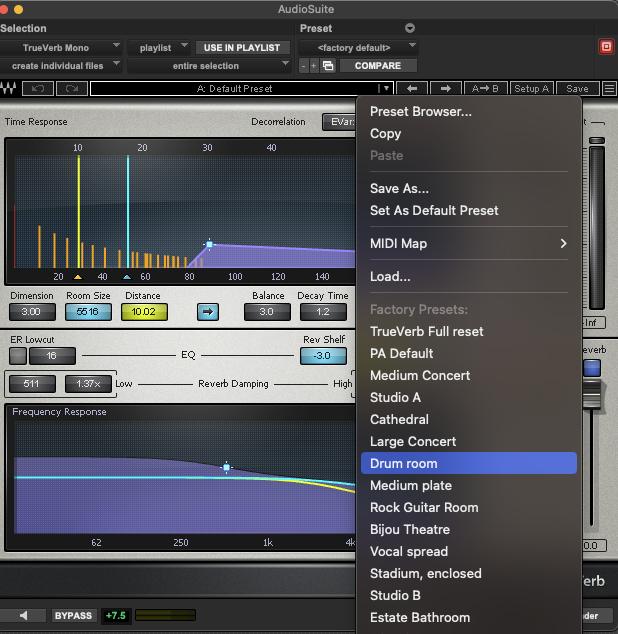
Now I’d like to select the popup menu to choose the “Drum room” preset (as shown in screenshot).
It took a bit of trial and error to find out the right number for closing the window (12), but I can’t find the one corresponding to the menu option.
Is there a way to obtain that information?
-- Apri AudioSuite > Delay > TrueVerb Mono, fai Render e chiudi la finestra
tell application "Pro Tools" to activate
delay 0.3
tell application "System Events"
tell process "Pro Tools"
  -- 1. Apri il plugin dall'AudioSuite

  **click** *menu item* "TrueVerb Mono" **of** *menu* 1 ¬

  	**of** *menu item* "Reverb" **of** *menu* 1 ¬

  	**of** *menu bar item* "AudioSuite" **of** *menu bar* 1

  -- 2. Dai il tempo alla finestra di aprirsi

  **delay** 0.5

  -- 3. Trova la finestra dell'Audiosuite di TrueVerb

  **set** asWin **to** **first** *window* **whose** name **contains** "TrueVerb"

  -- porta la finestra in primo piano

  **perform** *action* "AXRaise" **of** asWin

  -- CHOOSE PRESET

  -- 4. Clicca il pulsante Render

  **click** *button* "Render" **of** asWin

  **delay** 0.3

  -- 5. Chiudi la finestra (il tuo bottone 12 funziona)

  **click** *button* 12 **of** asWin
end tell
end tell