Hi ! I’ve successfully managed to create a macro triggered by a hotkey in order to do the following :
- when there’s an edit selection, the hotkey opens up Beat Detective and applies “Fill and crossfade”, then “Smooth” and then closes the Beat Detective window by typing the following keystroke : “⌃⌥⌘W”.
That is all well and good, however the macro only works when the “Edit Smoothing” menu is already checked on the BD window before triggering the macro with the hotkey. By default the first menu that is checked is “Bar-beat marker generation”. The way this works seems to be session-dependent, meaning that whatever BD menu was checked the last time BD was opened in a session, that’s the menu that is going to be checked when you open BD again.
But what I’d really like to do is to have the macro check the “Edit Smoothing” menu automatically when pressing the hotkey that opens up BD, before applying “Smooth” and “⌃⌥⌘W“.
If anybody has any idea can help me do that, that would be fantastic. Thank you for you time !
L
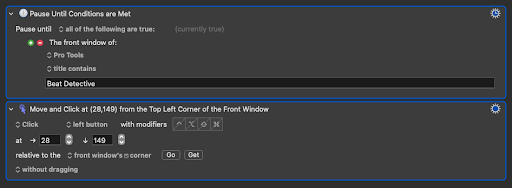
I think the simplest way to do this is to just have the macro click the “Edit Smoothing” Radio button when the beat detective window pops up.
The 2 actions below wait for the window to open, and then click the location of the Edit Smoothing button, relative to the windows corner. These coordinates work on my system, but your milage may vary!
1 Like
If only I’d seen your reply sooner ! I did the screenshot method etc…but after a couple of hours I figured that there was a discrepancy between my usual custom monitor display size (“To scale > Bigger font”) and the actual true size of the screenshot, entering the correct pixel coordinates did not work until I divided those numbers by two and voilà ! I came up with the exact same coordinates as the ones shown on your example. I wish I could find a workaround so that my screenshots would work without me having to resize my display to “Default”. But I guess I won’t have to repeat that action very often so that’ll do for the moment.
Thank you very much for taking the time !
No problem! Using the screenshot/found image is powerful, but I usually use it as a last resort, since it can be finicky.
1 Like