Python can’t access Keyboard Maestro variable (KMVAR_)

Hi everyone,

I’m trying to access a Keyboard Maestro variable from a Python script, but I keep getting None.

Here’s my setup:

#!/usr/local/bin/python3
import os
import json
import urllib.request
import sys

prompt = os.environ.get('KMVAR_LocalPrompt')
print(f"var: {prompt}")

In Keyboard Maestro, I have a variable called LocalPrompt with the value hello.

However, when I run this macro, the output is:
My system is macOS Monterey, Version 12.7.5.

Set Variable to Text.kmactions (481 B)

The first thing to try is to access a global KM variable instead of a local one. Local ones are available only inside the same shell that spawns the python code, and you didn't show us exactly where and how you spawned that python code.

The second thing is to show us how you spawned that python code. Did you run it from an action inside the same macro where the local variable was created? My guess is that this is your problem.

As I often say, there's a 10% chance that I'm wrong.

Thanks for your reply! I’ve attached a screenshot of my code.
I found this code online, so I wasn’t entirely sure about the best way to set up the variable.
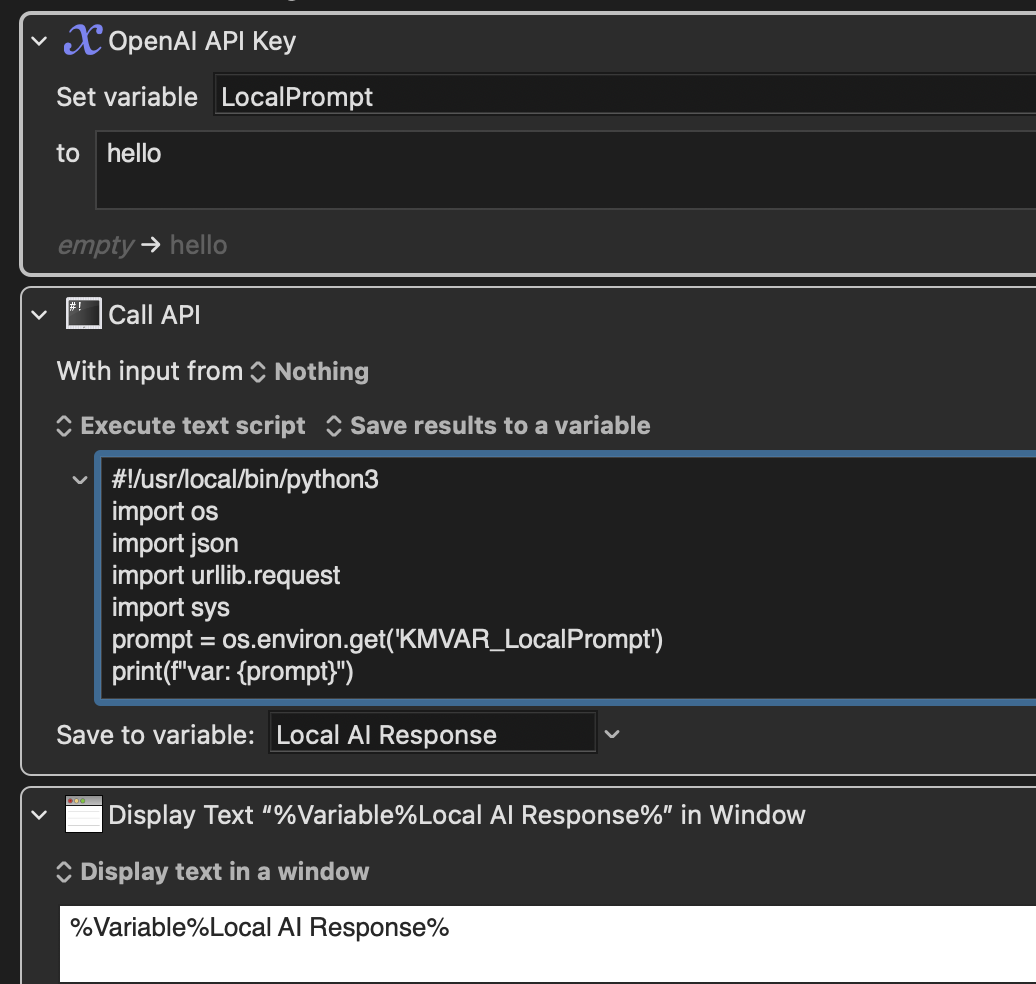
Change "LocalPrompt" to "MyPrompt" (in each location) and I'm guessing that that will work.

I'm not sure whether the middle Execute Shell Script action inherits local variables or not. Based on your result, I would think not.

I changed the variable to a l KM variable named MyPrompt, but the Python script still returns None.

I changed the variable to a l KM variable named MyPrompt, but the Python script still returns None.

Perhaps my average wrongness has now risen to 11%. I have to think about it some more.

Most languages use "printf" not "print(f". Are you sure that's not wrong?

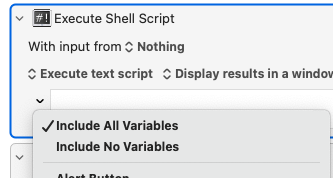
Try clicking on the small down arrow to the left of the script box and make sure it isn't set to "Include No Variables"

1 Like

Great point!

Thanks for your help! The issue has been resolved.

1 Like

Thanks for your help!

1 Like