Quick capture to Apple Notes

Quick capture to Apple Notes: append text to a note with a hotkey

Important disclaimer

The script in this post was created by Claude Code.


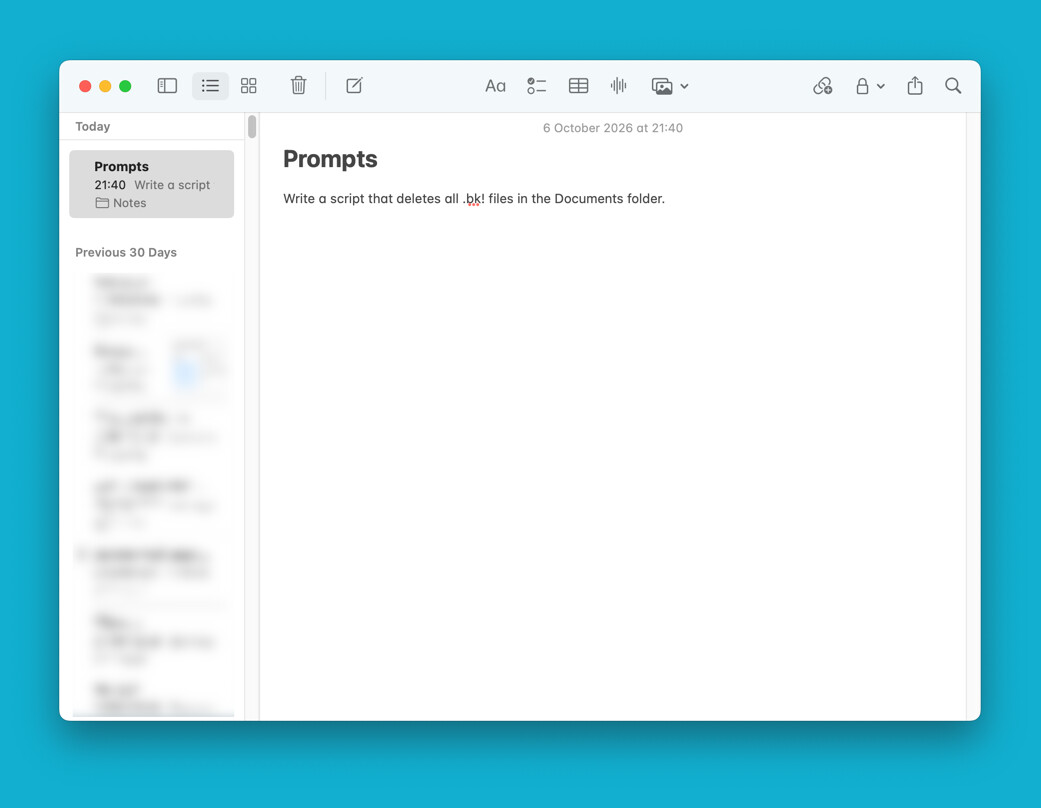
I keep a running collection of AI prompts in an Apple Notes note called "Prompts". Opening Notes, finding the note and scrolling to the end every time got old, so I made a small app that I trigger from Keyboard Maestro. It opens a window, I type or paste a prompt, press ⌘Return, and the text is appended to the note. Notes never comes to the front.

What it does

  • Opens a window titled "Add a new prompt" with a large multi-line text box and Cancel / OK buttons.
  • Return adds a new line, ⌘Return clicks OK, Esc cancels.
  • Appends the text to the end of the note under a bold date and time. Line breaks are kept, and <, > and & appear as typed.
  • Creates the folder and the note if they don't exist yet.
  • Starts Notes hidden if it isn't running and leaves it running in the background. If Notes is quit right after the edit, the change doesn't sync to iCloud (and your other devices) until you next open Notes on the Mac.
  • Shows a notification with the text that was added.

Why an app and not an Execute AppleScript action

The input window is built with AppleScriptObjC. It needs to run in its own app, which is why it's saved as an application. When Keyboard Maestro runs an AppleScript action, the script runs in the background, and the window may not appear.

Setup

  1. Open Script Editor, create a new document and paste in the script below.
  2. Change the three properties at the top to match your setup. accountName must match the account name in the Notes sidebar, for example "iCloud" or "On My Mac".
  3. Choose File › Export…, set File Format to Application, and save it, for example as ~/Applications/Add to Prompts.app.
  4. In Keyboard Maestro, create a new macro:
    • Trigger: Hot Key Trigger with a shortcut of your choice
    • Action: Open a File, Folder or Application, pointing at the app
  5. The first time it runs, macOS asks whether the app may control Notes. Click Allow. If you missed it, look under System Settings › Privacy & Security › Automation.

Customising

  • Window size: winW and winH in askForText()
  • Window title: the labelWithString: line
  • Timestamp format: the date '+%Y-%m-%d %H:%M' command in appendToNote()

Tested on macOS Sequoia 15.8.

The script

-- Add to Prompts: appends typed text to the Apple Notes note "Prompts"
use AppleScript version "2.4"
use framework "Foundation"
use framework "AppKit"
use scripting additions

property accountName : "iCloud"
property folderName : "Notes"
property noteName : "Prompts"

on run
	set entry to my askForText()
	if entry is missing value then return -- cancelled

	set entry to my trimText(entry)
	if entry is not "" then
		my appendToNote(entry)
		display notification entry with title "Added to " & noteName
	end if
end run

-- Custom input window: bold title, multi-line text box, centered Cancel / OK
-- Return = new line, ⌘Return = OK, Esc = Cancel
on askForText()
	set ca to current application
	set winW to 520
	set winH to 380
	set margin to 20

	set panel to ca's NSPanel's alloc()'s initWithContentRect:(ca's NSMakeRect(0, 0, winW, winH)) ¬
		styleMask:(1 + 32768) ¬
		backing:2 defer:false
	panel's setTitlebarAppearsTransparent:true
	panel's setTitleVisibility:1
	panel's setMovableByWindowBackground:true
	panel's setLevel:3
	set content to panel's contentView()

	-- title
	set titleLabel to ca's NSTextField's labelWithString:"Add a new prompt"
	titleLabel's setFont:(ca's NSFont's boldSystemFontOfSize:20)
	titleLabel's setAlignment:2
	titleLabel's setFrame:(ca's NSMakeRect(margin, winH - 58, winW - 2 * margin, 28))
	content's addSubview:titleLabel

	-- text box
	set boxRect to ca's NSMakeRect(margin, 68, winW - 2 * margin, winH - 68 - 72)
	set scroll to ca's NSScrollView's alloc()'s initWithFrame:boxRect
	scroll's setHasVerticalScroller:true
	scroll's setBorderType:2
	set tv to ca's NSTextView's alloc()'s initWithFrame:(ca's NSMakeRect(0, 0, winW - 2 * margin, 200))
	tv's setRichText:false
	tv's setFont:(ca's NSFont's systemFontOfSize:13)
	tv's setAutoresizingMask:2
	tv's setAutomaticQuoteSubstitutionEnabled:false
	tv's setAutomaticDashSubstitutionEnabled:false
	tv's setTextContainerInset:(ca's NSMakeSize(4, 6))
	scroll's setDocumentView:tv
	content's addSubview:scroll

	-- buttons, centered on one row
	set btnW to 110
	set gap to 16
	set x0 to (winW - (2 * btnW + gap)) / 2

	set cancelBtn to ca's NSButton's buttonWithTitle:"Cancel" target:me action:"cancelClicked:"
	cancelBtn's setFrame:(ca's NSMakeRect(x0, margin, btnW, 32))
	cancelBtn's setKeyEquivalent:(character id 27)
	content's addSubview:cancelBtn

	set okBtn to ca's NSButton's buttonWithTitle:"OK" target:me action:"okClicked:"
	okBtn's setFrame:(ca's NSMakeRect(x0 + btnW + gap, margin, btnW, 32))
	okBtn's setBezelColor:(ca's NSColor's systemGreenColor())
	okBtn's setKeyEquivalent:return
	okBtn's setKeyEquivalentModifierMask:1048576
	content's addSubview:okBtn

	-- show modally
	ca's NSApp's activateIgnoringOtherApps:true
	panel's |center|()
	panel's makeKeyAndOrderFront:me
	panel's makeFirstResponder:tv
	set r to (ca's NSApp's runModalForWindow:panel) as integer
	panel's orderOut:me

	if r is 1 then return (tv's |string|()) as text
	return missing value
end askForText

on okClicked:sender
	current application's NSApp's stopModalWithCode:1
end okClicked:

on cancelClicked:sender
	current application's NSApp's stopModalWithCode:0
end cancelClicked:

on appendToNote(entry)
	set stamp to do shell script "date '+%Y-%m-%d %H:%M'"
	set html to "<div><br></div><div><b>" & stamp & "</b></div><div>" & my htmlEscape(entry) & "</div>"
	-- launch Notes hidden in the background if it isn't already running
	if not (application "Notes" is running) then
		do shell script "open -g -j -a Notes"
		repeat 50 times
			if application "Notes" is running then exit repeat
			delay 0.1
		end repeat
	end if
	tell application "Notes"
		tell account accountName
			if not (exists folder folderName) then make new folder with properties {name:folderName}
			tell folder folderName
				if exists note noteName then
					set n to note noteName
					set body of n to (body of n) & html
				else
					make new note with properties {body:"<h1>" & noteName & "</h1>" & html}
				end if
			end tell
		end tell
	end tell
	-- leave Notes running (hidden) so it can push the change to iCloud;
	-- quitting right away keeps the edit local until Notes is next opened
end appendToNote

on htmlEscape(t)
	set t to my replaceText("&", "&amp;", t)
	set t to my replaceText("<", "&lt;", t)
	set t to my replaceText(">", "&gt;", t)
	set t to my replaceText(return & linefeed, linefeed, t)
	set t to my replaceText(return, linefeed, t)
	set t to my replaceText(linefeed, "<br>", t)
	return t
end htmlEscape

on replaceText(findStr, replStr, t)
	set AppleScript's text item delimiters to findStr
	set parts to text items of t
	set AppleScript's text item delimiters to replStr
	set t to parts as text
	set AppleScript's text item delimiters to ""
	return t
end replaceText

on trimText(t)
	set ws to {space, tab, return, linefeed}
	repeat while t is not "" and (character 1 of t) is in ws
		if length of t is 1 then return ""
		set t to text 2 thru -1 of t
	end repeat
	repeat while t is not "" and (character -1 of t) is in ws
		if length of t is 1 then return ""
		set t to text 1 thru -2 of t
	end repeat
	return t
end trimText
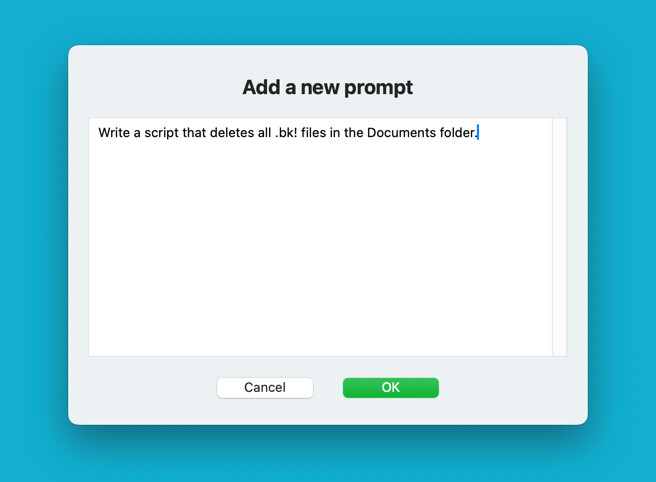
The UI

The added text in the Notes app

1 Like

What changed

  1. ⌥ + OK opens Notes. If you hold Option while clicking OK, the entry is saved and then Notes comes to the front with the Prompts note open. A plain click behaves as before (saves quietly and shows a notification). This only works with a click: ⌥⌘Return won't trigger it, because the OK button only answers to exactly ⌘Return.

  2. A dividing line replaces the date line. Apple Notes has no real horizontal line, and when I tested it, Notes simply removed <hr>. So above each entry there's now a light-gray line of 60 "─" characters. If that length looks wrong at your window width, it can be changed.

  3. Markdown becomes real formatting:

    • #, ## and ### become Notes' heading sizes (24pt and 18pt bold for the first two)
    • Lines starting with *, - or + become a real bulleted list
    • **bold** and __bold__ become bold; *italics* and _italics_ become italic
    • Plain stars like 2 * 3 * 4 and words like snake_case stay as they are
  4. Added tooltip for OK button

  • OK button tooltip: hovering over OK now shows:
    ▎ Add the prompt to the "Prompts" note.
    ▎ ⌘Return: same as clicking OK.
    ▎ ⌥-click: add it, then open Notes showing the note.
-- Add to Prompts: appends typed text to the Apple Notes note "Prompts"
use AppleScript version "2.4"
use framework "Foundation"
use framework "AppKit"
use scripting additions

property accountName : "iCloud"
property folderName : "Notes"
property noteName : "Prompts"

property openNotesAfter : false

on run
	set openNotesAfter to false
	set entry to my askForText()
	if entry is missing value then return -- cancelled
	
	set entry to my trimText(entry)
	if entry is not "" then
		my appendToNote(entry)
		if openNotesAfter then
			my showNote()
		else
			display notification entry with title "Added to " & noteName
		end if
	end if
end run

-- Custom input window: bold title, multi-line text box, centered Cancel / OK
-- Return = new line, ⌘Return = OK, Esc = Cancel
-- ⌥-click OK = OK, then open Notes showing the note
on askForText()
	set ca to current application
	set winW to 520
	set winH to 380
	set margin to 20
	
	set panel to ca's NSPanel's alloc()'s initWithContentRect:(ca's NSMakeRect(0, 0, winW, winH)) ¬
		styleMask:(1 + 32768) ¬
		backing:2 defer:false
	panel's setTitlebarAppearsTransparent:true
	panel's setTitleVisibility:1
	panel's setMovableByWindowBackground:true
	panel's setLevel:3
	set content to panel's contentView()
	
	-- title
	set titleLabel to ca's NSTextField's labelWithString:"Add a new prompt"
	titleLabel's setFont:(ca's NSFont's boldSystemFontOfSize:20)
	titleLabel's setAlignment:2
	titleLabel's setFrame:(ca's NSMakeRect(margin, winH - 58, winW - 2 * margin, 28))
	content's addSubview:titleLabel
	
	-- text box
	set boxRect to ca's NSMakeRect(margin, 68, winW - 2 * margin, winH - 68 - 72)
	set scroll to ca's NSScrollView's alloc()'s initWithFrame:boxRect
	scroll's setHasVerticalScroller:true
	scroll's setBorderType:2
	set tv to ca's NSTextView's alloc()'s initWithFrame:(ca's NSMakeRect(0, 0, winW - 2 * margin, 200))
	tv's setRichText:false
	tv's setFont:(ca's NSFont's systemFontOfSize:13)
	tv's setAutoresizingMask:2
	tv's setAutomaticQuoteSubstitutionEnabled:false
	tv's setAutomaticDashSubstitutionEnabled:false
	tv's setTextContainerInset:(ca's NSMakeSize(4, 6))
	scroll's setDocumentView:tv
	content's addSubview:scroll
	
	-- buttons, centered on one row
	set btnW to 110
	set gap to 16
	set x0 to (winW - (2 * btnW + gap)) / 2
	
	set cancelBtn to ca's NSButton's buttonWithTitle:"Cancel" target:me action:"cancelClicked:"
	cancelBtn's setFrame:(ca's NSMakeRect(x0, margin, btnW, 32))
	cancelBtn's setKeyEquivalent:(character id 27)
	content's addSubview:cancelBtn
	
	set okBtn to ca's NSButton's buttonWithTitle:"OK" target:me action:"okClicked:"
	okBtn's setFrame:(ca's NSMakeRect(x0 + btnW + gap, margin, btnW, 32))
	okBtn's setBezelColor:(ca's NSColor's systemGreenColor())
	okBtn's setKeyEquivalent:return
	okBtn's setKeyEquivalentModifierMask:1048576
	okBtn's setToolTip:("Add the prompt to the \"" & noteName & "\" note." & linefeed & "⌘Return: same as clicking OK." & linefeed & "⌥-click: add it, then open Notes showing the note.")
	content's addSubview:okBtn
	
	-- show modally
	ca's NSApp's activateIgnoringOtherApps:true
	panel's |center|()
	panel's makeKeyAndOrderFront:me
	panel's makeFirstResponder:tv
	set r to (ca's NSApp's runModalForWindow:panel) as integer
	panel's orderOut:me
	
	if r is 1 then return (tv's |string|()) as text
	return missing value
end askForText

on okClicked:sender
	-- NSEventModifierFlagOption = 524288
	set flags to (current application's NSEvent's modifierFlags()) as integer
	set openNotesAfter to ((flags div 524288) mod 2 is 1)
	current application's NSApp's stopModalWithCode:1
end okClicked:

on cancelClicked:sender
	current application's NSApp's stopModalWithCode:0
end cancelClicked:

on appendToNote(entry)
	-- Notes has no real horizontal rule (<hr> is stripped), so draw a gray line
	set divider to ""
	repeat 30 times
		set divider to divider & "─"
	end repeat
	set html to "<div><br></div><div><font color=\"#A0A0A0\">" & divider & "</font></div>" & my markdownToHtml(entry)
	-- launch Notes hidden in the background if it isn't already running
	if not (application "Notes" is running) then
		do shell script "open -g -j -a Notes"
		repeat 50 times
			if application "Notes" is running then exit repeat
			delay 0.1
		end repeat
	end if
	tell application "Notes"
		tell account accountName
			if not (exists folder folderName) then make new folder with properties {name:folderName}
			tell folder folderName
				if exists note noteName then
					set n to note noteName
					set body of n to (body of n) & html
				else
					make new note with properties {body:"<h1>" & noteName & "</h1>" & html}
				end if
			end tell
		end tell
	end tell
	-- leave Notes running (hidden) so it can push the change to iCloud;
	-- quitting right away keeps the edit local until Notes is next opened
end appendToNote

on showNote()
	tell application "Notes"
		activate
		show note noteName of folder folderName of account accountName
	end tell
end showNote

-- Basic Markdown: # / ## / ### headings, * / - / + bullet lists,
-- **bold**, __bold__, *italics*, _italics_
on markdownToHtml(t)
	set t to my replaceText(return & linefeed, linefeed, t)
	set t to my replaceText(return, linefeed, t)
	set html to ""
	set inList to false
	repeat with ln in paragraphs of t
		set ln to ln as text
		set lineKind to "text"
		if ln starts with "### " then
			set lineKind to "h3"
			set ln to text 5 thru -1 of ln
		else if ln starts with "## " then
			set lineKind to "h2"
			set ln to text 4 thru -1 of ln
		else if ln starts with "# " then
			set lineKind to "h1"
			set ln to text 3 thru -1 of ln
		else if ln starts with "* " or ln starts with "- " or ln starts with "+ " then
			set lineKind to "li"
			set ln to text 3 thru -1 of ln
		end if
		if lineKind is not "li" and inList then
			set html to html & "</ul>"
			set inList to false
		end if
		set ln to my inlineMarkdown(my htmlEscape(ln))
		if lineKind is "li" then
			if not inList then
				set html to html & "<ul>"
				set inList to true
			end if
			set html to html & "<li>" & ln & "</li>"
		else if lineKind is "text" then
			if ln is "" then set ln to "<br>"
			set html to html & "<div>" & ln & "</div>"
		else
			set html to html & "<" & lineKind & ">" & ln & "</" & lineKind & ">"
		end if
	end repeat
	if inList then set html to html & "</ul>"
	return html
end markdownToHtml

on inlineMarkdown(t)
	set s to current application's NSMutableString's stringWithString:t
	set rx to {{"\\*\\*(\\S(?:.*?\\S)?)\\*\\*", "<b>$1</b>"}, ¬
		{"__(\\S(?:.*?\\S)?)__", "<b>$1</b>"}, ¬
		{"(?<![\\*\\w])\\*(\\S(?:.*?\\S)?)\\*(?![\\*\\w])", "<i>$1</i>"}, ¬
		{"(?<![_\\w])_(\\S(?:.*?\\S)?)_(?![_\\w])", "<i>$1</i>"}}
	repeat with r in rx
		(s's replaceOccurrencesOfString:(item 1 of r) withString:(item 2 of r) ¬
			options:(current application's NSRegularExpressionSearch) range:{0, s's |length|()})
	end repeat
	return s as text
end inlineMarkdown

on htmlEscape(t)
	set t to my replaceText("&", "&amp;", t)
	set t to my replaceText("<", "&lt;", t)
	set t to my replaceText(">", "&gt;", t)
	set t to my replaceText(return & linefeed, linefeed, t)
	set t to my replaceText(return, linefeed, t)
	set t to my replaceText(linefeed, "<br>", t)
	return t
end htmlEscape

on replaceText(findStr, replStr, t)
	set AppleScript's text item delimiters to findStr
	set parts to text items of t
	set AppleScript's text item delimiters to replStr
	set t to parts as text
	set AppleScript's text item delimiters to ""
	return t
end replaceText

on trimText(t)
	set ws to {space, tab, return, linefeed}
	repeat while t is not "" and (character 1 of t) is in ws
		if length of t is 1 then return ""
		set t to text 2 thru -1 of t
	end repeat
	repeat while t is not "" and (character -1 of t) is in ws
		if length of t is 1 then return ""
		set t to text 1 thru -2 of t
	end repeat
	return t
end trimText


Changes

Divider length

The divider above each entry is now 16 characters (it was 30), so new entries fit on one line on the iPhone.

Bullet lists

In the "Add a new prompt" window:

  • Return on a line starting with - , * or + starts the next line with the same bullet.
  • Return on a line that has only a bullet removes the bullet and leaves an empty line, which ends the list. So two Returns in a row end it, like in Apple Notes.
  • Return on any other line just starts a new line.
  • ⌘Return still clicks OK, and Esc still cancels.

Numbered lists

  • Return on a line starting with 1. starts the next line with 2. , then 3. , and so on. A list can start at any number: 9. continues with 10. .
  • Return on a line that has only a number (for example 4. with nothing after it) removes it and ends the list.

Example: typing Steps:, Return, 1. first, Return, second, Return, third, Return, Return, done gives:

Steps:
1. first
2. second
3. third
done

-- Add to Prompts: appends typed text to the Apple Notes note "Prompts"
use AppleScript version "2.4"
use framework "Foundation"
use framework "AppKit"
use scripting additions

property accountName : "iCloud"
property folderName : "Notes"
property noteName : "Prompts"

property openNotesAfter : false

on run
	set openNotesAfter to false
	set entry to my askForText()
	if entry is missing value then return -- cancelled
	
	set entry to my trimText(entry)
	if entry is not "" then
		my appendToNote(entry)
		if openNotesAfter then
			my showNote()
		else
			display notification entry with title "Added to " & noteName
		end if
	end if
end run

-- Custom input window: bold title, multi-line text box, centered Cancel / OK
-- Return = new line, ⌘Return = OK, Esc = Cancel
-- ⌥-click OK = OK, then open Notes showing the note
on askForText()
	set ca to current application
	set winW to 520
	set winH to 380
	set margin to 20
	
	set panel to ca's NSPanel's alloc()'s initWithContentRect:(ca's NSMakeRect(0, 0, winW, winH)) ¬
		styleMask:(1 + 32768) ¬
		backing:2 defer:false
	panel's setTitlebarAppearsTransparent:true
	panel's setTitleVisibility:1
	panel's setMovableByWindowBackground:true
	panel's setLevel:3
	set content to panel's contentView()
	
	-- title
	set titleLabel to ca's NSTextField's labelWithString:"Add a new prompt"
	titleLabel's setFont:(ca's NSFont's boldSystemFontOfSize:20)
	titleLabel's setAlignment:2
	titleLabel's setFrame:(ca's NSMakeRect(margin, winH - 58, winW - 2 * margin, 28))
	content's addSubview:titleLabel
	
	-- text box
	set boxRect to ca's NSMakeRect(margin, 68, winW - 2 * margin, winH - 68 - 72)
	set scroll to ca's NSScrollView's alloc()'s initWithFrame:boxRect
	scroll's setHasVerticalScroller:true
	scroll's setBorderType:2
	set tv to ca's NSTextView's alloc()'s initWithFrame:(ca's NSMakeRect(0, 0, winW - 2 * margin, 200))
	tv's setRichText:false
	tv's setFont:(ca's NSFont's systemFontOfSize:13)
	tv's setAutoresizingMask:2
	tv's setAutomaticQuoteSubstitutionEnabled:false
	tv's setAutomaticDashSubstitutionEnabled:false
	tv's setTextContainerInset:(ca's NSMakeSize(4, 6))
	tv's setDelegate:me
	scroll's setDocumentView:tv
	content's addSubview:scroll
	
	-- buttons, centered on one row
	set btnW to 110
	set gap to 16
	set x0 to (winW - (2 * btnW + gap)) / 2
	
	set cancelBtn to ca's NSButton's buttonWithTitle:"Cancel" target:me action:"cancelClicked:"
	cancelBtn's setFrame:(ca's NSMakeRect(x0, margin, btnW, 32))
	cancelBtn's setKeyEquivalent:(character id 27)
	content's addSubview:cancelBtn
	
	set okBtn to ca's NSButton's buttonWithTitle:"OK" target:me action:"okClicked:"
	okBtn's setFrame:(ca's NSMakeRect(x0 + btnW + gap, margin, btnW, 32))
	okBtn's setBezelColor:(ca's NSColor's systemGreenColor())
	okBtn's setKeyEquivalent:return
	okBtn's setKeyEquivalentModifierMask:1048576
	okBtn's setToolTip:("Add the prompt to the \"" & noteName & "\" note." & linefeed & "⌘Return: same as clicking OK." & linefeed & "⌥-click: add it, then open Notes showing the note.")
	content's addSubview:okBtn
	
	-- show modally
	ca's NSApp's activateIgnoringOtherApps:true
	panel's |center|()
	panel's makeKeyAndOrderFront:me
	panel's makeFirstResponder:tv
	set r to (ca's NSApp's runModalForWindow:panel) as integer
	panel's orderOut:me
	
	if r is 1 then return (tv's |string|()) as text
	return missing value
end askForText

on okClicked:sender
	-- NSEventModifierFlagOption = 524288
	set flags to (current application's NSEvent's modifierFlags()) as integer
	set openNotesAfter to ((flags div 524288) mod 2 is 1)
	current application's NSApp's stopModalWithCode:1
end okClicked:

-- Return on a "* ", "- " or "+ " line continues the list with the same bullet,
-- on a "1. " line with the next number;
-- Return on an empty bullet/number line removes it and ends the list
on textView:tv doCommandBySelector:theSelector
	if (theSelector as text) is not "insertNewline:" then return false
	set s to tv's |string|()
	set loc to (location of (tv's selectedRange())) as integer
	set lr to s's lineRangeForRange:{location:loc, |length|:0}
	set lineStart to (location of lr) as integer
	set lineText to ((s's substringWithRange:lr)'s stringByTrimmingCharactersInSet:(current application's NSCharacterSet's newlineCharacterSet())) as text
	set bullet to missing value
	set nextBullet to missing value
	repeat with b in {"* ", "- ", "+ "}
		if lineText starts with (b as text) then
			set bullet to b as text
			set nextBullet to bullet
		end if
	end repeat
	if bullet is missing value then
		set i to 0
		repeat while i < (length of lineText) and "0123456789" contains (character (i + 1) of lineText)
			set i to i + 1
		end repeat
		if i > 0 and i < 10 and (text (i + 1) thru -1 of (lineText & "  ")) starts with ". " then
			set bullet to (text 1 thru i of lineText) & ". "
			set nextBullet to (((text 1 thru i of lineText) as integer) + 1) & ". " as text
		end if
	end if
	if bullet is missing value then return false
	if lineText is bullet then
		tv's insertText:"" replacementRange:{location:lineStart, |length|:(length of bullet)}
	else
		tv's insertText:(linefeed & nextBullet) replacementRange:(tv's selectedRange())
	end if
	return true
end textView:doCommandBySelector:

on cancelClicked:sender
	current application's NSApp's stopModalWithCode:0
end cancelClicked:

on appendToNote(entry)
	-- Notes has no real horizontal rule (<hr> is stripped), so draw a gray line
	set divider to ""
	repeat 16 times
		set divider to divider & "─"
	end repeat
	set html to "<div><br></div><div><font color=\"#A0A0A0\">" & divider & "</font></div>" & my markdownToHtml(entry)
	-- launch Notes hidden in the background if it isn't already running
	if not (application "Notes" is running) then
		do shell script "open -g -j -a Notes"
		repeat 50 times
			if application "Notes" is running then exit repeat
			delay 0.1
		end repeat
	end if
	tell application "Notes"
		tell account accountName
			if not (exists folder folderName) then make new folder with properties {name:folderName}
			tell folder folderName
				if exists note noteName then
					set n to note noteName
					set body of n to (body of n) & html
				else
					make new note with properties {body:"<h1>" & noteName & "</h1>" & html}
				end if
			end tell
		end tell
	end tell
	-- leave Notes running (hidden) so it can push the change to iCloud;
	-- quitting right away keeps the edit local until Notes is next opened
end appendToNote

on showNote()
	tell application "Notes"
		activate
		show note noteName of folder folderName of account accountName
	end tell
end showNote

-- Basic Markdown: # / ## / ### headings, * / - / + bullet lists,
-- **bold**, __bold__, *italics*, _italics_
on markdownToHtml(t)
	set t to my replaceText(return & linefeed, linefeed, t)
	set t to my replaceText(return, linefeed, t)
	set html to ""
	set inList to false
	repeat with ln in paragraphs of t
		set ln to ln as text
		set lineKind to "text"
		if ln starts with "### " then
			set lineKind to "h3"
			set ln to text 5 thru -1 of ln
		else if ln starts with "## " then
			set lineKind to "h2"
			set ln to text 4 thru -1 of ln
		else if ln starts with "# " then
			set lineKind to "h1"
			set ln to text 3 thru -1 of ln
		else if ln starts with "* " or ln starts with "- " or ln starts with "+ " then
			set lineKind to "li"
			set ln to text 3 thru -1 of ln
		end if
		if lineKind is not "li" and inList then
			set html to html & "</ul>"
			set inList to false
		end if
		set ln to my inlineMarkdown(my htmlEscape(ln))
		if lineKind is "li" then
			if not inList then
				set html to html & "<ul>"
				set inList to true
			end if
			set html to html & "<li>" & ln & "</li>"
		else if lineKind is "text" then
			if ln is "" then set ln to "<br>"
			set html to html & "<div>" & ln & "</div>"
		else
			set html to html & "<" & lineKind & ">" & ln & "</" & lineKind & ">"
		end if
	end repeat
	if inList then set html to html & "</ul>"
	return html
end markdownToHtml

on inlineMarkdown(t)
	set s to current application's NSMutableString's stringWithString:t
	set rx to {{"\\*\\*(\\S(?:.*?\\S)?)\\*\\*", "<b>$1</b>"}, ¬
		{"__(\\S(?:.*?\\S)?)__", "<b>$1</b>"}, ¬
		{"(?<![\\*\\w])\\*(\\S(?:.*?\\S)?)\\*(?![\\*\\w])", "<i>$1</i>"}, ¬
		{"(?<![_\\w])_(\\S(?:.*?\\S)?)_(?![_\\w])", "<i>$1</i>"}}
	repeat with r in rx
		(s's replaceOccurrencesOfString:(item 1 of r) withString:(item 2 of r) ¬
			options:(current application's NSRegularExpressionSearch) range:{0, s's |length|()})
	end repeat
	return s as text
end inlineMarkdown

on htmlEscape(t)
	set t to my replaceText("&", "&amp;", t)
	set t to my replaceText("<", "&lt;", t)
	set t to my replaceText(">", "&gt;", t)
	set t to my replaceText(return & linefeed, linefeed, t)
	set t to my replaceText(return, linefeed, t)
	set t to my replaceText(linefeed, "<br>", t)
	return t
end htmlEscape

on replaceText(findStr, replStr, t)
	set AppleScript's text item delimiters to findStr
	set parts to text items of t
	set AppleScript's text item delimiters to replStr
	set t to parts as text
	set AppleScript's text item delimiters to ""
	return t
end replaceText

on trimText(t)
	set ws to {space, tab, return, linefeed}
	repeat while t is not "" and (character 1 of t) is in ws
		if length of t is 1 then return ""
		set t to text 2 thru -1 of t
	end repeat
	repeat while t is not "" and (character -1 of t) is in ws
		if length of t is 1 then return ""
		set t to text 1 thru -2 of t
	end repeat
	return t
end trimText


To make this more generic, a Prompt with list could be added to set the name of the note. That name would be passed to a variable that replaces the fixed name "Prompts".