Welcome to the forum and thanks for being clear with your first question. I shall leave it to others to give comprehensive replies, because their solutions will be more elegant than my suggestions!
While you wait, though, you might be interested to look at the Wiki about the following: for step (1), read about the open a URL action; for step (4), see the read a file action.
Also, let us know which browser (or browsers) you will be using, and, if possible, the Web site in question.
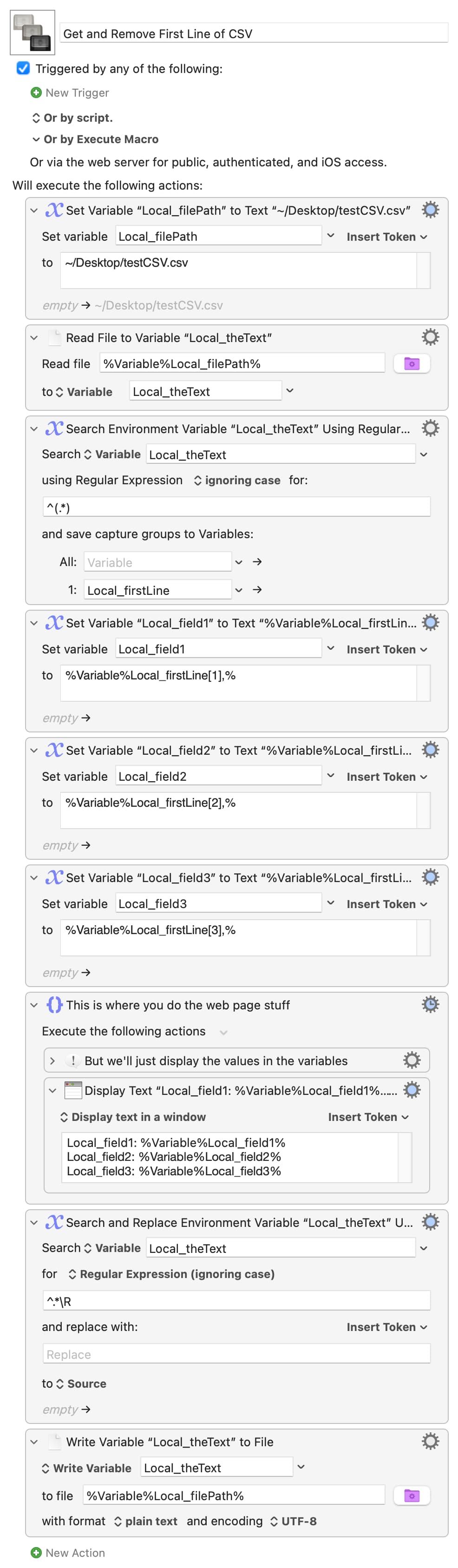
There are almost certainly better/quicker ways of doing this, but the macro serves as a gentle intro to some KM basics -- you'll find everything there in the manual or on the Wiki, but ask if anything isn't clear.
The web site bit will be trickier to help with, especially if it isn't available to Forum members. The best way to work with web forms is using "Browser Form Actions", but if they aren't available because of how the form is coded you can usually use "Type a Keystroke" to tab to a field and "Insert Text by Typing" (or "...by Pasting" for bigger text blocks) to insert values, along with image detection and the "Pause Until" and "Move or Click Mouse" actions to wait for/click buttons.