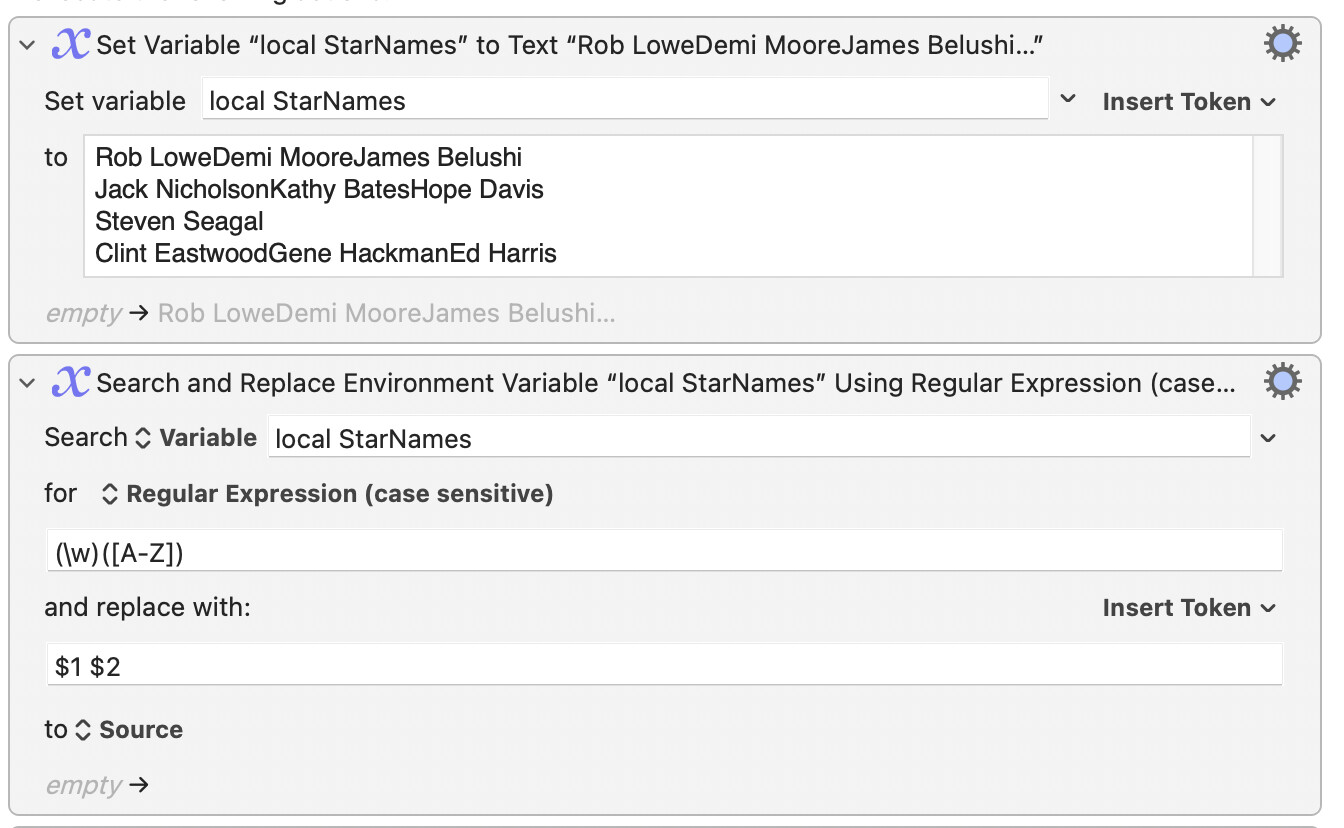
I have a movie database of 2600 movies that I’m trying to cleanup. I have a list of stars that were in a particular movie where each line looks like this: Jack NicholsonKathy BatesHope Davis
I want the lines to look like this: Jack Nicholson Kathy Bates Hope Davis
I have a regex that puts a space in front of every capital letter but the first. Reg101 seems to prove the code is okay, but the macro fails. Trying just 4 lines, I get 4 Display Text windows displaying and the names are not corrected.
Maybe I don’t understand ‘For Each’ loops properly.
The regex (\w)([A-Z]) matches on any word character that is immediately followed by capital letter. We replace any such match with those two characters separated with a space.
I renamed the global StarNames as local StarNames in the belief that you will not wish to access the variable outside this macro. Any variable beginning with local (not necessarily followed by a space) will be automatically cleared away when the macro that contains it has finished.
Note that some assumptions are made with this approach. For example, we assume that all the stars’ surnames start with a letter that is in the range A to Z, so if you are a fan of “world cinema”you might need to have stored some names in a transliterated form.
We further assume that everyone has what we normally mean by a surname… and that the surname comes after the other names…
It doesn't matter -- all you need to worry about is picking something that doesn't occur in the data you are exporting and, for names, Tab is a good choice.
If your destination database doesn't support the import of tab-delimited data it's only a simple Search'n'Replace to change the delimiters to something it does accept.