Just to make sure I understand you correctly, you would want the macro to take text like this:
Lorem ipsum dolor sit amet, consectetur adipisicing elit, sed do eiusmod tempor incididunt ut labore et
dolore magna aliqua. Ut enim ad minim veniam, quis
nostrud exercitation ullamco laboris nisi ut aliquip ex
ea commodo consequat. Duis aute irure dolor in reprehenderit in voluptate velit esse cillum dolore eu fugiat nulla pariatur. Excepteur sint occaecat
cupidatat non proident, sunt in culpa qui officia deserunt mollit anim id est laborum.
and make it into this?
Lorem ipsum dolor sit amet, consectetur adipisicing elit, sed do eiusmod tempor incididunt ut labore et dolore magna aliqua. Ut enim ad minim veniam, quis nostrud exercitation ullamco laboris nisi ut aliquip ex ea commodo consequat. Duis aute irure dolor in reprehenderit in voluptate velit esse cillum dolore eu fugiat nulla pariatur. Excepteur sint occaecat cupidatat non proident, sunt in culpa qui officia deserunt mollit anim id est laborum.
If that's the case, something like this should do the trick:
Remove Line and Paragraph Breaks.kmmacros (1.6 KB)
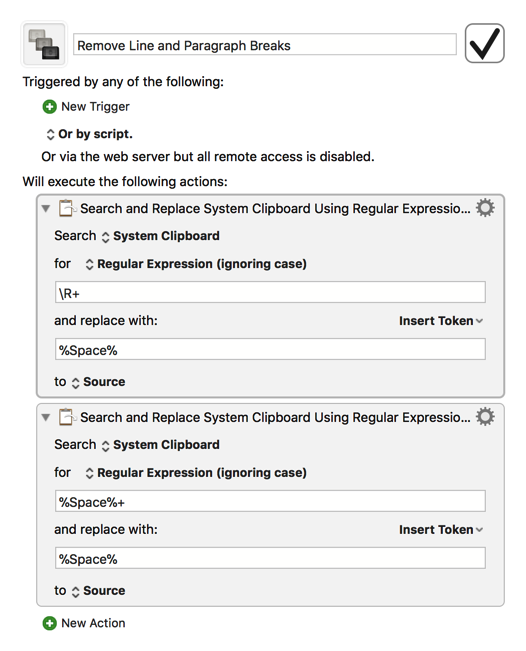
The first search and replace action removes every line break from the clipboard, and the second one ensures that doing so doesn't result in more than one space. You can of course just use a standard space character in place of the %Space% token used here; I just used %Space% in this case to make it clearer what was being searched for and/or replaced. Feel free to post again if you have any other questions!