Goal: I want to repeat the “1” key over and over when I press “Tab”. And it should stop when I press “Tab” again. I am using a variable calculation method as attached, but its failing. Any suggestions?
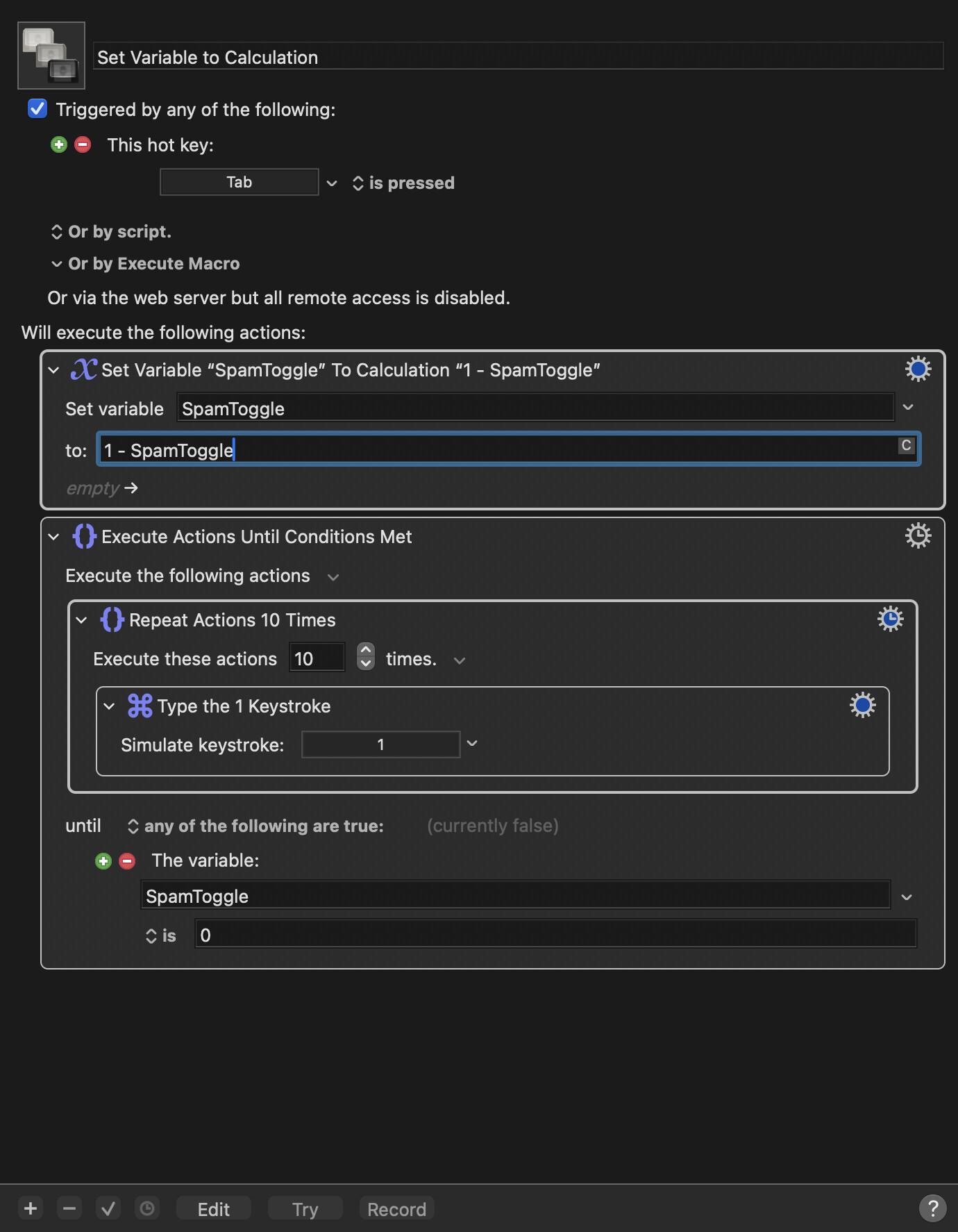
I don't see where your macro is changing the global variable's value after the loop starts, which is probably why it's not working.
But you don't need a variable; here's a solution that seems to work, though you may have to play with the delay values on your Mac:
Repeat '1' Macro (v11.0.4)
Repeat '1'.kmmacros (3.1 KB)
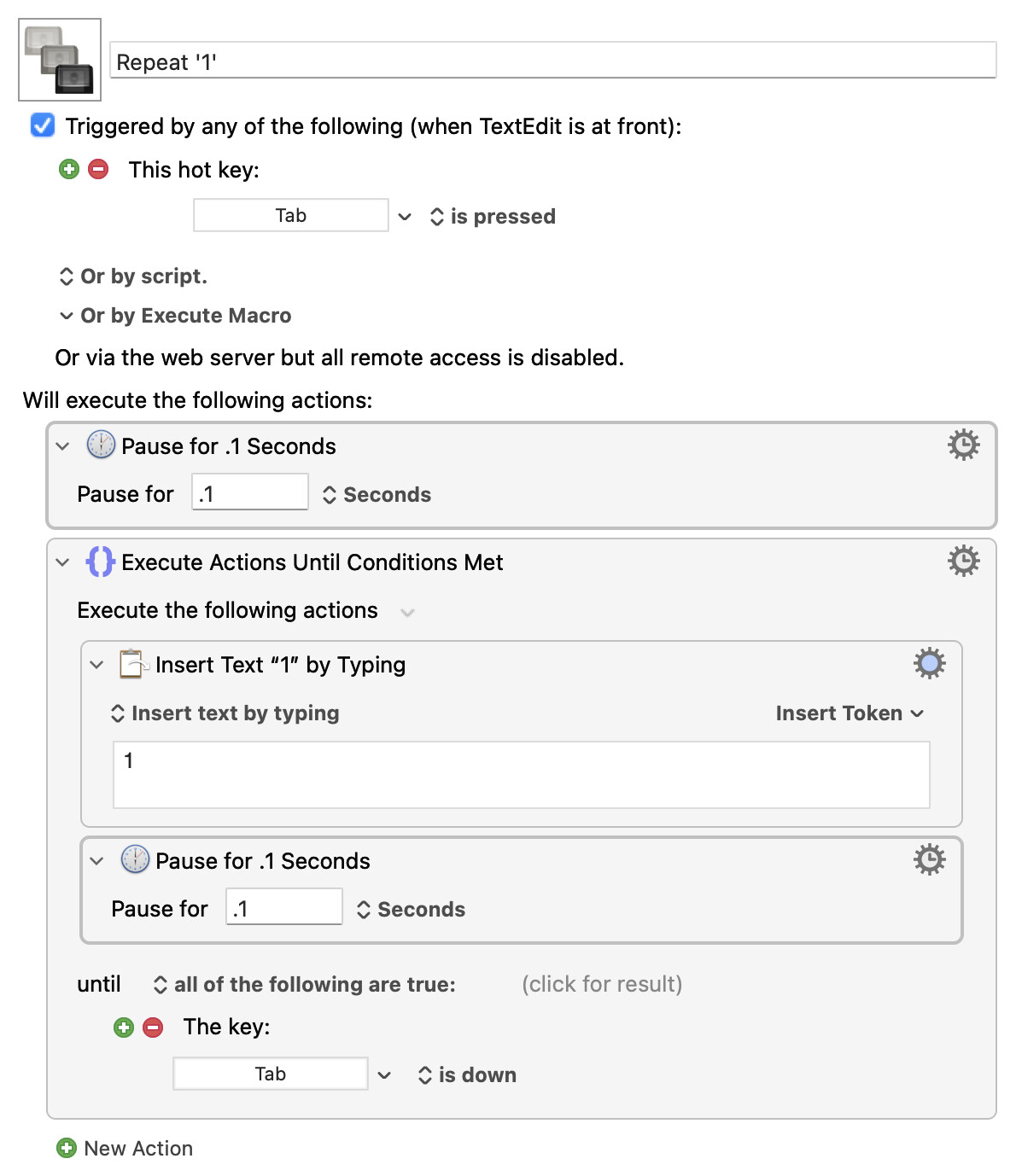
It's set up in a TextEdit-only macro group; open a new document there, make sure the macro group is enabled, then press Tab. To stop the macro, press and hold Tab until the macro stops.
-rob.
I tried that but it doesnt seem to work. What I want it to do is when I press Tab once, it starts the macro and starts to repeat “1”. When I press Tab again, it should stop the macro. But not having to press and hold tab
Also it seems like holding down tab doesnt stop it  so it keeps spamming over and over
You don't need to press and hold Tab, pressing it once starts the macro. It's stopping it that requires holding it down. Try increasing the delays a bit—it's working perfectly here on two different Macs running two different versions of the OS (Sequoia and the dev version of Golden gate).
Watching for keypresses in a running macro, especially one that outputs continuously, is tricky. That's why you need to hold the Tab key down to exit the loop, because you have to give Keyboard Maestro a chance to see that the key is down. But starting it requires just a press of the Tab key, then release, nothing more.
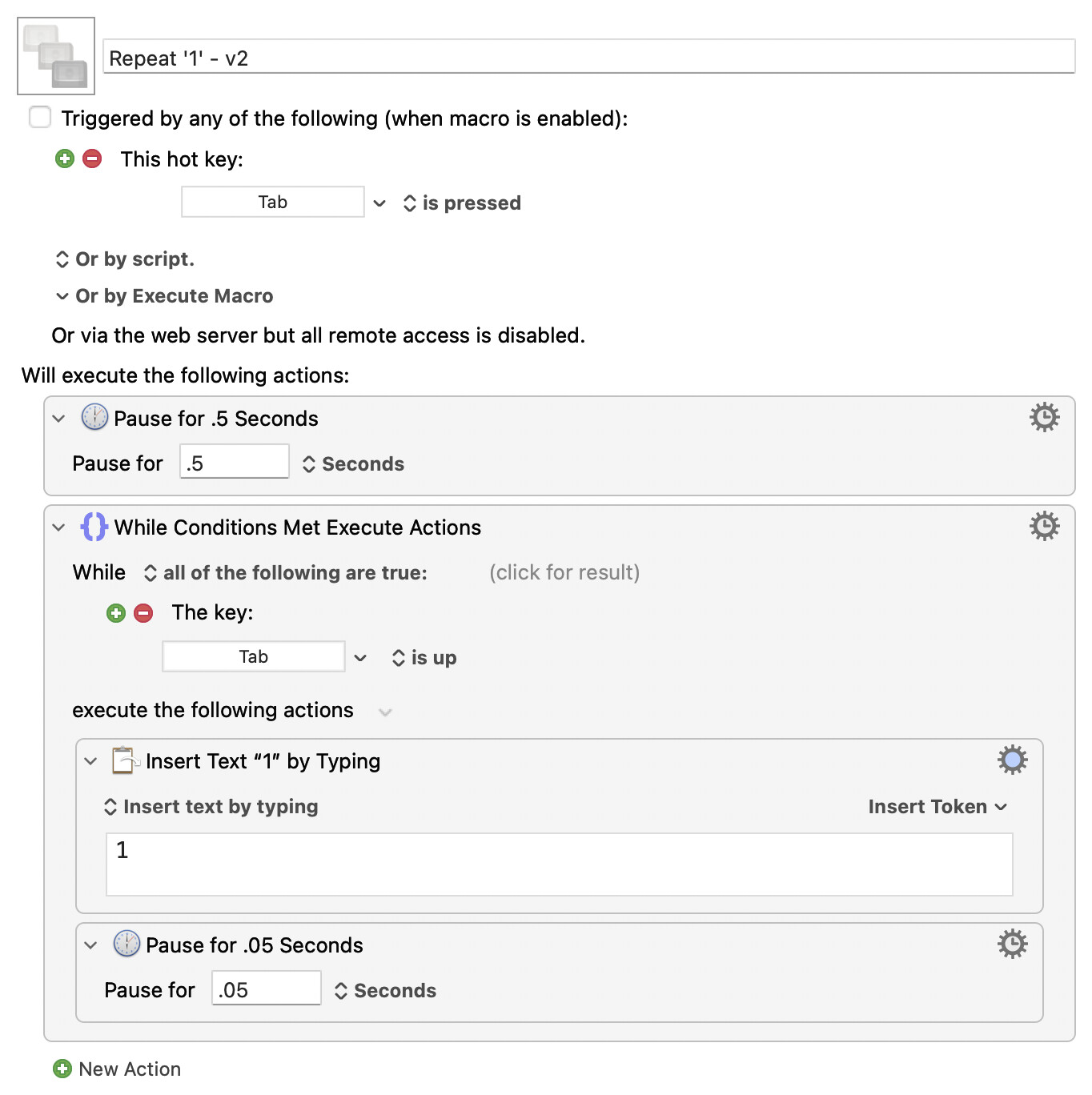
Try this version; it uses a While action. Same end result, but maybe it'll work better for you. Press and release Tab once to start, then press and hold Tab until the 1's stop appearing. Works fine here on both Macs.
Download Macro(s): Repeat '1' - v2.kmmacros (3.1 KB)
Macro notes
- Macros are always disabled when imported into the Keyboard Maestro Editor.
- The user must ensure the macro is enabled.
- The user must also ensure the macro's parent macro-group is enabled.
System information
- macOS 26.5.2
- Keyboard Maestro v11.0.4
-rob.
This is not a good approach because when the Tab key is tapped a) it will trigger the macro again, and b) it will likely not be detected by the macro because it could easily be pressed and released during the Pause action.
Your calculation action is failing because SpamToggle does not initially have a value, and then 1-SpamToggle is not a valid calculation. Set it to 0 manually, or add an action to the from that does "If SpamToggle is empty then set SpamToggle to 0".
Change the Until action to a While action to ensure that if it is toggled off it does not execute anything.
Remote the Repeat action unless there is some reason you want it done in batches of 10.
Also note that this will likely spam them too quickly resulting in the event queue filling with '1's, so you probably want to add a short pause.
I know it's not ideal, but with the pause, I've never had any troubles using this construct (other than having to hold Tab down briefly to end the macro). And now that I see how the global is supposed to work, that does make a lot more sense, and is definitely the right way to go. Notes updated :).
-rob.
Yes, as long as you train yourself to hold the key, it's fine.
But as a general rule, detecting keys is better done with a Hot Key trigger than a Key condition for this reason. The hot key will always detect the key press, which the condition only detects the current state.
An alternative sometimes is to have another macro that has the hot key trigger and sets a global variable. The macro can be enabled and disabled from the "parent" macro as needed.
You'll want to semaphore lock that -- as written, a second short-press of the Tab can both end the macro and trigger it again, while a quick tap of Tab will trigger a second instance without ending the first.
(And the Forum page has just refreshed, revealing posts from 7 hours ago already mentioning the problem -- I leave the above because of the semaphore idea.)
For those who avoid Global variables -- how about a twofer? One macro to start typing 1s, a second to cancel that macro, both disable themselves and enable the other allowing you to use Tab for the hot key without a Conflict.
Typing 1s Macros.kmmacros (7.7 KB)
First macro (initially enabled):
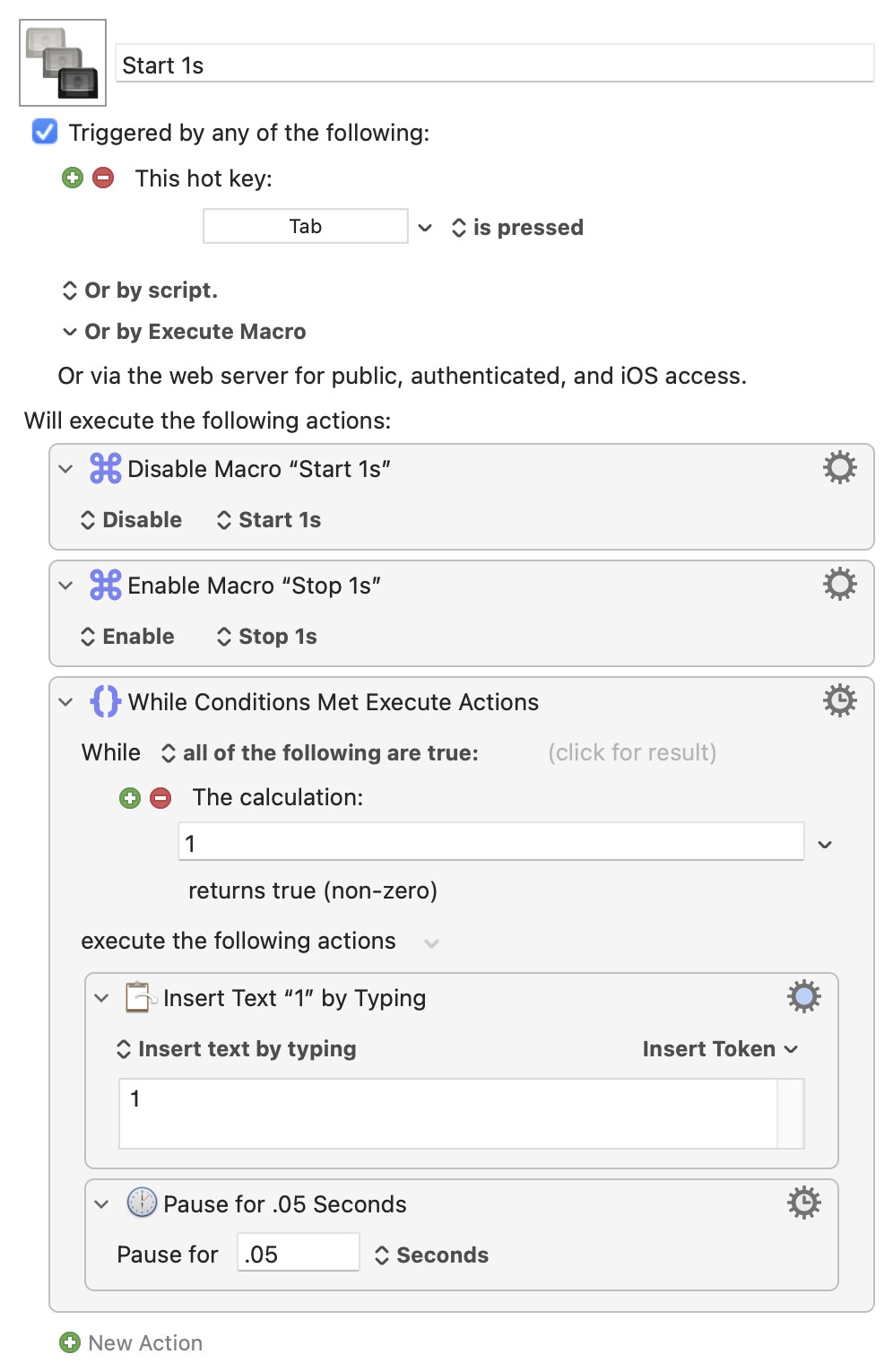
Second (initially disabled):
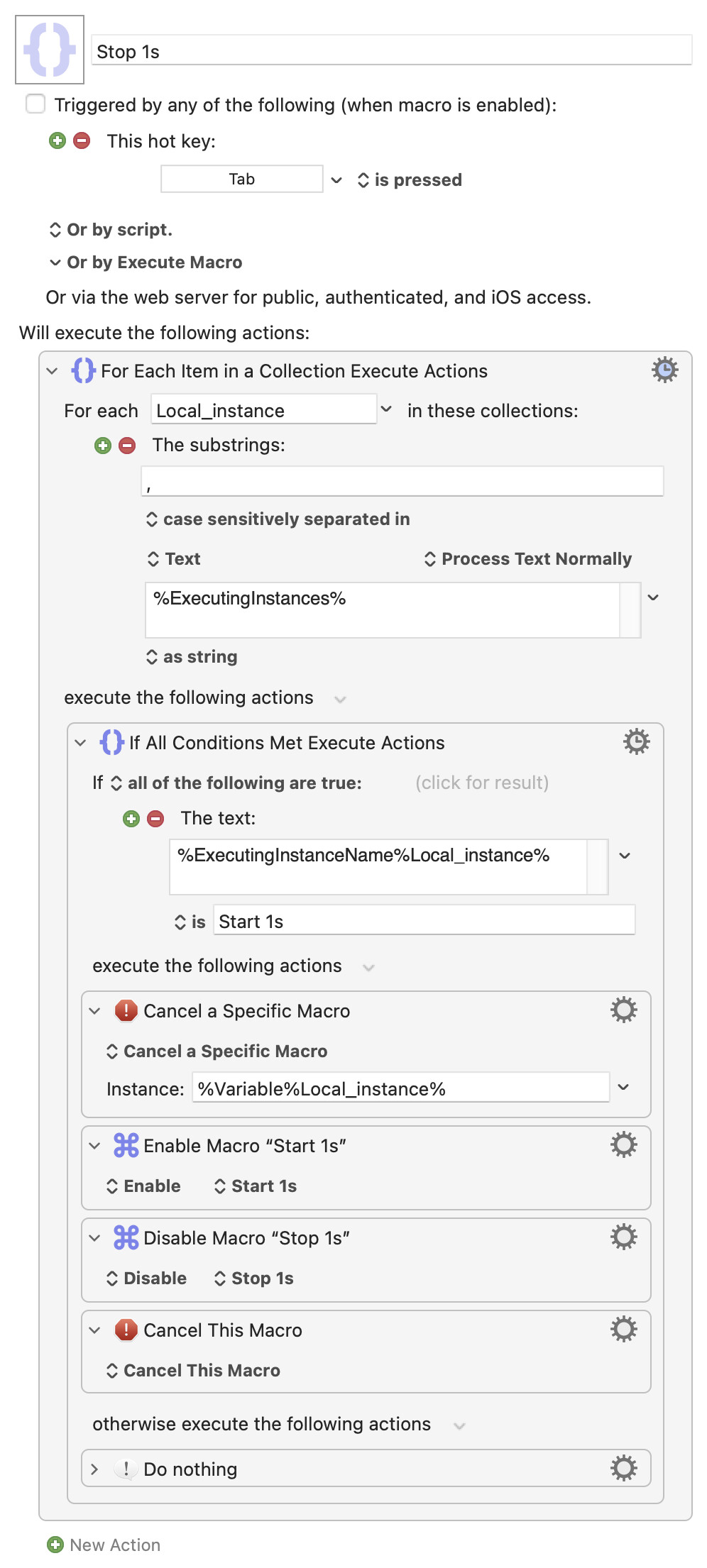
So I had to enable the “whole” folder that contains both of those macros and now it works perfect. One tab hit starts it and one tab hit instantly stops it! its great! I will now edit the “1” part and replace with the key combos that are highly repetiative in excel at work  thank you guys so much
How can I make it go to a specific window? Like it’ll work in text pad but it wont work in excel?
It seems that when I am in “excel” as fullsreen, hitting tab isnt recogizied and the macro doesnt start. Wonder why that is? But If I set the keystroke to sent specifcally to excell, and have another application in forefornt and hit tab, it’ll send the 1 to excel. But it just doesnt invoke the macro hitting tab in excel or any other full screen app it seems
TextPad is a Windows app. Are you trying to send these keystrokes to Windows apps running in a VM? Over a remote desktop connection? Something else?
Asking because the macros work fine in full screen macOS Excel for me.
The general assumption here is that you are macroing a local Mac app -- if it's running virtually or remotely then things may behave differently, and doubly so if it's a Windows app! And it helps people test things if they know the specifics of your situation.
If these are Windows apps in Parallels or similar, are you running them discretely inside a Windows UI or in Coherence mode or equivalent?
No, its all on a local mac. No windows or pararrels. I meant TextEdit. I reset the accessiblity permissions and now it works!! Thanks!