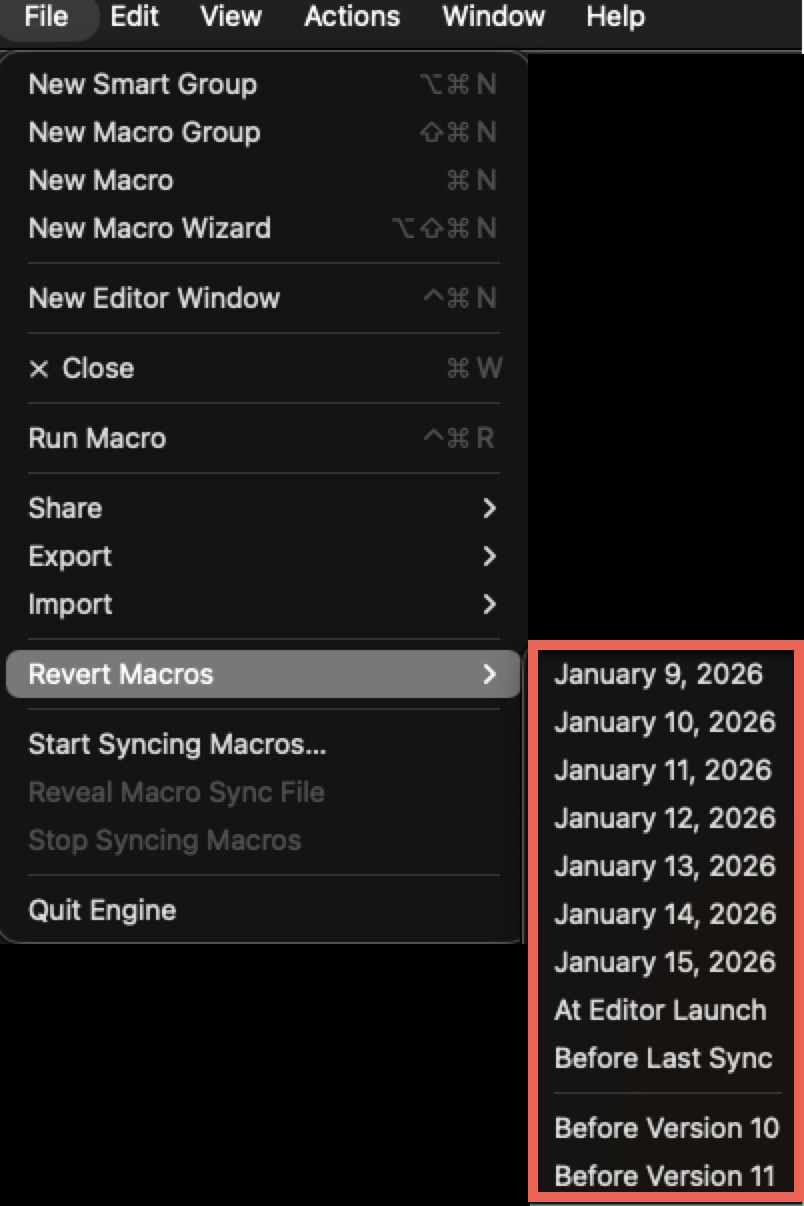
I needed to back to an earlier version of a macro group lets say last Tuesday at 11:15 am
On that Tuesday, I may have logged in and out of KM and/or my macbook several times. However Revert only gives the day and not the time, so Tuesday at 0900 would be completely different to Tuesday at 1600.
Does KM only keep one revert snapshot per day and which time is chosen? What triggers a revert snapshot?
I usually duplicate a macro or macrogroup for my own backup/checkpoint. It would be helpful if say CMD+I on a selected macro/macrogroup showed "internal info" of that macro/macrogroup e.g. date created, last modified, last used, usage count etc
You can revert back to the previous [7 days] at the start of the day (0:00) FAIK. Or to the last sync or the major version update in the menu File > Revert Macros > …
It may be possible to revert the whole macro plist file using Time Machine, assuming you are set up for hourly backups or similar and you were connected to your backup device at the time.
I would do something like:
copy the current plist for safety
restore the old plist
export the old version of the problematic macro
restore the most recent plist
load the saved macro
That kind of routine would keep all your changes in other macros intact.